
Desk Booking Software Pricing: Compare Top Platforms in 2026

If you’re shopping for desk booking software , you’ve probably noticed pricing can look different everywhere you check.
Some tools charge per desk. Others charge per employee. Some bundle everything together, while others show a starting price that changes once you add the features you actually need. It’s not always clear what you’ll end up paying each month.
The right pricing model for your office depends on your setup: how many desks you’re managing, how many people need access, and which features matter most to your team.
This guide walks through the main pricing models, what usually affects cost, and how to estimate your monthly spend based on your actual office configuration. We’ll also overview the top hot desking solutions that share their pricing publicly, so you can see exactly how costs stack up across different vendors.
TL;DR:
- Four main pricing models exist: free (limited features, under 20 users), per-user ($2.50-$7/user/month), per-desk ($2-$4/desk/month), and enterprise or quote-based ($5,000-$50,000+/year).
- The right model depends on your desk-to-employee ratio , calculated as desks divided by employees. Per-user pricing suits offices where the ratio is near or above 1:1, while per-desk pricing saves money when the ratio is below 1:1 in hybrid or hot-desking setups.
- Costs typically rise beyond the base price due to additional office locations (+20-50%), exceeding included user or desk thresholds, advanced features like SSO or SCIM (+$50-$500/month), deeper integrations such as Teams, Slack, or API access, advanced analytics and reporting (+$100-$300/month), and admin controls like approval workflows or booking rules (+$300-$600/month).
- Many per-desk vendors enforce minimum monthly fees, so very small offices may pay more per desk than the advertised rate.
- Hardware such as QR stickers, desk signs, kiosks, and room displays is optional and usually a one-time cost separate from software subscription fees.
- A simple estimation approach is to gather employee and desk counts and locations, identify must-have features , add a 10-60% buffer based on company size (larger organizations need bigger buffers), then request comparable quotes from multiple vendors.
- ROI typically comes from real estate savings (15-30% space reduction), lower utility costs, recovered admin time, and less time spent searching for desks, often justifying the software cost within a few months.
- Budget guidelines by company size: under 50 employees ($2,000-$5,000/year), 50-199 employees ($5,000-$10,000/year), 200-499 employees ($10,000-$25,000/year), and 500+ employees ($25,000-$100,000+/year).
4 Hot Desk Booking Software Pricing Models
Free Desk Booking Systems
What it is: Free plans let small teams manage desk bookings without paying anything. These plans work indefinitely but come with limits on users, locations, or features.
Cost: $0 per month
What’s typically included:
- Basic desk booking functionality
- Simple floor plans
- Limited user capacity (usually 10-25 people)
- Single location only
- Email support
What’s usually missing:
- SSO and advanced security
- Integrations with Microsoft Teams or Slack
- Analytics and reporting
- Admin controls and booking rules
- Multiple office locations
- Priority support
Best for: Startups, small teams testing desk booking for the first time, or offices with under 20 employees who only need basic functionality.
Real-world fit: Free plans work well during the testing phase. Most teams outgrow them within three to six months once they need integrations, better admin controls, or support for multiple floors. If you’re serious about desk booking long-term, plan to budget for a paid tool.
Examples: Officely and deskbird offer free plans for small teams, making them ideal options for organizations testing desk booking software before committing to paid subscriptions.
Per-User Pricing
What it is: You pay a monthly fee for each employee who has access to the desk booking system. This includes everyone who can log in and make a booking, regardless of how often they actually use it.
Cost range: $2.50 to $7 per user per month
How it works: If 200 employees need access to book desks, you pay for 200 users - even if only 50 people come into the office on any given day. Some vendors count “active users” (people who actually log in during the billing period), while others charge for total licensed seats.
What’s typically included:
- Full desk booking features
- Mobile and web access
- Calendar integrations
- Basic analytics
- Standard support
What usually costs extra:
- SSO (often requires higher tier)
- Advanced admin controls
- Multi-location support
- Premium integrations
- Custom reporting
Best for: Small offices with assigned seating or low desk-sharing ratios. If your team size matches your desk count closely, per-user pricing is straightforward and predictable.
Watch out for: Per-user pricing gets expensive fast in hybrid setups. If you have 200 employees but only 100 desks, you’re paying for twice as many users as you have physical space. Even occasional office visitors need licenses, which adds up.
Example: YAROOMS uses a user-based pricing model with tiered plans based on both the number of users and the features included at each level.
Real-world scenario: A company with 200 employees using per-user pricing at $4 per user pays $800 per month, even if only 80 desks exist and half the team works remotely most days.
Per-Desk Pricing
What it is: You pay for each desk (or bookable space) you manage in the system. Your cost stays tied to your physical office footprint, not your headcount.
Cost range: $2 to $4 per desk per month
How it works: If you make 100 desks bookable, you pay for 100 desks - regardless of whether 150 or 500 employees have access to book them. This model works well when employee count exceeds available desk space.
What’s typically included:
- Unlimited employee access
- Desk booking and floor plans
- Mobile and web apps
- Calendar sync
- Basic reporting
What usually costs extra:
- Additional locations beyond the first
- Advanced analytics
- Hardware (kiosks, room displays)
- Premium integrations in some cases
Best for: Hybrid offices, hot desking environments , and any setup where more people need access than you have desks. Per-desk pricing gives you predictable costs that scale with your office space, not your employee roster.
Watch out for: Minimum monthly fees apply even if you have fewer desks than the minimum requires. For example, Archie’s $159 minimum covers roughly 57 desks at $2.80 each - if you only have 30 desks, you still pay the minimum.
Example: Envoy and Tactic use per-resource pricing models, charging for each bookable workspace such as desks, rooms, and parking spaces.
Real-world scenario: A company with 100 desks and 200 employees using per-desk pricing at $2.80 per desk pays $280 per month. Everyone gets access, but the cost stays fixed to office capacity.
Enterprise Pricing (Quote-Based)
What it is: Custom pricing built around your specific needs, delivered after discovery calls and demos. Vendors design a package that includes desks, features, onboarding, support, and sometimes hardware.
Cost range: Typically $5,000 to $50,000+ per year (sometimes higher for large multi-site deployments)
How it works: You share your requirements - number of locations, employee count, security needs, integrations, SLA expectations - and the vendor builds a custom proposal. Pricing depends on scale, complexity, contract length, and negotiation.
What’s typically included:
- Full feature access across all modules
- White-glove onboarding and training
- Dedicated account manager
- Custom integrations and API access
- Service level agreements (SLAs)
- Advanced security (SSO, SAML, SCIM provisioning)
- Multi-location support
- Priority support with faster response times
What might cost extra:
- Hardware purchases (kiosks, displays)
- Custom development work
- Additional training sessions
- Premium SLA upgrades
Best for: Large enterprises , organizations with multiple office locations , companies with strict compliance requirements (finance, healthcare, government), and teams needing deep integrations with existing systems.
Watch out for: Quote-based pricing lacks transparency until you’re deep in the sales process. It’s harder to compare vendors quickly, and contract terms often lock you in for one to three years. The sales cycle is longer—expect several weeks from first contact to signed contract.
Examples: Most desk booking solutions offer custom Enterprise plans for large organizations, including YAROOMS, Archie, and Tactic, which provide tailored pricing for complex deployments with advanced security and dedicated support.
Real-world scenario: A 500-person company with offices in five cities, requiring SSO, custom integrations, 24/7 support, and full analytics typically pays $15,000 to $30,000 annually. Larger organizations with thousands of employees can exceed $100,000 per year when including hardware and premium support.
| Pricing Model | Cost Range | How It Works | Best For | Watch Out For |
|---|---|---|---|---|
| Free Plans | $0/month | Limited features, users (10-25), and single location indefinitely | Startups testing desk booking, offices under 20 employees | Missing SSO, integrations, analytics, admin controls; most outgrow in 3-6 months |
| Per-User | $2.50-$7/user/month | Pay for each employee with access, regardless of usage frequency | Small offices with assigned seating, team size matches desk count | Gets expensive in hybrid setups with more employees than desks; occasional visitors still need licenses |
| Per-Desk | $2-$4/desk/month | Pay for each bookable desk, unlimited employee access | Hybrid offices, hot desking, more employees than desks | Minimum monthly fees apply even below desk threshold; additional locations cost extra |
| Enterprise (Quote-Based) | $5,000-$50,000+/year | Custom pricing after discovery, tailored to specific requirements | Large enterprises, multi-location organizations, strict compliance needs | Lacks transparency until deep in sales process; longer sales cycle; 1-3 year contract lock-ins |
Comparison of desk booking software pricing models
Which Desk Booking Pricing Model Is Right for You?
| Pricing Model | Choose This If... |
|---|---|
| Per-Desk Pricing | • You have more employees than desks • You run a hot desking or hybrid office setup • Your headcount fluctuates but your office space stays stable • You want predictable costs tied to physical capacity |
| Per-User Pricing | • Your team is small (under 50 people) • You have assigned seating or a 1:1 desk-to-employee ratio • Most employees come to the office regularly • You prefer straightforward per-seat SaaS billing |
| Free Plan | • You're testing desk booking for the first time • Your team is under 20 people • You only need basic features for now • You can upgrade later when needs grow |
| Enterprise Pricing | • You manage multiple office locations • You need custom integrations and advanced security • Compliance and SLAs matter for your industry • You have budget for onboarding and dedicated support |
Still not sure? Start by calculating costs both ways. Take your employee count and multiply by typical per-user rates ($3-5). Then take your desk count and multiply by per-desk rates ($2.50-3.50). The lower number usually points you toward the better model for your setup.
What Actually Affects Desk Booking Software Pricing
The price you see on a vendor’s website isn’t always what you end up paying. Base pricing covers basic desk booking, but most offices need more than that - multiple locations, integrations, analytics, or hardware. These additions change your monthly cost, sometimes significantly.
Understanding what drives pricing up helps you budget accurately and compare desk bookings software vendors on equal footing. Here’s what usually increases the cost beyond the starting rate.
Number of Locations & Floors
Single office vs. multi-site: Most vendors price their entry-level plans around a single office location. Once you add a second building, campus, or city, pricing changes. Some vendors charge per location. Others move you into a higher tier that supports multiple sites.
How it affects cost: Adding locations typically increases your monthly cost by 20% to 50%, depending on the vendor. Some tools include a set number of locations in higher tiers. Others charge per additional site as an add-on.
Per-location fees: Tools with per-location pricing might charge $50 to $200 per month for each additional office beyond the first. This works if your locations are small. It gets expensive fast if you’re managing five or ten sites.
Tier jumps: Other vendors use tiered plans where multi-location support only appears in Professional or Enterprise tiers. Moving from a Starter plan at $99 per month to a Professional plan at $199 per month unlocks multiple locations - but you’re paying for the tier upgrade, not just the location feature.
Example cost differences:
- Single office with 100 desks at $2.80 per desk = $280 per month
- Three offices with 100 desks total, per-location fee of $100 = $280 + $200 = $480 per month
- Three offices requiring Enterprise tier = $800+ per month
Floor management: Within a single building, adding floors rarely costs extra. Most tools let you create unlimited floor plans within one location. The cost increase happens when you cross into separate buildings or addresses.
User & Desk Volume Thresholds
Minimum monthly fees: Even if you only have 30 desks, vendors with per-desk pricing often enforce a minimum monthly charge. Archie’s minimum is $159 per month, which covers roughly 57 desks at $2.80 each. If you have fewer desks, you still pay the minimum. This protects vendors from very small accounts while keeping pricing simple for everyone else.
How minimums work: Check whether the minimum applies per location or across your entire account. Some vendors set a $200 minimum per office, which means managing three small locations could cost $600 per month even if your total desk count would only be $350 without minimums.
Volume discounts: Larger deployments sometimes unlock lower per-desk or per-user rates. These discounts typically kick in around 200 to 500 desks or users. A vendor charging $3 per desk might drop to $2.50 per desk once you exceed 300 desks. Volume discounts matter most for enterprise accounts managing hundreds or thousands of desks.
Cost per additional unit beyond limits: Tiered plans often include a set number of desks or users. For example, a $299 per month plan might cover 100 users. Adding 25 more users could cost $75 extra per month, or it might force you into the next tier at $499 per month. Always check what happens when you exceed included limits—some vendors make it easy to add units incrementally, while others require tier upgrades.
Example scenarios:
- 40 desks at $2.80 per desk = $112, but minimum is $159, so you pay $159
- 150 users at $4 per user = $600 per month, but volume discount at 150+ drops rate to $3.50, so you pay $525
- Tier includes 100 users, you have 110 users, adding 10 costs $40 or forces $200 tier jump depending on vendor
Advanced Features & Add-ons
What it includes: Single sign-on (SSO) with SAML, SCIM user provisioning, automated directory sync with Azure AD or Google Workspace, and advanced security controls.
Why it matters: SSO eliminates the need for separate login credentials , simplifies onboarding, and meets IT security requirements. SCIM automatically adds or removes users based on your HR system, which saves admin time and reduces security risks.
Cost: SSO features typically add $50 to $500 per month depending on vendor and contract size. Some vendors include basic SSO in mid-tier plans but charge extra for SCIM or advanced provisioning. Enterprise plans almost always include full SSO and security features.
Where it’s usually locked: Starter and basic plans rarely include SSO. Expect to upgrade to Professional, Business, or Enterprise tiers to get it.
Integrations
What’s available: Microsoft Teams desk booking , Slack booking commands, Google Workspace calendar sync, Zoom room integrations, Outlook calendar sync, and API access for custom connections.
Cost structure: Basic calendar sync (Google Calendar, Outlook) is usually free in all plans. Deeper integrations like Microsoft Teams bots, Slack workflows, or API access often require paid plans. Some vendors include all integrations in mid-tier plans. Others charge per integration or lock them behind enterprise pricing.
Examples:
- Microsoft Teams integration: Free in some tools, requires $299+ per month tier in others
- Slack integration: Often included in Professional plans and up
- API access: Typically enterprise-only or requires $500+ per month plans
- Custom integrations: Quote-based, often $1,000+ one-time setup fee
What to check: Verify whether the integrations you need are included in the tier you’re considering. A tool that looks affordable might require a tier jump just to get Teams booking working.
Analytics & Reporting
What’s included in basic plans: Simple dashboards showing desk usage, popular desks, and booking counts . Data history limited to 30 or 90 days.
What costs extra:
- Real-time occupancy dashboards
- Historical data beyond 90 days (six months, one year, unlimited)
- Custom reports and scheduled exports
- Advanced analytics (utilization rates, cost-per-desk calculations, space optimization recommendations )
- API access for pulling data into your own tools
- White-label reporting for executives
Cost: Advanced analytics typically appear in higher tiers or as add-ons ranging from $100 to $300 per month. Enterprise plans usually include full analytics access with unlimited history and custom reporting.
Why it matters: Basic dashboards tell you desks are being used. Advanced analytics tell you whether you need more desks, fewer desks, or different desk arrangements. This data drives real estate decisions that can save thousands per month.
Admin Controls
What’s included in basic plans: Simple desk booking with first-come-first-served access. Limited or no control over who books what.
What costs extra:
- Approval workflows (managers approve bookings before confirmation)
- Booking rules (max days ahead, time limits, recurring bookings, blackout dates)
- Desk neighborhoods (group desks by team, department, or project)
- Auto-release (cancel bookings if users don’t check in)
- Role-based permissions (admins, managers, standard users)
- Booking restrictions by user type or department
Cost: Admin controls usually appear in mid-to-upper tiers. Expect to pay $300 to $600 per month to access full admin functionality, or look for vendors that include these features earlier in their pricing.
Why it matters: Without admin controls, desk booking becomes chaotic. People book desks they don’t use. Teams can’t sit together. No-shows waste space. Admin controls turn desk booking from a calendar into an actual workspace management system .
Hardware
What’s available:
- Check-in kiosks for lobby or floor entry
- Desk signs showing booking status and QR codes
- Room displays for meeting spaces
- QR code stickers for quick mobile check-in
Cost range:
- QR code stickers: $2 to $5 per desk (one-time)
- Desk signs (e-ink or LED): $50 to $200 per desk (one-time)
- Check-in kiosks (tablets with stands): $300 to $800 per device (one-time)
- Room displays: $400 to $1,200 per room (one-time)
Ongoing costs: Most hardware is one-time purchase, but some vendors charge monthly fees for hardware management, updates, or support ($5 to $20 per device per month).
What to consider: Hardware improves the experience but adds significant upfront cost. Outfitting 100 desks with QR codes costs $200 to $500. Adding desk signs for key desks or neighborhoods costs $2,000 to $8,000. Kiosks for check-in points cost $1,000 to $3,000 per location. Budget hardware separately from software when comparing vendors.
Compare Pricing for the Top Hot Desking Platforms in 2026
Choosing desk booking software means comparing pricing models that work differently. This comparison breaks down actual costs from vendors that share pricing publicly, helping you see what you’ll actually pay.
| Vendor | Pricing Model | Starting Price | Best For | Key Differentiator |
|---|---|---|---|---|
| YAROOMS | Per-user (tiered) | $99/month (10-20 users) | Organizations wanting comprehensive platform | Full workplace suite: desks, rooms, visitors, AI assistant |
| Skedda | Tiered (per-space) | $99/month (15 spaces) | Offices with predictable, stable space needs | Unlimited users regardless of space count |
| Officely | Per-user | $2.50/user/month (annual) | Slack/Teams-first organizations | Native integration with collaboration tools |
| Archie | Per-desk | $2.80/desk/month (min. $159/month) | Hybrid offices with more employees than desks | Predictable costs tied to physical space, not headcount |
| Envoy | Per-resource (annual) | $60/resource/year ($5/month) | Organizations already using Envoy Visitors | Integrated visitor + workspace management platform |
| deskbird | Per-user | €2.75/user/month (annual) | Mobile-first teams | Strong mobile app and team coordination features |
| Tactic | Per-workspace | $3/workspace/month | Teams needing desks + rooms in one platform | Combines all bookable resources under one rate |
Best desk booking systems in 2026: pricing comparison (reviewed July 2026)
YAROOMS Pricing
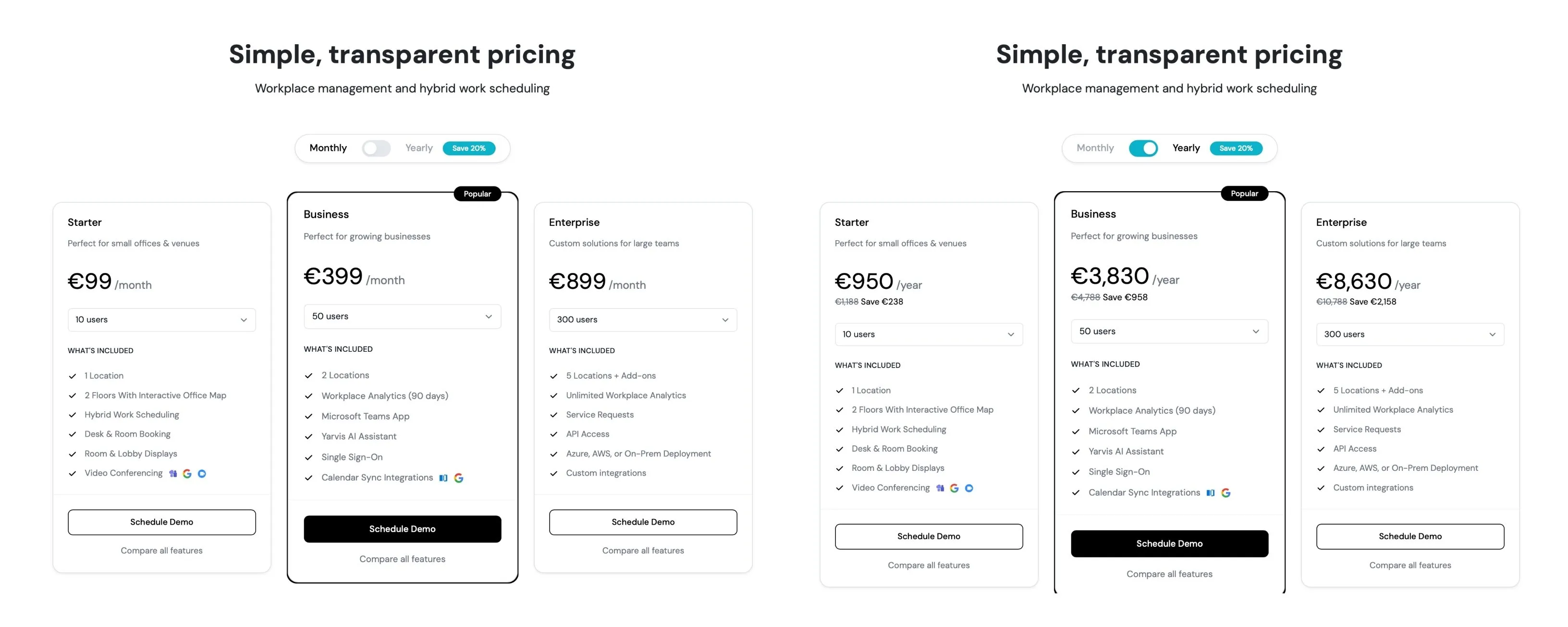
Pricing model: Per-user, tiered by features
How it works: YAROOMS charges based on the number of users and selected tier. The three main tiers are designed for different organization sizes and requirements.
Publicly shared pricing:
- Starter tier: $99/month for 10-20 users
- Business tier: $399/month for 50-200 users
- Enterprise tier: $899/month for 300-1000+ users
Key features by tier:
Starter: 1 location, 2 floors with interactive office maps, hybrid work scheduling , desk and room booking, room and lobby displays, video conferencing integrations (Microsoft Teams, Google Meet, Zoom), mobile app
Business: Everything in Starter, plus 2 locations, workplace analytics (90 days), Microsoft Teams app , Yarvis AI assistant , single sign-on, calendar sync integrations (Microsoft Outlook , Google Calendar ), unlimited floors, up to 150 bookable spaces, team analytics, WiFi check-in
Enterprise: Everything in Business, plus 5+ locations (with add-on options), unlimited workplace analytics, service requests and ticketing system, API access, Azure/AWS/on-prem deployment options, custom integrations, unlimited bookable spaces, unlimited users, parking management , employee surveys, emergency roles, SAML login
Add-ons available: Meeting room displays, lobby displays , digital desk signs
Platform strengths: YAROOMS offers a comprehensive workplace management platform that combines desks, rooms, visitors, and analytics in one system. Organizations note the platform’s flexibility as they grow, with responsive support for office changes and updates.
What to ask about: How user counts are calculated (active users vs total employees), pricing when you exceed tier user limits, costs for additional locations beyond what’s included, hardware pricing for room displays and desk signs, implementation and onboarding included in pricing, annual vs monthly billing options, how pricing scales for organizations between tier thresholds (e.g., 250 users).
Skedda Pricing
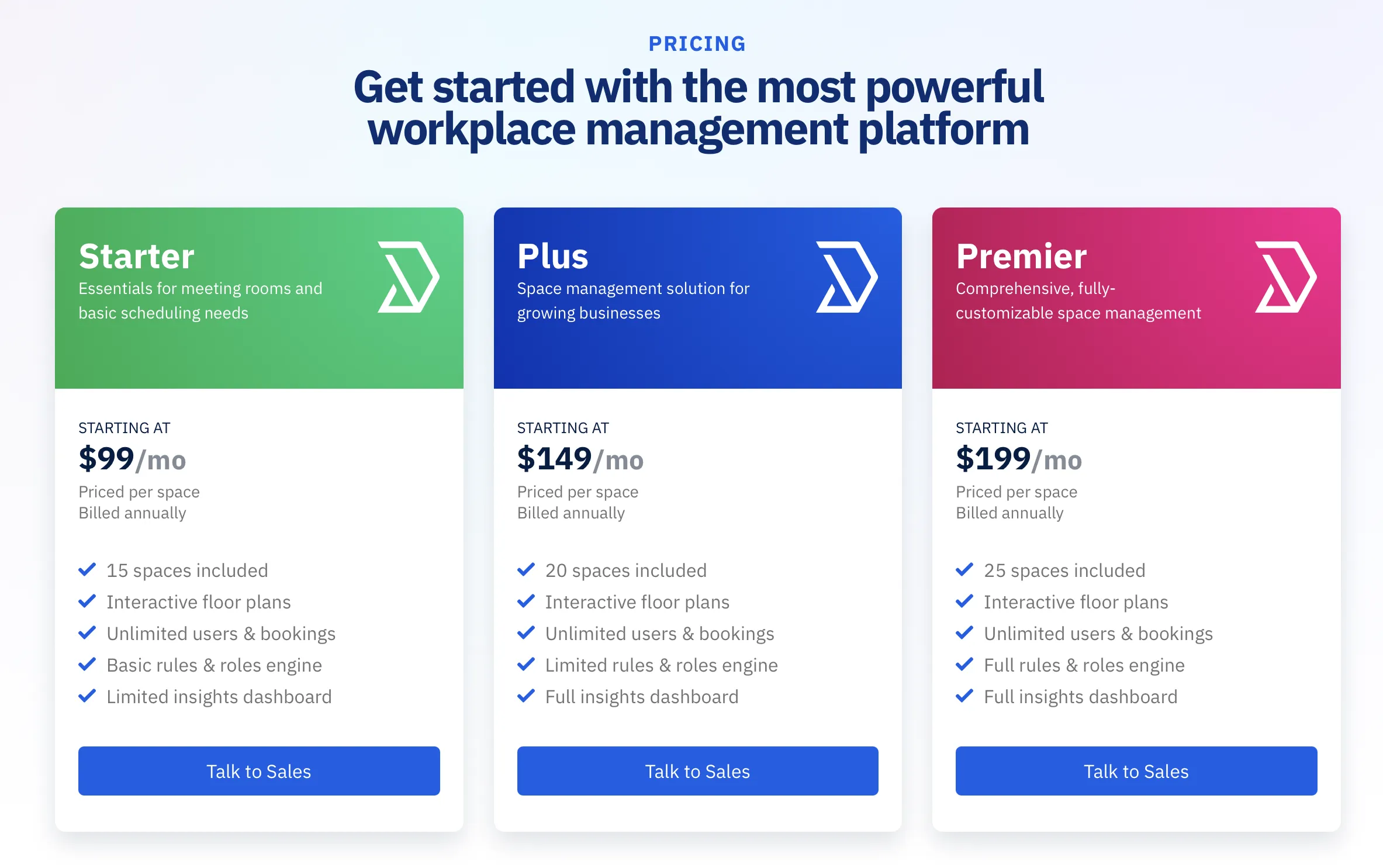
Pricing model: Tiered, based on number of spaces
How it works: Skedda offers fixed monthly plans that include a set number of bookable spaces. Plans scale up as you need more spaces.
Publicly shared pricing tiers:
- Starter: Starting at $99/month, billed annually
- Plus: Starting at $149/month, billed annually
- Premier: Starting at $199/month, billed annually
Key features by tier:
Starter: Unlimited users/bookings, interactive floor plans, basic rules engine, limited insights dashboard, mobile apps, calendar sync, Teams/Slack apps, SSO
Plus: Everything in Starter, plus limited rules engine (defined condition/window/quota limits), full insights dashboard, extended data retention
Premier: Everything in Plus, plus assigned spaces, full rules engine (unlimited conditions/quotas), booking approvals, SCIM, white labeling, occupancy tracking, longest data retention
What to ask about: How pricing changes when you exceed tier space limits, whether you can add spaces incrementally or must upgrade tiers, annual vs monthly pricing differences, what happens if your space needs fluctuate.
Officely Pricing
Pricing model: Per-user
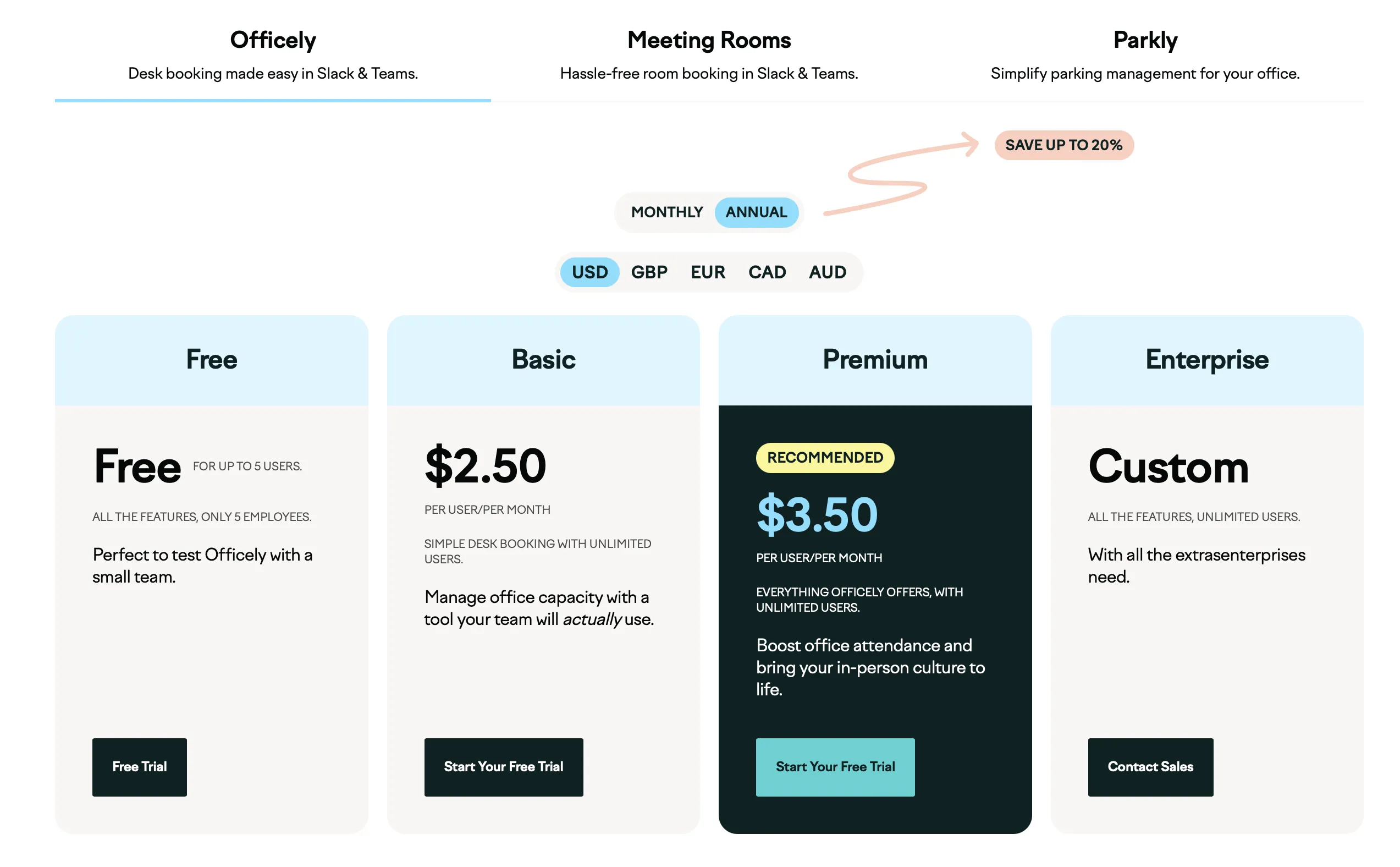
How it works: Officely charges a monthly fee per employee who needs access to the desk booking system. Pricing is displayed on their website.
Publicly shared pricing:
- Free plan: Available for up to 5 users with full features
- Basic tier: $3.00 per-user monthly rate (billed monthly) or $2.50 if billed annually
- Premium tier: $4.50 per-user monthly rate (billed monthly) or $3.50 if billed annually
- Enterprise: Custom pricing
Key features by tier:
Basic: Unlimited users, office attendance visibility, desk booking/check-ins, private neighborhoods, capacity management, automated booking, Slack/Teams integration, floor plans, analytics, unlimited admins
Premium: Everything in Basic, plus smart office recommendations, coworker notifications, office chat/announcements, event creation, team visibility, HRIS integrations
Enterprise: Everything in Premium, plus local billing options, security questionnaire support, dedicated account manager
What to ask about: How “unlimited users” works with per-user billing, whether contractors or occasional visitors count as users, minimum user commitments, specific features in each tier beyond what’s listed.
Archie Pricing
Pricing model: Per-desk
How it works: Archie charges a monthly fee per bookable desk. Pricing information is available on their website at archieapp.co/pricing.
Publicly shared pricing:
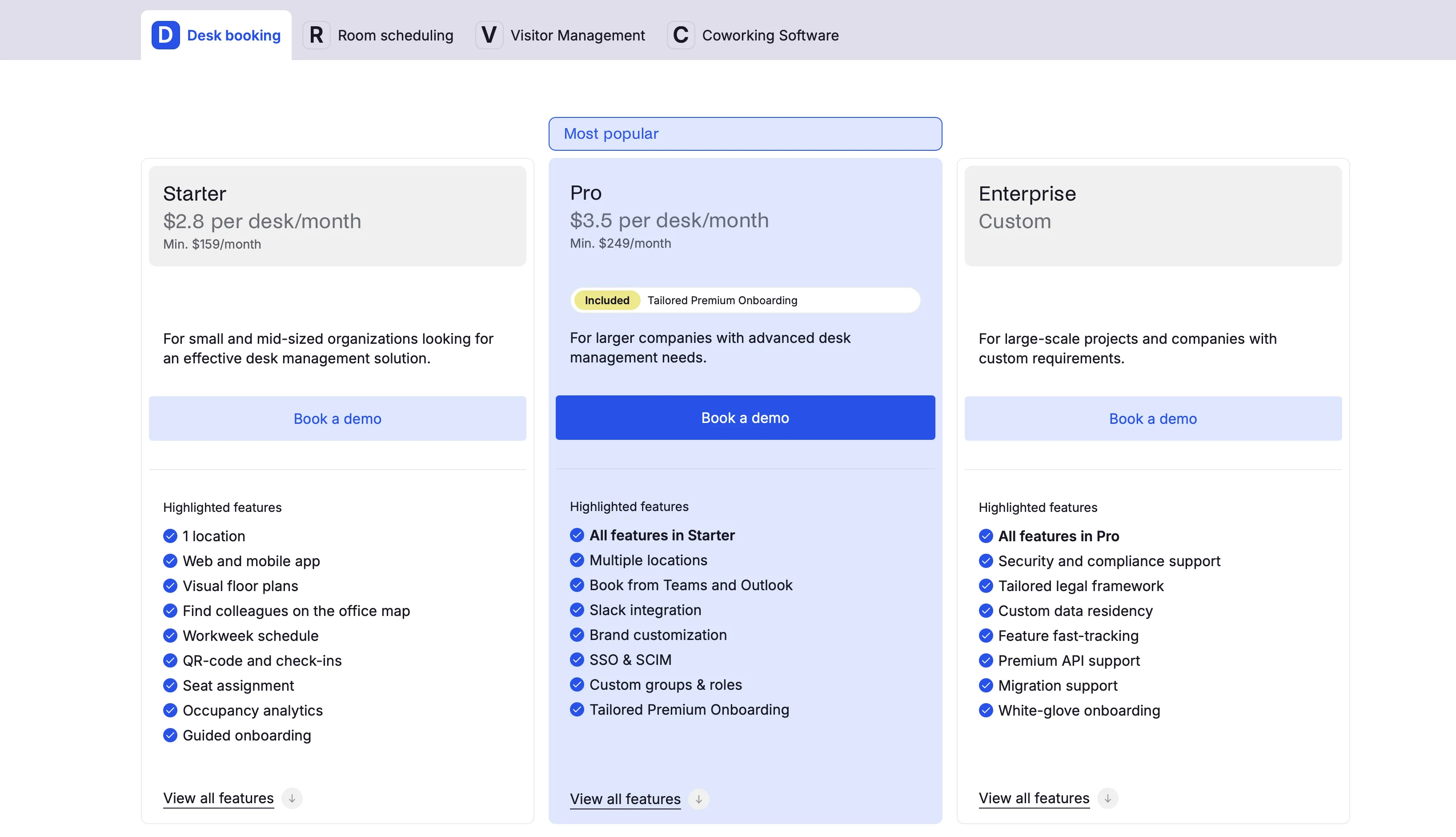
- Starter tier: $2.8 per-desk monthly rate with a minimum monthly fee ($159/month)
- Pro tier: $3.5 per-desk rate a month, min. $249/month. Includes additional features
- Enterprise tier: Custom pricing for large-scale or complex deployments
Key features by tier:
Starter includes single location, web/mobile apps, floor plans, QR check-ins, seat assignment, occupancy analytics, and guided onboarding
Pro adds multiple locations, Microsoft Teams and Outlook booking, Slack integration, brand customization, SSO and SCIM, custom roles, and premium onboarding
Enterprise includes everything in Pro plus security/compliance support, custom legal frameworks, custom data residency, feature prioritization, premium API support, migration support, and white-glove onboarding
What to ask about: How the minimum applies if you’re below the desk threshold, pricing for additional locations beyond what’s included in your tier, annual vs monthly billing discounts.
Envoy Reservations Pricing
Pricing model: Per-resource (Reservations module)
How it works: Envoy is primarily a visitor management platform that offers desk/room/parking booking as a separate Reservations module. Pricing structures differ by product.
Publicly shared pricing for Reservations:
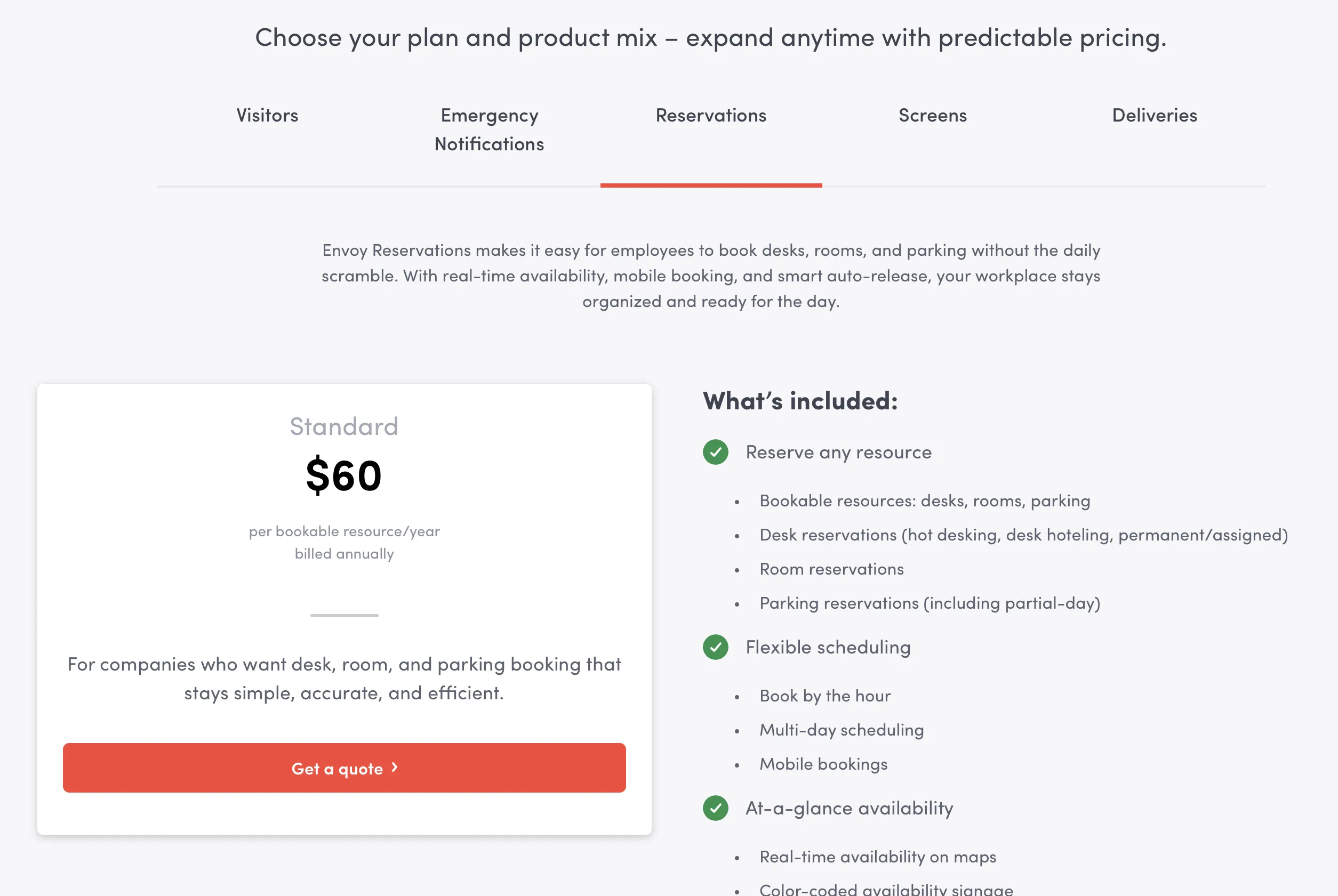
- Standard tier listed at an $60 per-bookable-resource/year (billed annually)
- Pricing covers desks, rooms, and parking spaces as bookable resources
- Each resource (desk, room, parking spot) counts toward your total
Key features in Envoy Reservations:
- Desk, room, and parking reservations (hot desking, desk hoteling, permanent/assigned)
- Hourly and multi-day scheduling
- Mobile bookings via Envoy app
- Real-time availability on interactive maps
- Color-coded availability signage
- Room scheduling on displays
- Walk-up booking on room tablets
- Auto-release for missed check-ins
- Admin visibility dashboards
- Desk amenities
What to ask about: How resources are counted (does a desk cost the same as a room?), whether pricing differs for different resource types, minimum commitments, what’s included vs enterprise-only features.
deskbird Pricing
Pricing model: Per-user
How it works: deskbird charges per employee with access to the booking system. Based on available information, pricing ranges across different tiers.
General pricing structure:
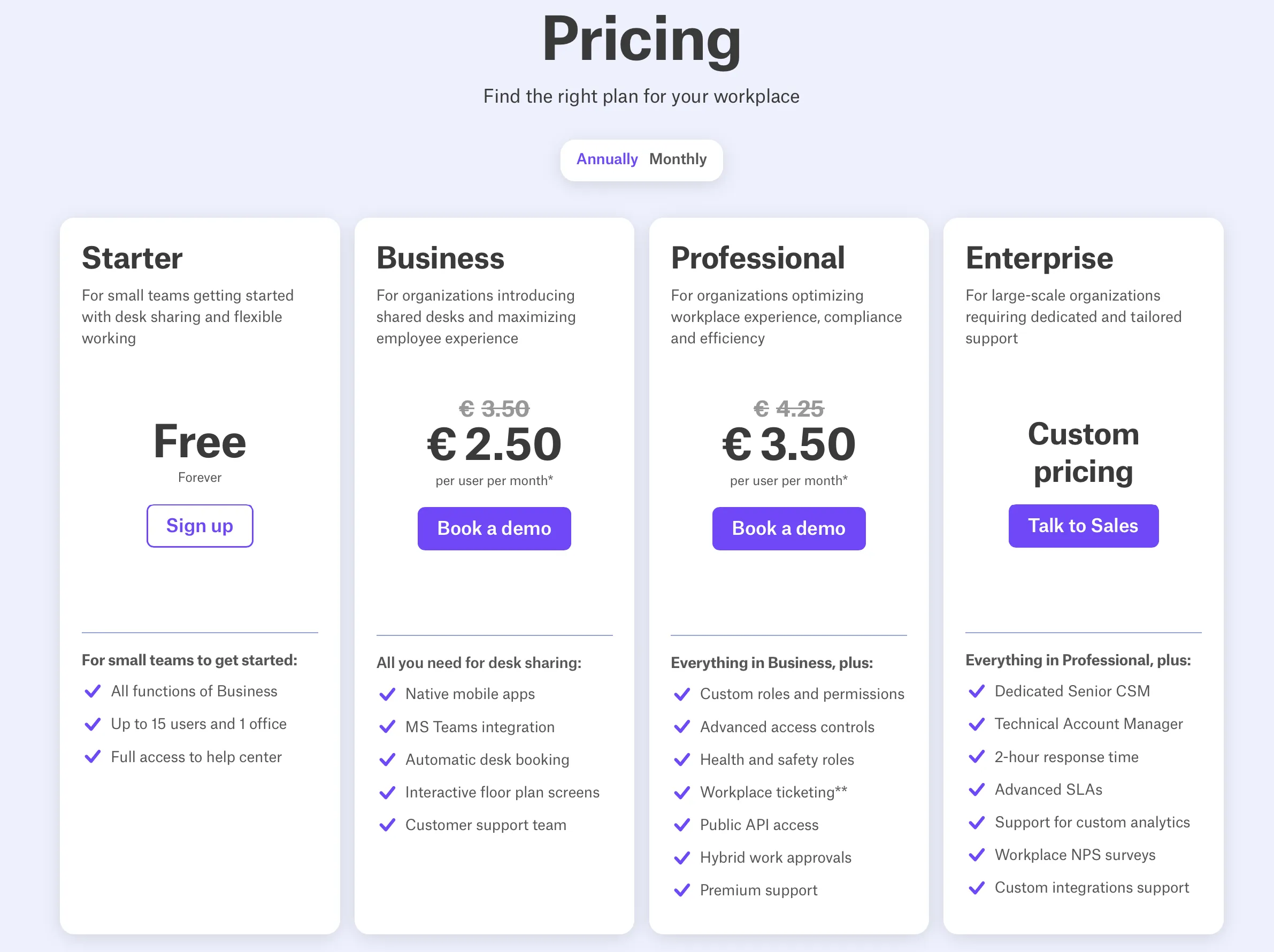
- Free Starter plan (Up to 15 users and 1 office)
- Business plan - €2.75 per user/month (billed annually) or €4.25 per user/month if billed monthly
- Professional - €3.50 per user/month (billed annually) or €5.00 per user/month if billed monthly
- Enterprise - custom pricing
Key features typically include: Desk/workspace booking, mobile app (iOS/Android), interactive office maps, team coordination features, calendar integrations, analytics/reporting, collaboration tool integrations (availability varies by tier)
What to ask about: Exact per-user rates for each tier, which features are included at each price point, how SSO and advanced integrations are priced, whether free trials are available, annual vs monthly billing differences, minimum user commitments.
Tactic Pricing
Pricing model: Per-workspace
How it works: Tactic charges a monthly fee per workspace (which includes desks, rooms, and other bookable spaces). Pricing information is available on their website at gettactic.com/pricing.
Publicly shared pricing:
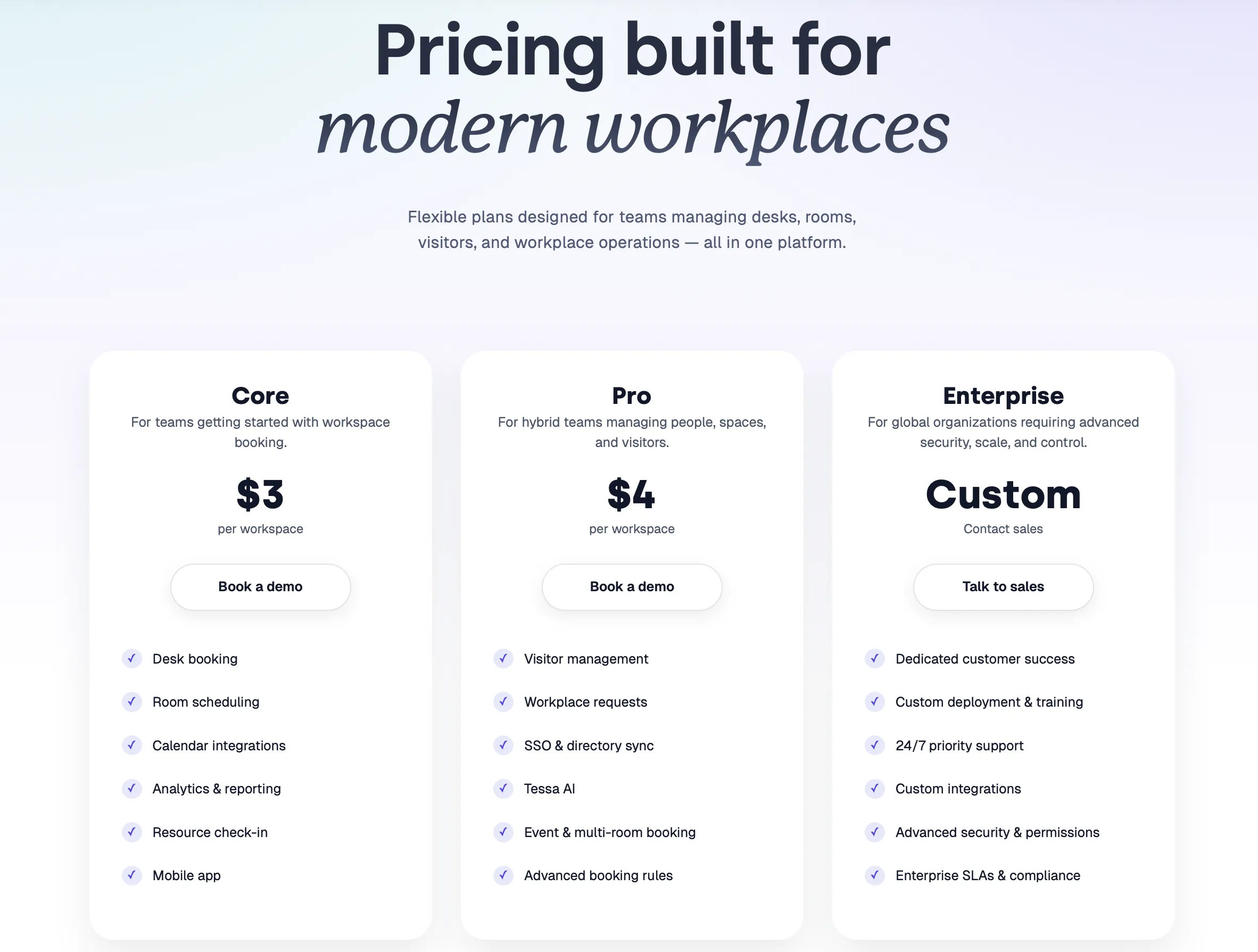
- Core tier: $3 per workspace per month
- Pro tier: $4 per workspace per month
- Enterprise tier: Custom pricing for large-scale deployments
Key features by tier:
Core: Desk booking, room scheduling, calendar integrations, analytics and reporting, resource check-in, mobile app
Pro: Everything in Core, plus visitor management, workplace requests, SSO and directory sync, Tessa AI (workplace assistant), event and multi-room booking, advanced booking rules
Enterprise: Everything in Pro, plus dedicated customer success, custom deployment and training, 24/7 priority support, custom integrations, advanced security and permissions, enterprise SLAs and compliance (SOC 2, HIPAA, GDPR)
What to ask about: How workspaces are counted (does a desk count the same as a meeting room?), minimum workspace commitments, annual vs monthly billing options, what’s included in onboarding, pilot program availability for testing before full rollout.
4-Step Formula to Estimate Your Desk Booking Software Cost
Estimating your desk booking costs requires understanding both your setup and your vendor’s pricing structure. Here’s a practical four-step framework to calculate realistic numbers.
Step 1: Gather Your Key Numbers
Before comparing vendors, collect baseline data about your office:
- Total employees needing access: Count everyone who might need to book a desk. Include remote workers, hybrid employees, and contractors. This number is crucial for per-user pricing models.
- Bookable desks available: Count the exact number of desks you’ll add to the system. Don’t count conference rooms separately if the vendor bundles all spaces under one pricing model.
- Number of office locations: Count separate buildings or cities. Single-campus companies typically pay one rate; multi-site organizations pay significantly more.
- Desk-to-employee ratio: Divide desks by employees. If 200 employees share 100 desks, your ratio is 0.5:1.
This determines which pricing model benefits you most. Per-user pricing generally works best when the ratio is near or above 1:1. Per-desk pricing generally works best when the ratio is below 1:1.
Step 2: Identify Your Must-Have Features
Not every company needs every feature. Identify your non-negotiables:
- Security requirements: Do you need SSO? SAML? SCIM provisioning? Compliance requirements? (This often bumps you 2-3 tiers up)
- Integrations: Which tools are essential? Teams calendar sync? Slack notifications? Outlook integration?
- Analytics capabilities: Do you need real-time dashboards, or is monthly reporting sufficient?
- Admin controls: Do you need approval workflows, custom booking rules, and role-based access?
- Hardware: Do you plan to purchase desk signs, kiosks, or room displays?
Make a simple list and prioritize:
- Must-have: Non-negotiable for your business
- Nice-to-have: Valuable but not essential
- Not needed: Can skip to save costs
Step 3: Factor in Hidden Costs & Add a Buffer
Add 20-30% buffer to your estimated costs. Most offices need features beyond the base plan once rolled out.
Use these guidelines by company size:
- Small offices (under 50 employees): Add 10-15% buffer
- Mid-size offices (50-199 employees): Add 20-30% buffer
- Large offices (200-499 employees): Add 30-50% buffer
- Enterprise (500+ employees): Add 40-60% buffer
For example, if a vendor quotes $500/month for base features, budget $550-650/month when accounting for add-ons.
Step 4: Request Quotes from Multiple Vendors
Contact 3-5 vendors with your specific requirements. Request:
- Monthly pricing breakdown (base price + add-ons)
- Implementation and setup fees
- Contract terms and lock-in periods
- Annual vs. monthly pricing differences
- Support response times and SLAs
Normalize all quotes to the same format (monthly cost for year one and ongoing annual cost). This makes comparing apples-to-apples far easier.
Real-world example:
A 150-person company with 80 desks (0.53:1 ratio) needs:
- Per-desk pricing is likely best ($240/month base)
- Must-have features: Teams integration, basic analytics, admin controls
- These features typically cost 40-60% more than base pricing
- Estimated cost with buffer: $240 × 1.5 = $360/month
- Annual cost: $4,320
- With 20% buffer for overage: $5,184/year
How to Calculate Desk Booking Software ROI
The software investment pays for itself through multiple channels. Calculate your potential savings to understand the true cost.
Real Estate Savings: The Biggest ROI Driver
Space utilization insights from desk booking data drive significant real estate decisions . Most companies reduce office space after implementing desk booking software.
Typical space reduction: 15-30% depending on office design and remote work policies.
How to calculate:
- Current office square footage: 10,000 sq ft
- Expected reduction: 20% = 2,000 sq ft
- Cost per sq ft annually: $40-60 (varies by region)
- Annual real estate savings: 2,000 × $50 = $100,000/year
In this example, real estate savings alone justify the entire software investment within several months.
Utility & Operating Cost Reductions
Smaller footprints reduce electricity, HVAC, water, and maintenance costs by 10-20%.
How to calculate:
- Current annual facilities budget: $150,000
- Expected reduction with 20% space reduction: 10-20% = $15,000-$30,000/year
Admin Time Recovery
Manual desk assignment, booking management, and conflict resolution consume staff time. Desk booking software automates these processes.
Typical annual savings:
- 8 hours per week × $30/hour × 52 weeks = $12,480/year in recovered admin time
For larger organizations with dedicated facilities teams, this figure is often significantly higher.
Employee Productivity Gains
Employees waste time searching for available desks, navigating unknown office layouts, and dealing with booking conflicts. Desk booking systems eliminate this friction.
How to calculate:
- 200 employees × 12 minutes daily desk-search time × 220 working days/year
- 200 × 12 × 220 ÷ 60 = 8,800 hours/year recovered
- 8,800 hours × $35/hour average = $308,000/year in productivity gains
This is often conservative. Actual time savings may be higher in large hot desking environments.
Putting It Together: ROI Timeline
For a 200-person company with a 10,000 sq ft office spending $1,500/month on desk booking software:
Year 1 Savings:
- Real estate: $100,000 (after renegotiating lease)
- Utilities: $20,000
- Admin time: $12,480
- Productivity: $308,000
- Total: $440,480
Investment:
- Software: 12 × $1,500 = $18,000
- Implementation: $5,000
- Hardware (optional): $0-15,000
- Total: $23,000-$38,000
Net ROI: Year 1 = $402,480-$417,480 (1,060-1,815% return)
In this example, the investment pays for itself within 1-2 months. Beyond that, almost everything is savings.
Estimate Your Desk Booking ROI
Add your country and employee count to start estimating potential savings, then continue in the full YAROOMS ROI calculator.
Desk Booking Software Pricing FAQs
How Much Does Desk Booking Software Typically Cost?
Desk booking software typically costs $2 to $4 per desk per month or $2.50 to $7 per user per month, depending on the vendor. For a 100-desk office, expect to pay $200 to $400 per month with per-desk pricing, or $250 to $700 per month with per-user pricing for 100 employees. Enterprise solutions with custom pricing typically start around $5,000 to $15,000 annually.
What’s the Difference Between Per-Desk and Per-User Pricing?
Per-desk pricing charges for each bookable desk you manage, regardless of how many employees have access. Per-user pricing charges for each employee who can log in and book desks, regardless of desk count. Per-desk pricing works better for hybrid offices with more employees than desks (saves money when your ratio is less than 1:1). Per-user pricing suits smaller offices where employee count matches or is less than desk count.
Are There Free Desk Booking Tools?
Yes, free desk booking tools exist but typically limit you to 10-25 users, single location, and basic features only. Free plans exclude SSO, advanced integrations (Teams, Slack), analytics, admin controls, and multi-location support. Most teams outgrow free plans within 3-6 months once they need better functionality or exceed user limits. Free trials (7-30 days) offer full feature access temporarily, while freemium plans work indefinitely with restrictions.
What Desk Booking Features Should Be Included in the Base Price?
Base desk booking plans should include:
- Core booking functionality (reserve desks, view floor plans)
- Mobile and web access
- Basic calendar sync (Google Calendar, Outlook)
- Simple floor maps and desk search
- Email notifications
- Standard reporting (basic usage stats)
- Email support
Features often requiring upgrades: SSO, SCIM provisioning, Microsoft Teams/Slack integration, advanced analytics, admin controls (booking rules, approvals), multi-location support, API access, premium support, and hardware.
How Much Should I Budget for Desk Booking Software Annually?
Small offices (under 50 employees): $2,000 to $5,000 per year. Base plans usually sufficient with minimal add-ons.
Mid-size offices (50-199 employees): $5,000 to $10,000 per year. Includes mid-tier plans with SSO, integrations, and admin controls.
Large offices (200-499 employees): $10,000 to $25,000 per year. Business or Enterprise tiers with full security, analytics, and multi-location support.
Enterprise (500+ employees): $25,000 to $100,000+ per year. Custom pricing with dedicated support, SLAs, hardware, and advanced features.
Add 20-30% buffer to base estimates for features, add-ons, and growth.
Do I Need to Pay Extra for Integrations?
It depends on the vendor and integration type. Basic calendar sync (Google Calendar, Outlook) is typically included in all plans. Advanced integrations like Microsoft Teams desk booking, Slack commands, and API access often require mid-tier or higher plans. Some vendors include all integrations in Professional plans ($300-500/month), while others lock them behind Enterprise pricing or charge per integration. Always verify which integrations are included in your chosen tier before committing - integration requirements often determine which plan you actually need, not just base desk booking features.
Workplace of the future. Today.
See how YAROOMS integrates with Microsoft 365 to create a seamless workspace booking experience.