
Hybrid work scheduling software: coordinate office days & team schedules
Create a balanced hybrid schedule that combines working remotely with time in the office for better collaboration.
Last updated: September 16, 2026
Trusted by innovative organizations worldwide







See it in action
Take a quick tour of hybrid work scheduling and see how teams can plan office days, coordinate attendance, and stay aligned with less effort.
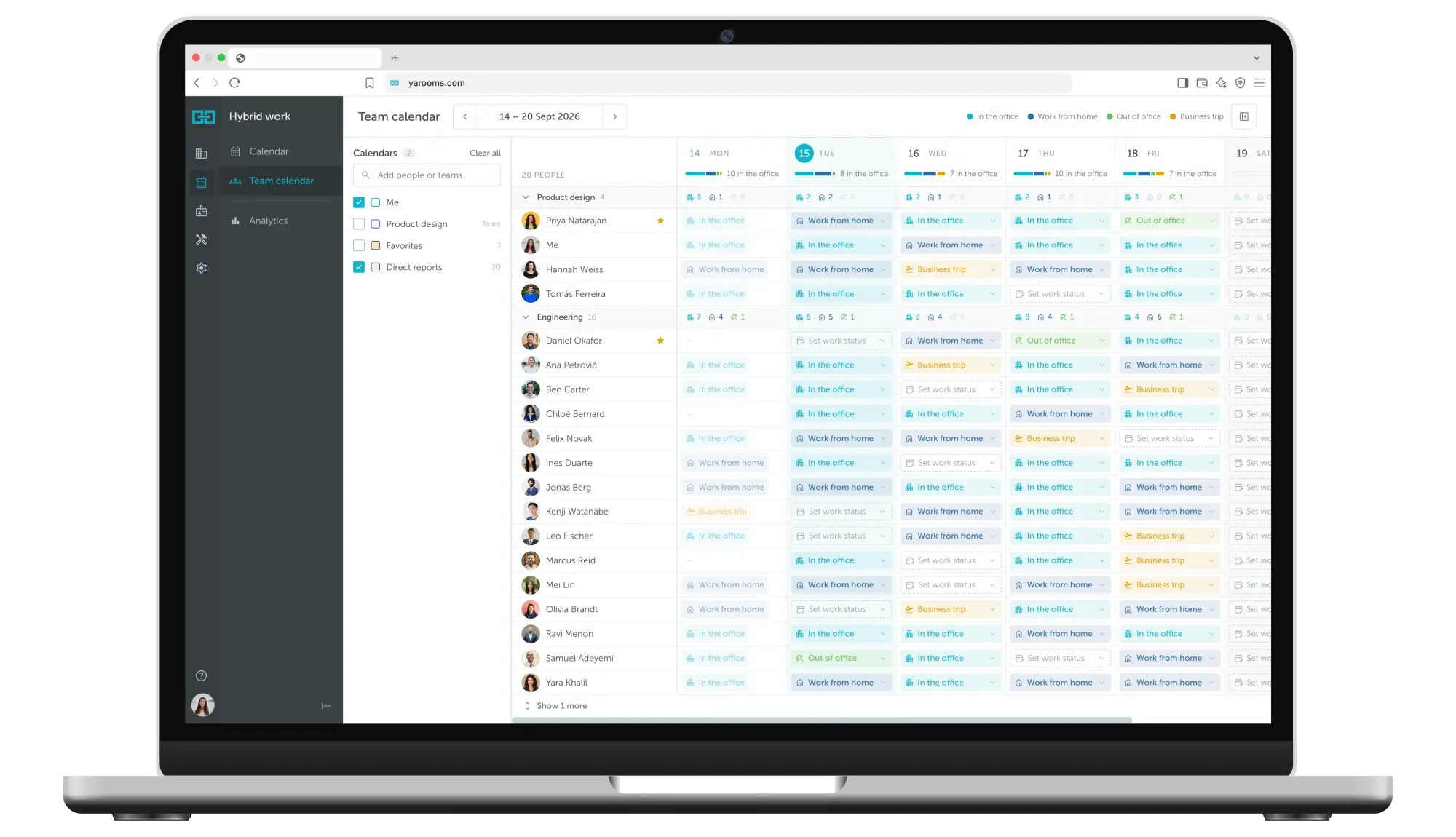
All hybrid work schedules in one calendar
YAROOMS work planning calendar is an intuitive hybrid scheduling tool designed to support flexibility and collaboration within your organization.
Full flexibility and autonomy
Create your hybrid work schedule for the day, week, or another time interval.
Your own hybrid work schedule
Define your own hybrid work schedule: set up a ratio between working remotely and days in the office.
User-friendly mobile application
Create your hybrid schedule and book spaces for days at the office on the go.
Better work schedule visibility
Maintain hybrid schedule visibility across your organization to support smooth collaboration.




Hybrid work schedule: FAQ
Answering the most popular questions about hybrid and remote work schedulling.
A hybrid work schedule is an arrangement where employees split their week between the office and working remotely. The schedule sets which days are which - by policy, by team, or by individual choice - and makes that visible so people can plan around each other. Without shared visibility it stops being a schedule and becomes guesswork. YAROOMS holds every employee’s work status in one calendar the whole organization can see.
Five models cover almost every arrangement in use:
- Fixed - set days in the office for everyone, or per team. Predictable, easiest to plan desks around.
- Flexible - employees choose their own days. Highest autonomy, hardest to forecast.
- Minimum days - employees choose, but must meet a quota. The most common compromise.
- Task-based - people come in for specific activities: workshops, client visits, onboarding.
- Office-first - office by default, remote by exception.
Which one you pick determines what your software has to do. Fixed needs a shared team calendar; minimum days needs attendance tracked against a quota; flexible mainly needs enough desks. YAROOMS supports all five, and different teams can run different models in the same office.
Most hybrid policies land on two or three days in the office. There is no correct number - it depends on how much of the work genuinely needs people in the same room, and on what your office can seat. The number matters most because it sets your desk ratio: a two-day policy across five weekdays means roughly 40% of staff on site at once, so an office sized for full headcount will sit two-thirds empty. YAROOMS reports actual attendance by day, so the policy can be adjusted from evidence rather than assumption.
Fixed schedules make collaboration reliable and capacity predictable, but people resent losing choice. Flexible schedules are popular and hard to plan around - everyone picks Tuesday and Thursday, and the office is empty on Monday and full on Wednesday.
Most organizations end up between the two: a minimum number of days, or one anchor day per team with the rest left free. YAROOMS supports either, with rules set per team rather than company-wide, so a client-facing group and an engineering group can run different policies without separate systems.
Four decisions, in order:
- How many days in the office, and whether that is a minimum, a maximum or a fixed set
- Who decides - the company, the team lead, or the individual
- Which days - anchor days for collaboration, or left open
- How it is enforced - visible expectation only, or tracked against the policy
Then check if the office can actually seat the busiest day under the policy you chose. Most hybrid schedules fail on step 4 or on that final check rather than on the policy itself.
YAROOMS applies the rules at booking time and shows whether any day is running over capacity.
To get the employees to actually follow the hybrid work schedule, make declaring a status take seconds, and make it worth doing. Adoption fails when the tool is a separate app nobody opens; it works when people can set their status where they already are, and when seeing who else is in genuinely helps them plan.
In YAROOMS, employees set their work status inside Microsoft Teams, in the mobile app, or by asking Yarvis in plain language - no separate login. Dedalus rolled this out across its Vienna site while growing from 200 to 300 people in a downsized office, running two employees per desk.
Three numbers tell you almost everything: attendance by day, which shows whether anchor days are actually working; declared versus actual attendance, which is where the gap usually is; and occupancy against capacity, which tells you whether the office is the right size for the policy.
If declared and actual diverge, the policy is aspirational rather than real, and any desk planning based on declared numbers will be wrong. YAROOMS reports all three, with heat maps showing which zones fill first.
Related Products
Hybrid Workplace
Seamlessly manage people and spaces in a flexible work environment with modern and user-friendly hybrid workplace software.
Desk Booking
YAROOMS desk booking: employees reserve desks on an interactive floor map from web, mobile, Teams or Outlook, in one platform with rooms and visitors.
Mobile App
Keep your teams connected with the tools they need to collaborate and navigate the workplace from their mobile device.