Visitor NDA
Require visitors to sign an NDA or other legal document before check-in completes.

Check every visitor against your company watchlist at check-in. Block flagged visitors and apply the same entry rules across every office, without manual lookups.
Rated 4.6/5 from 102 reviews on Capterra
Last updated: October 7, 2026

Trusted by innovative organizations worldwide







Visitor screening is the check a workplace runs on a guest before letting them on site.
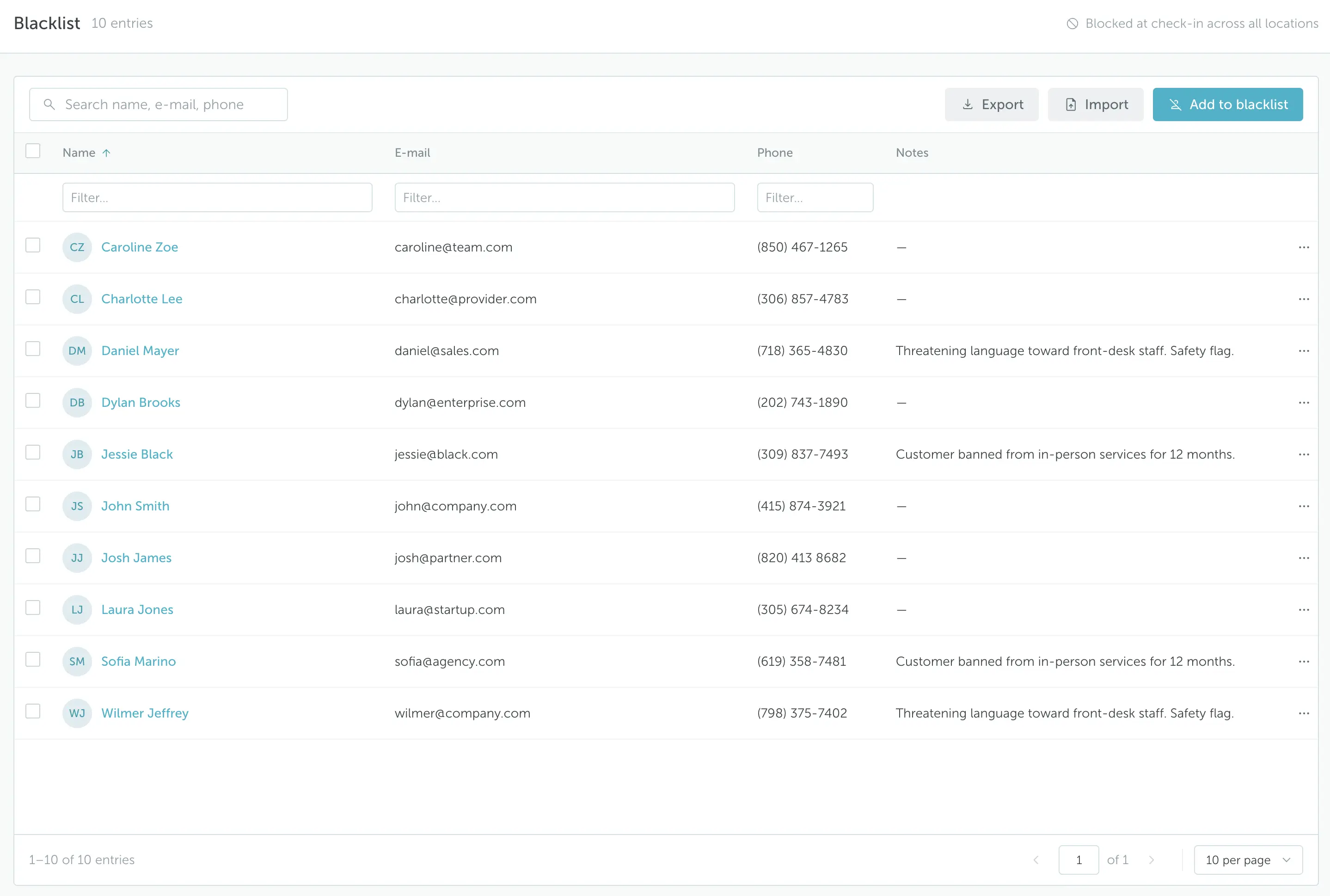
In YAROOMS, every visitor check-in is matched against your company watchlist automatically, across all your locations. If the visitor's email matches an entry, they are blocked from access and the staff you choose are alerted.
Screening also covers what visitors must complete before entry: an NDA, a policy agreement, a questionnaire, a photo or an uploaded document.
Screening runs automatically every time a visitor checks in, at every location.
Add the people you do not want on site, with their personal details and/or the reason they are blocked.
The watchlist covers all your locations, so a person blocked at one office is blocked at every office.
When a visitor checks in, YAROOMS compares their email against the watchlist.
If the email matches, the visitor is blocked from access and the staff you nominated are alerted.
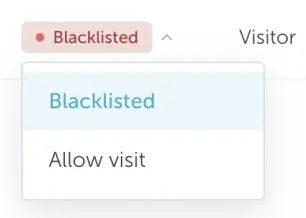
Authorized staff can review the match and override it so a legitimate visit goes ahead.
Watchlist checks answer whether someone may enter. The visitor registration flow answers what they must complete first, and you can set it per visitor type.
Require visitors to sign an NDA or other legal document before check-in completes.
Ask the questions your policy needs, such as purpose of visit, safety or health declarations.
Guests confirm your office policies with a checkbox before they can check in.
Capture a photo during registration so reception can confirm who is at the desk.
Ask contractors for an insurance certificate or safety training record before they arrive.
Your data is protected with industry-leading certifications:ISO 27001, ISO 27701, SOC 2 Type II and GDPR compliance


Screening is one step in YAROOMS Visitor Management, not a separate tool to integrate. The digital reception kiosk checks the watchlist at self check-in and prints a badge only for cleared visitors. Every visit shares one record in the digital visitor log, from registration to check-out.
Use visitor analytics to see visit volumes, peak arrival times and repeat visitors at each office. The same YAROOMS platform also connects desk booking, room booking, digital signage, parking and service requests.

Answers to common questions about visitor screening and watchlist checks in YAROOMS.
A visitor screening system checks guests before they are allowed on site. It compares each visitor against a watchlist and collects anything required for entry, such as a signed NDA or a completed questionnaire. YAROOMS runs the watchlist check at every check-in, across all locations.
Visitor watchlist screening compares each arriving visitor against a list of people who should not be admitted. In YAROOMS, the watchlist is maintained by your company and holds each person's details and, optionally, the reason they are blocked. A visitor whose email matches an entry is blocked from access, and the staff you nominate are alerted.
Yes. YAROOMS checks every visitor against the watchlist at check-in, before they get past reception. If the visitor's email matches an entry, access is blocked and your security staff are alerted. The same watchlist applies at all your locations.
The visitor is blocked from access, and the email addresses you configured receive an alert straight away, so security or reception can handle the situation in person. If the match is a mistake or the visit is approved, authorized staff can override the block and complete the check-in.
Yes. Both terms describe a list of people who should not be admitted. YAROOMS settings and help articles call it the visitor blacklist; this page uses watchlist, the more common industry term.
Yes. Each visitor type can have its own registration flow combining an NDA or other legal document, a policy agreement, a questionnaire, a visitor photo and document uploads. A contractor can be asked for an insurance certificate while a client only signs an NDA.
No. YAROOMS screens against the watchlist your company maintains. It does not run criminal background checks, sex-offender registry searches or government denied-party checks. Sites that need those, such as schools or regulated facilities, typically pair visitor management with a dedicated background-screening provider.
Watchlist screening is part of YAROOMS Visitor Management, which starts at $960 per location per year. See pricing.
See how organizations use YAROOMS to screen visitors and manage the whole workplace. Join a live demo or watch the on-demand platform tour.
Office visitor management system with pre-registration, QR and kiosk check-in, badge printing, host alerts, NDA signing and a searchable visitor log.
YAROOMS Digital Reception is a reception check-in system for office tablets and kiosks: visitor self check-in, checkout, badge printing and host alerts.
Digital NDA signing before visitor check-in completes.
We use cookies to analyze traffic and improve your experience.
Required for the site to function
Help us understand how visitors use the site
Used to deliver relevant ads