
Digital visitor log book (electronic visitor book)
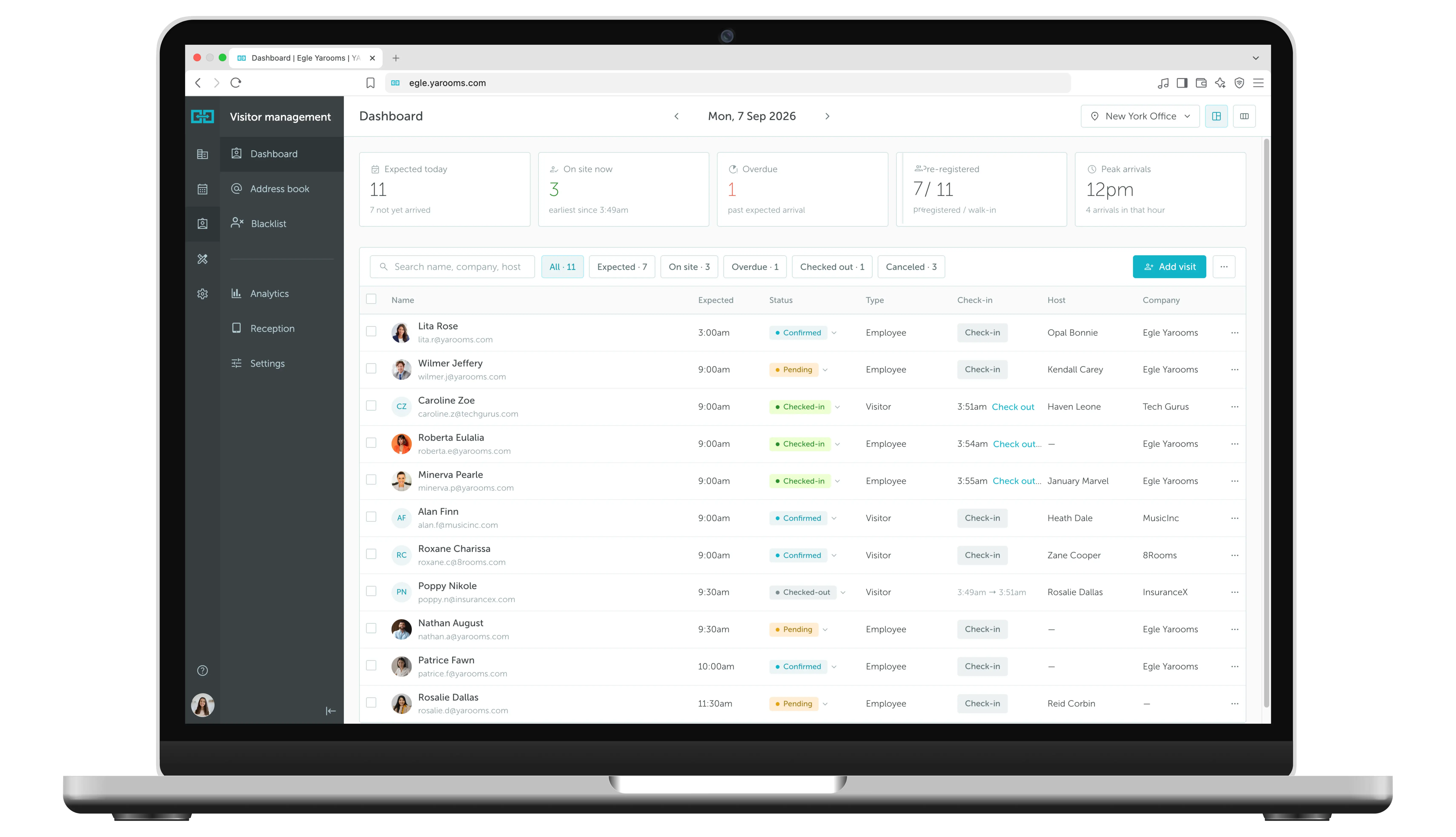
Meet the YAROOMS visitor management dashboard: a digital visitor log book to monitor who's been to your office, guest arrival times, and all relevant visitor information.
Rated 4.6/5 from 102 reviews on Capterra
Last updated: September 26, 2026
What is an electronic visitor log?
An electronic visitor log is a digital replacement for the paper visitor book at reception. It records each visitor's name, company, host, and check-in and check-out times. In YAROOMS, every visit across all your offices lands in one searchable dashboard that you can filter and export to CSV for audits.
Trusted by innovative organizations worldwide







See it in action
Take a quick tour of visitor management and see how easy it is to track every office visit in real time.
Full visibility of office visits in one dashboard
Paper logs fall short when it comes to data sharing and generating reports. The YAROOMS visitor dashboard centralizes real-time visitor data, offering an easy, efficient, and intelligent way to track all guest information in one place.
Real-time tracking
See who’s on-site right now with live check-in and check-out status.
Searchable records
Instantly find any visitor by name, date, host, or purpose of visit.
One-click exports
Export visitor logs to CSV for audits, compliance, or reporting.
The smart way to manage office visitor records
A real-time, customizable view of all visitor activity (check-in/check-out times, visitor status, host information, and more) in one digital log book.
Address book
A centralized database for storing employee and guest details. Add new contacts in just a few clicks.
Employee access
Enable every employee to add visitor details directly to the office address book, streamlining the check-in process.
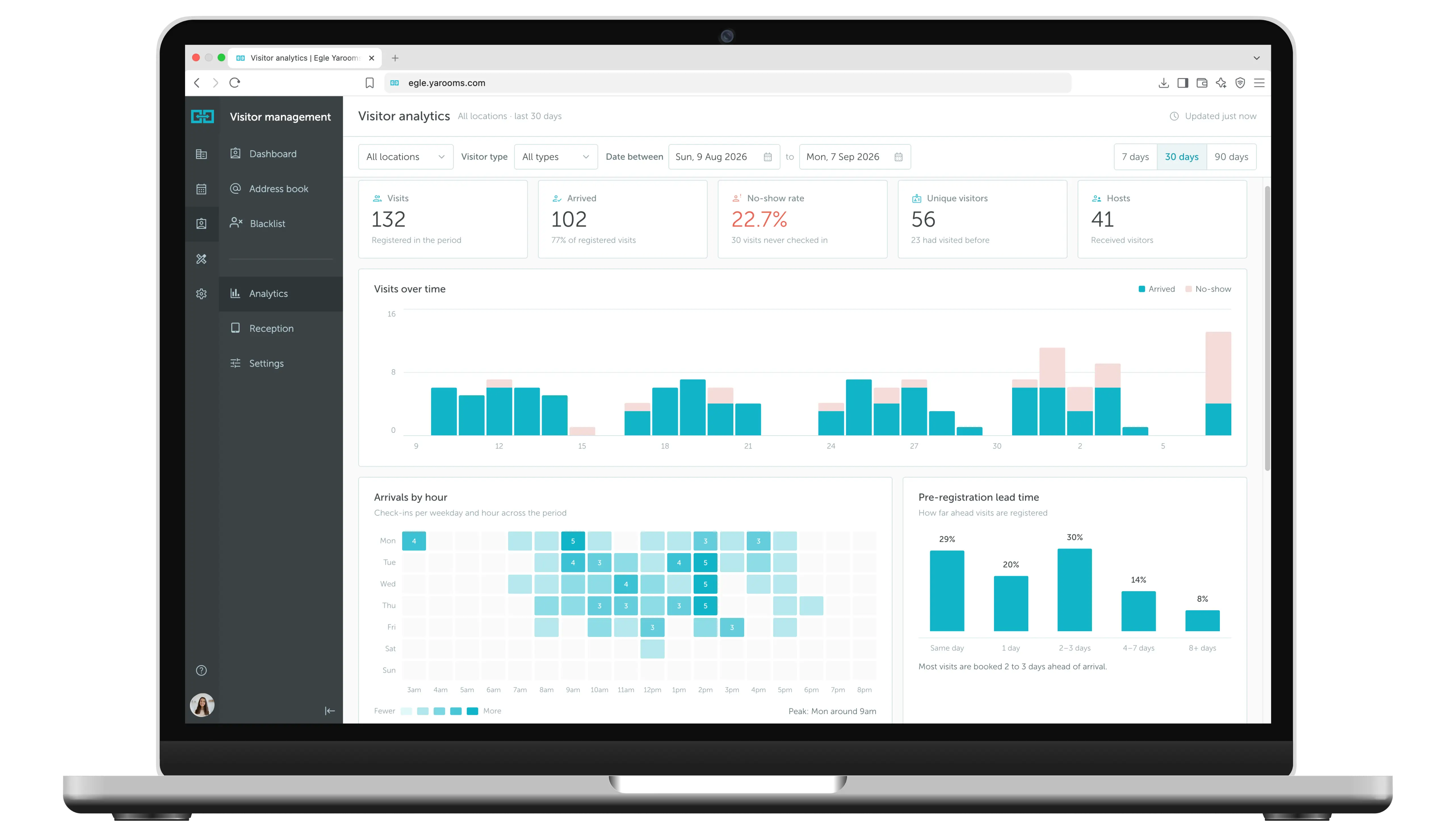
Visitor analytics
Get detailed insights into visitor patterns, host information, and other metrics for smarter decision-making. Explore visitor analytics.
Enterprise-grade security
Your data is protected with industry-leading certifications


Key benefits of a digital visitor log book
FAQ: Visitor log book
Answering the most popular questions about digital visitor log books.
Digital visitor register book: A visitor management system that replaces traditional paper logs with an app or software solution. Visitors sign in electronically, often using a digital reception app at the front desk. Features include instant data collection, badge printing, evacuation lists, and self-service check-in, reducing the receptionist's workload.
Physical (pen-and-paper) visitor register book: The traditional bound book where visitors sign in using a pen. It's straightforward and low-cost, doesn't rely on power or internet, but lacks advanced features and can become messy or hard to sort through as pages fill up.
A paper visitor book sits on the reception desk and relies on each guest to write legibly. Anyone at the desk can read earlier entries. Finding one visit means paging back by hand.
A digital visitor log captures the same details when the visitor checks in. Guests check in at a digital reception kiosk or scan a QR code with their own phone. Reception staff can also add or check in a visitor from the Visitor Management dashboard. The record is written to the log at check-in, and the host is notified automatically.
Past entries are not left open on the desk. Admins can see every location, and reception staff generally see only the dashboard for their own location.
Cons: May pose privacy concerns as personal information is more accessible. Some visitors may be unfamiliar with app-based sign-in. Technical difficulties like power outages could make the system temporarily inaccessible. Requires an initial investment and maintenance, which can be costlier than a traditional logbook for smaller businesses.
The Visitor Management dashboard lists visits by day. You can move back and forth in the calendar to see past or future visits. You choose which columns to show:
- Visitor name, email, phone number, company and job title
- Visit status and visitor type (external visitor or employee)
- Host (the person who invited the visitor)
- Check-in time and check-out time
- Linked desk or room bookings
- Car plate number
Depending on your registration flow, a visit can also hold a visitor photo, a signed NDA or policy, questionnaire answers and uploaded documents. The office address book stores contact details, the number of visits this month and the date of the last visit.
Filter the dashboard by date, location, host, visitor type, status or purpose of visit. Then export the visitor log to CSV in one click.
The Presence report under Workplace Analytics lists everyone who was present at a location on a given day or date range, with check-in and check-out times. You can export or print it, for example as an evacuation list. Admins can also export the tenant audit log as JSON. It records every change to a resource with a timestamp and the user who made it.
A company should keep visitor logs for at least one year, though retention periods can vary based on the organization's needs, security policies, or industry regulations. Keeping logs for this duration allows reviewing past entries for security, verifying visitor activity, or aiding post-visit inquiries. In high-security facilities or regulated industries like healthcare or finance, logs may need to be kept for several years to comply with legal requirements. Digital visitor management systems store logs securely and allow for easy sorting, retrieval, and export while ensuring data privacy standards are met.
In YAROOMS, your organization sets the retention period. YAROOMS keeps visitor records for as long as you use the service. Users with high privileges can delete or anonymize customer data at any time. All customer data is permanently deleted 30 days after a subscription is not renewed.
Visitor data is encrypted in transit (TLS 1.2+) and at rest. YAROOMS is certified for ISO 27001, ISO 27701 and SOC 2 Type II, and is GDPR compliant. See YAROOMS security for details.
Ready to see the big picture?
See how thousands of forward-thinking organizations use YAROOMS visitor management system. Join us for a Live Demo or watch the On-demand Platform Tour.
Related Products
Office Visitor Management System
Office visitor management system with pre-registration, QR and kiosk check-in, badge printing, host alerts, NDA signing and a searchable visitor log.
Digital Reception
YAROOMS Digital Reception is a reception check-in system for office tablets and kiosks: visitor self check-in, checkout, badge printing and host alerts.
Visitor Analytics
Visitor analytics in YAROOMS: a visitor management dashboard with visits, no-show rate, repeat visitors, arrivals by hour and CSV reports for every office.
We use cookies to analyze traffic and improve your experience.
Cookie preferences
Required for the site to function
Help us understand how visitors use the site
Used to deliver relevant ads