
Meeting Room Services Booking: Catering, Cleaning and AV
Book the meeting room and order catering, cleaning or AV equipment in the same step. Each order goes to the team that delivers it, appears on the Services Dashboard and carries a cost center.
Rated 4.6/5 from 102 reviews on Capterra
Last updated: September 26, 2026
What is meeting room services booking?
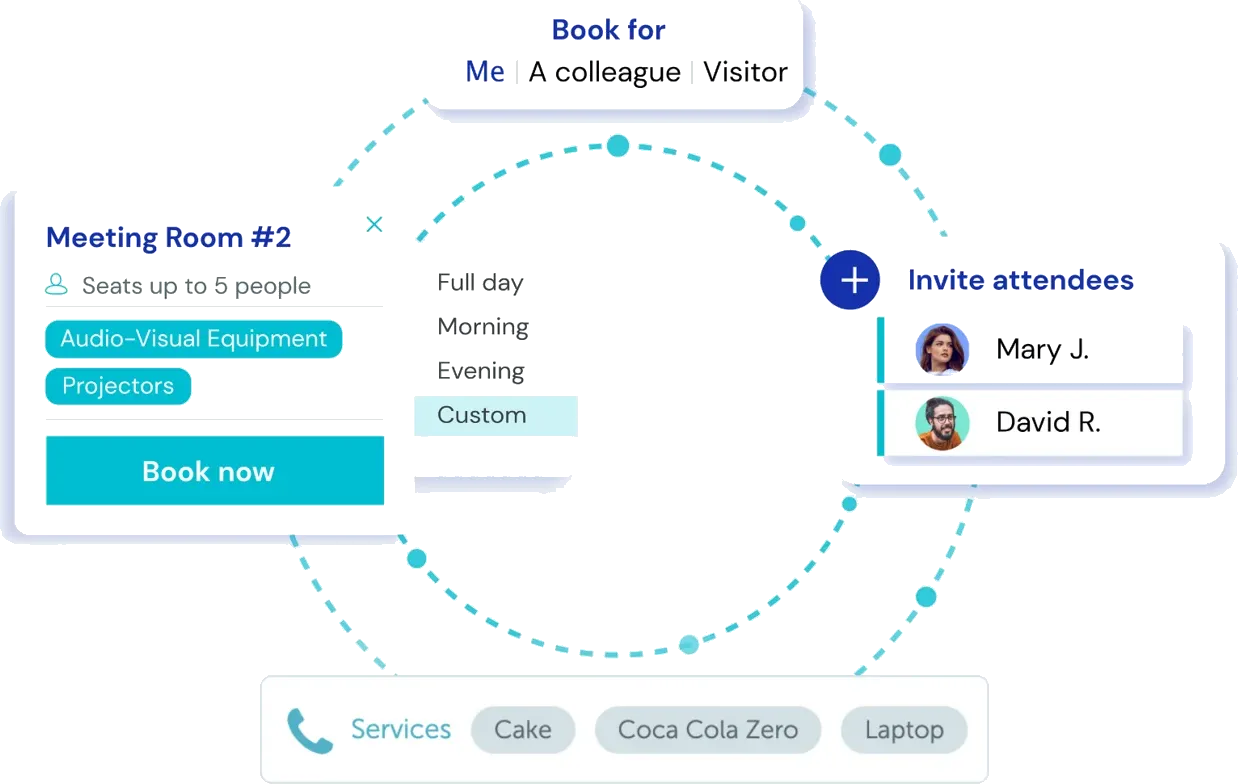
Meeting room services booking lets employees book a room and order catering, cleaning or AV equipment in one step. In YAROOMS, each order notifies the service owners who deliver it. Service managers see every order for the day on the Services Dashboard. Each service carries a cost center, so services analytics show spending by department.
Trusted by innovative organizations worldwide







See meeting room services booking in action
Click through a live demo: book a room, add catering and cleaning, and see the orders on the Services Dashboard.
Meeting room catering, ordered with the booking
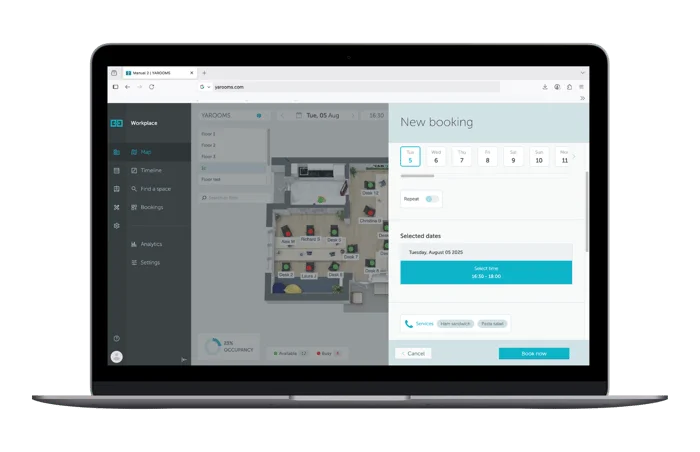
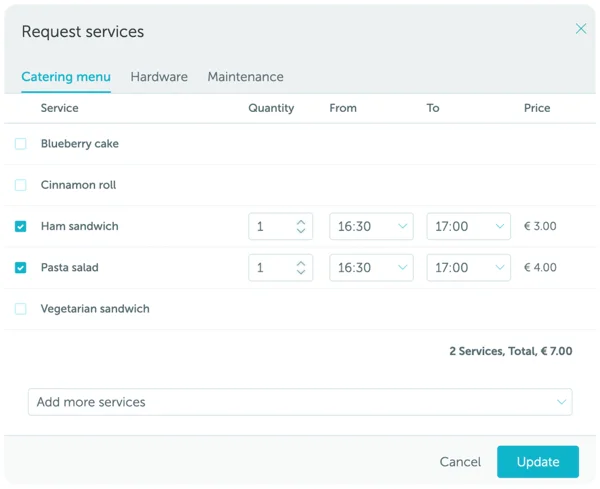
Employees turn on Services in the new booking window and choose from your catering menu. They set a quantity and a delivery time for each item. YAROOMS calculates the price, and the order goes to the catering team when the booking is saved.
Menus with categories and subcategories
Group the menu the way people order. For example, a Beverages category can hold Hot Drinks and Sodas subcategories, with coffee and sandwiches listed inside them.
Quantity and delivery time per item
Delivery times default to the booking time. Employees can change them for each item, so coffee arrives at the start and lunch arrives at noon.
Prices per location
Set a price for each item in each location. Employees see the calculated price before they save the booking.
The right menu for each room and team
Limit each item to specific locations, space types and user teams. A menu for the boardroom does not have to appear for a desk booking.
Long menus stay easy to browse
Each category shows up to five items in alphabetical order. An "Add more services" search finds the rest.
Employees can also request services when they book from the YAROOMS mobile app. See how to book workplace services.
Service dashboard and order management
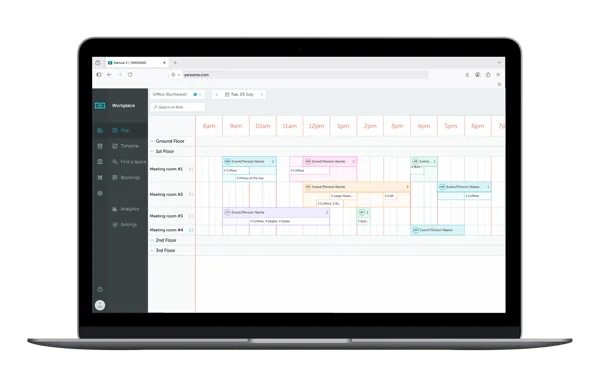
The Services Dashboard shows service managers every order scheduled for the day. Orders sit on a timeline, organized by room and floor. The team sees what is needed, where and when, across catering, IT setup and facility services.
Orders go to named service owners
Each service has one or more owners. YAROOMS notifies them when someone orders that service.
Filters by service type, service and space
Filter by a category such as Catering, search for one item such as Coffee, or show the orders for one room.
Role-based access
Admins give dashboard access per role, from the module access tab in the Roles menu.
Workflows for bookings with services
Workflows can filter on booked services. Use them to notify a team, a manager or a custom email address when a booking with services is created, updated or canceled.
Cost centers and services reporting
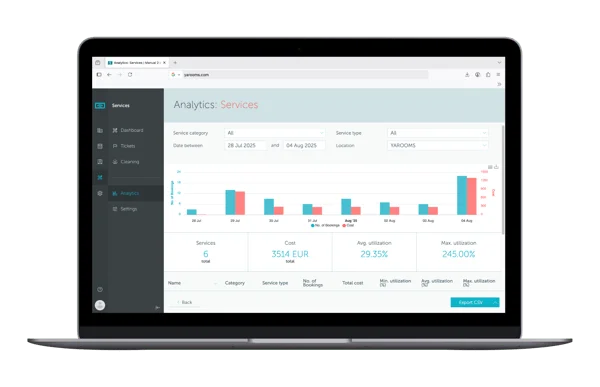
Assign a cost center to each service. It can be a department name or an accounting code. Cost centers appear in services analytics, so workplace and finance teams can track service spending by department.
Spending by department
See which departments drive catering and service costs, based on the cost center of each service.
Services report
See how bookable services are used, broken down by service type and location.
CSV and scheduled exports
Export the Services report as a CSV file, or schedule regular exports for finance.
Services data sits next to room and desk utilization in workplace analytics.
Cleaning and room preparation requests
Add cleaning to a booking the same way as catering, so every room is ready for the next meeting.
Cleaning after the meeting
Move the delivery time to the end of the meeting, so the room is ready for the next booking.
Maintenance tasks
Put cleaning in a maintenance category with tasks such as cable management.
Routed to the right team
Each request goes to the owners of that service.

AV equipment with real-time availability
Add projectors, laptops, headphones or extra monitors as services. YAROOMS supports two service types:
Physical resources
Equipment with real-time availability. Set a quantity per location to prevent overbooking and track usage.
Shared services
Items such as coffee or cleaning that people can book many times in the same time interval.
Admins set up every service under Settings, Services. See how to configure workplace services.
Key benefits of meeting room services booking



Setting up services: categories, owners and locations
Admins create services under Settings, Services. The setup takes four steps:
- Categories. Create categories such as Catering, Hardware and Maintenance, and add subcategories if needed.
- Details. Add each service with a name, a category, a cost center, a type and an option to ask for a quantity.
- Access. Choose the space types where it can be booked, the user teams that can book it and the owners who receive the orders.
- Locations. Choose the locations where it is available, with a cost and a quantity for each location.
Services in the same platform as rooms, desks and visitors
Services booking is part of the YAROOMS workplace platform. The same system runs meeting room booking, desk booking, visitor management, digital reception, signage and parking. Room bookings sync two ways with Microsoft 365 and Outlook. YAROOMS runs as SaaS, in your own Azure or AWS cloud, or on-premise, and holds ISO 27001 and SOC 2 Type II certifications.
For events with several rooms and suppliers, see corporate event management.
Meeting room services booking: FAQ
Answers to common questions about ordering catering, cleaning and AV with a meeting room booking.
Employees book the room, turn on Services in the new booking window and pick items from the catering menu. For each item they set a quantity and a delivery time. YAROOMS calculates the price, and the order goes to the catering team when the booking is saved.
Service requests and the Services Dashboard are part of the Enterprise plan.
Related Products
Room Booking System
YAROOMS is a room booking system for meeting rooms. Book from Outlook, Google Calendar, Microsoft Teams, the mobile app or a door display.
Mobile App
Keep your teams connected with the tools they need to collaborate and navigate the workplace from their mobile device.
Workplace Analytics
Create better office experiences with data-driven decisions. Get insights on space usage, hybrid work patterns, and employee satisfaction.