Meeting room layouts: book rooms by setup & capacity

Offer one meeting room as a Boardroom, Classroom, Theatre and more, each with its own capacity, photo and setup time.

Rated 4.6/5 from 102 reviews on Capterra

Last updated: October 19, 2026
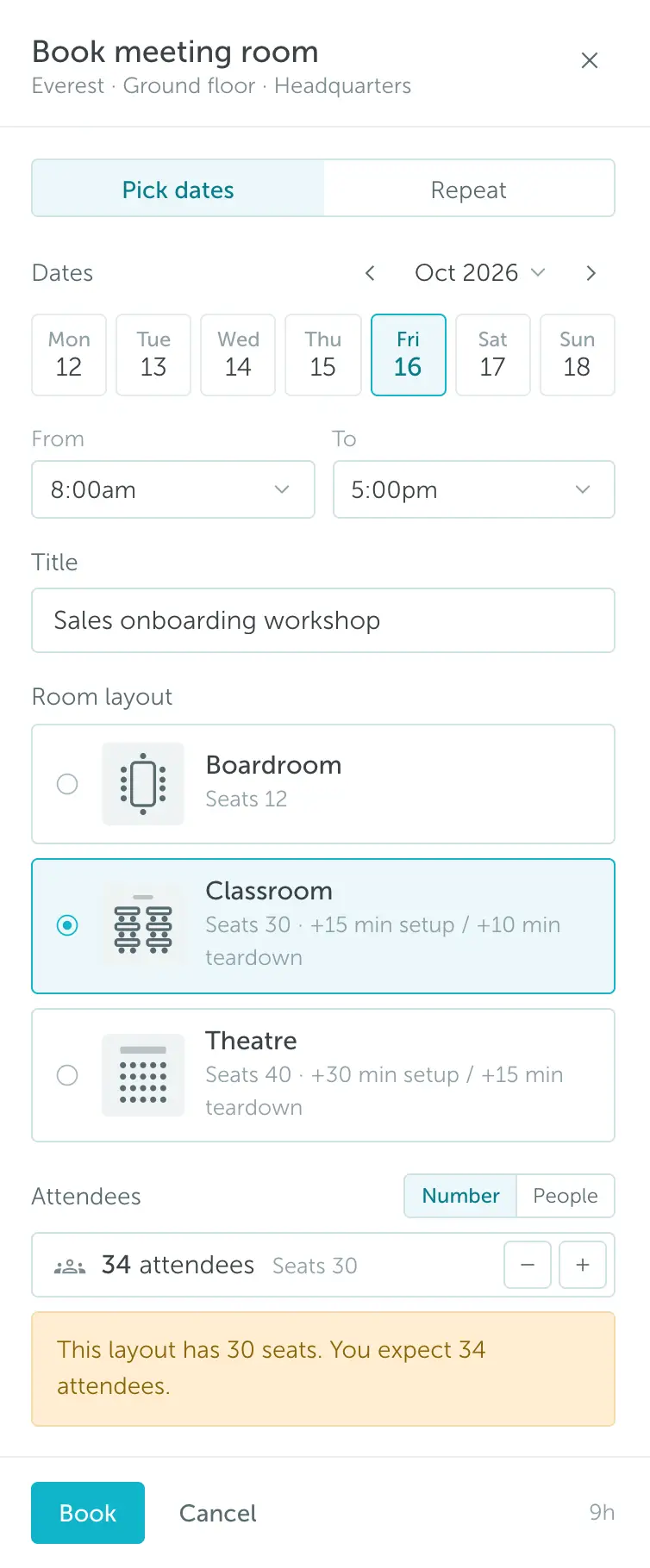
YAROOMS booking window showing Boardroom, Classroom and Theatre layout cards with seat counts and a capacity warning

Trusted by innovative organizations worldwide

Verizon
Dr. Martens
Columbia University
Dedalus
Cerved
ASEE
University of Sydney

What are meeting room layouts?

Meeting room layouts are the different ways a room’s tables and chairs can be arranged to suit a meeting, from Boardroom for discussions to Classroom for training or Theatre for presentations.

With YAROOMS, the same room can be booked in different layouts. Each layout has its own capacity, photo and setup time, so people can choose the right setup for their meeting.

Which meeting room layouts does YAROOMS support?

YAROOMS includes eight standard layouts, each with a diagram: Boardroom, Classroom, U-shape, Theatre, Banquet, Cabaret, Hollow square and Reception. Admins can add custom layouts and reuse them in any room.

LayoutHow the room is set upBest for meetings like
BoardroomOne large table, everyone seated around itLeadership and client meetings, video conferences, decision-making sessions
ClassroomRows of tables facing the frontTraining, onboarding, sessions where people take notes or use laptops
U-shapeTables in a U, open end facing a screen or presenterWorkshops, video conferences and hybrid meetings, discussions led from the front
TheatreRows of chairs, no tables, facing the frontTown halls, all-hands, presentations and product launches
BanquetRound tables seating small groupsTeam lunches, dinners and celebrations
CabaretRound tables with the side facing the front left openWorkshops mixing presentation and group work
Hollow squareTables in a closed square, open middleRound-table discussions where everyone sees everyone
ReceptionOpen floor, standing room, few or no chairsNetworking, launches, client and partner receptions
CustomAny setup you name, with an icon you chooseHuddle meetings, lounge sessions, hybrid pods, studio setups

Benefits of meeting room layouts

With YAROOMS Room Layouts, every flexible room is booked for how it will actually be used. The same space serves a board meeting, a training session and a town hall, each at the right capacity and ready when people arrive.

More use from every room

One space hosts different meeting types at the right capacity.

No booking guesswork

Bookers see each setup and its real seat count before they book.

Less time to prepare

Setup and teardown time is protected, so rooms are ready on time.

Faster room search

Filter by layout and group size to see only rooms that fit.

One setup, everywhere

The booked layout shows in Outlook, emails and on the room display.
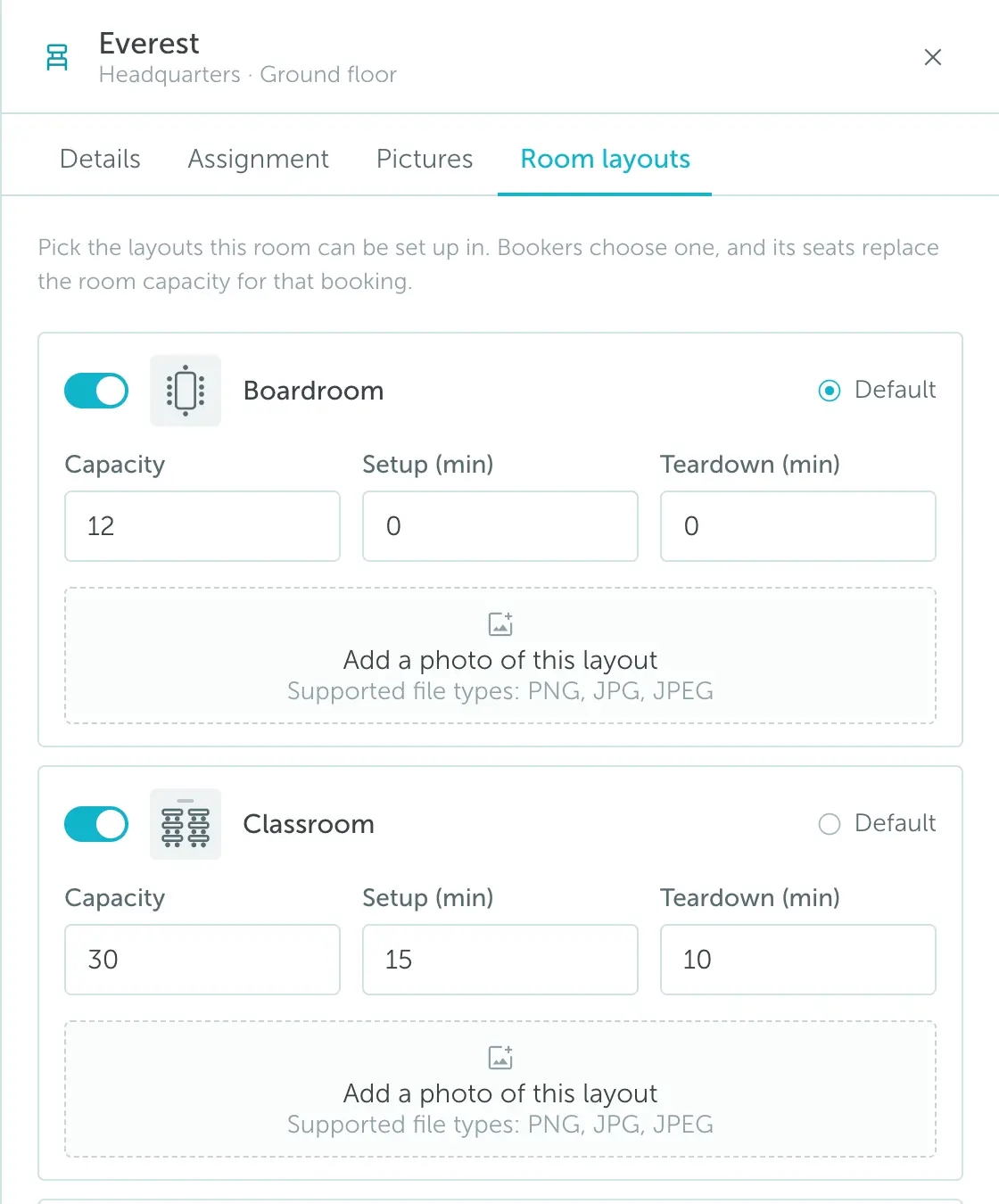
YAROOMS room layout settings showing Boardroom and Classroom with separate capacities, setup and teardown times

Room layouts are part of the YAROOMS workplace platform

Room layouts are part of YAROOMS Room Booking, so people can choose the setup they need and add catering, cleaning or equipment to the same booking. The same platform covers desk booking, visitor management, digital signage and parking.

YAROOMS works with Microsoft 365, Outlook and Google Workspace. It runs as SaaS, in your own Azure or AWS tenant, or on-premise, and it is ISO 27001 certified and SOC 2 Type II audited.

Connected workplace platform illustration showing rooms, desks, visitors, services and analytics

Frequently asked questions about meeting room layouts

Layout decides who can see whom, where attention goes and how easily people can talk. A Theatre setup keeps a large audience focused on one speaker, while a U-shape or Boardroom makes discussion natural. When the setup doesn't match the meeting, people spend the first ten minutes moving chairs or straining to see the screen.

Start with what the meeting needs to achieve: listening, discussing, or working in groups. Then check group size, whether remote people will join, how long the session runs, and whether attendees need table space. In YAROOMS, you can filter rooms by layout and group size, so the choice is made at booking and the room is set up to match. Read more about how to choose the right setup.

Boardroom, U-shape and Hollow square put everyone face to face, which suits discussion and decisions. Cabaret and Banquet split the room into small table groups, which suits collaboration. Classroom and Theatre keep interaction low and attention on the front.

Long, narrow rooms usually suit Boardroom or Classroom, because both run along the length of the room. U-shape, Banquet and Cabaret need more width to leave walkways between tables. In YAROOMS, administrators only turn on the layouts a room can physically hold, so bookers never pick a setup that won't fit.

The most common meeting room layout names are Boardroom, Classroom, U-shape, Theatre, Banquet, Cabaret, Hollow square and Reception. YAROOMS includes all eight as standard layouts and lets organizations add their own.

Yes. A meeting room in YAROOMS can offer as many layouts as it physically supports, each with its own capacity, photo, and setup and teardown time.

A U-shape or Boardroom layout with the open end facing the screen works best. Everyone in the room stays in camera view, and remote attendees see faces instead of backs. Keep seats within microphone range, and avoid Theatre rows, where people at the back disappear from the camera. In YAROOMS, booking the video-ready layout tells facilities exactly how to set the room. Explore technology for video conferencing and hybrid meetings.

Classroom is the most common training layout. Rows of tables face the trainer and leave space for laptops and notes. Cabaret works well when the training includes group exercises.

Theatre fits the most people, because it uses rows of chairs without tables. Reception, with standing room, can fit more for short events.

Capacity depends on room size and setup, so the same room seats far more people in Theatre than in Boardroom. In YAROOMS, administrators enter the real seat count for each layout, and bookings are checked against it.

A huddle room is a small meeting room for a few people, usually set up around one table with a screen. In YAROOMS, huddle rooms can use a Boardroom layout or a custom huddle layout with its own seats and photo.

Yes. YAROOMS shows each layout with a diagram, and administrators can replace it with a real photo of the room in that setup.

Yes. YAROOMS administrators can add a custom layout with its own name and icon. It joins the organization's layout library and can be used in any room.

Yes. Setups such as Lounge, Standing or Hybrid pod can be added as custom layouts in YAROOMS, each with its own seats and a photo, so informal spaces are as easy to book as formal ones.

Yes. In YAROOMS Find a space, people filter by layout and number of attendees and see only rooms that can host their group in that setup. Explore meeting spaces on an interactive office map.

Each layout can have its own setup and teardown time, up to 24 hours. YAROOMS blocks that time around the booking and prevents other bookings from overlapping it.

Yes. A recurring booking in YAROOMS uses the same layout on every date.

Yes. The YAROOMS Outlook add-in has the same layout picker as the web app, and booking emails include the booked layout.

Yes. The YAROOMS meeting room display shows the layout of the current booking at the door.

Existing YAROOMS bookings keep the layout and setup time they were made with. Changes apply to new bookings only.

Yes. Rooms without layouts in YAROOMS work as before, using the room capacity.

Book every room the way it will be used

Get more out of your flexible spaces with YAROOMS Room Booking.

See meeting room layouts in action.

Read the setup guide

We use cookies to analyze traffic and improve your experience.

Cookie preferences

Essential

Required for the site to function

Always on
Analytics

Help us understand how visitors use the site

Marketing

Used to deliver relevant ads

Talk to Sales or Support