
Equipment booking system for labs and offices
Book lab instruments and shared devices by the hour on a timeline, or add projectors and laptops to a room or desk booking. YAROOMS blocks double bookings and tells the team that prepares the equipment.
Rated 4.6/5 from 102 reviews on Capterra
Last updated: October 2, 2026
Trusted by innovative organizations worldwide







What is an equipment booking system?
An equipment booking system lets people reserve shared equipment for a set time, so two people never count on the same item. YAROOMS books equipment in two ways. Instruments and devices that people book on their own, such as a flow cytometer or a confocal microscope, are spaces of their own type, booked by time slot on a timeline. Items that go with a meeting, such as a projector or a laptop, are added to a room or desk booking, with stock checked per location.
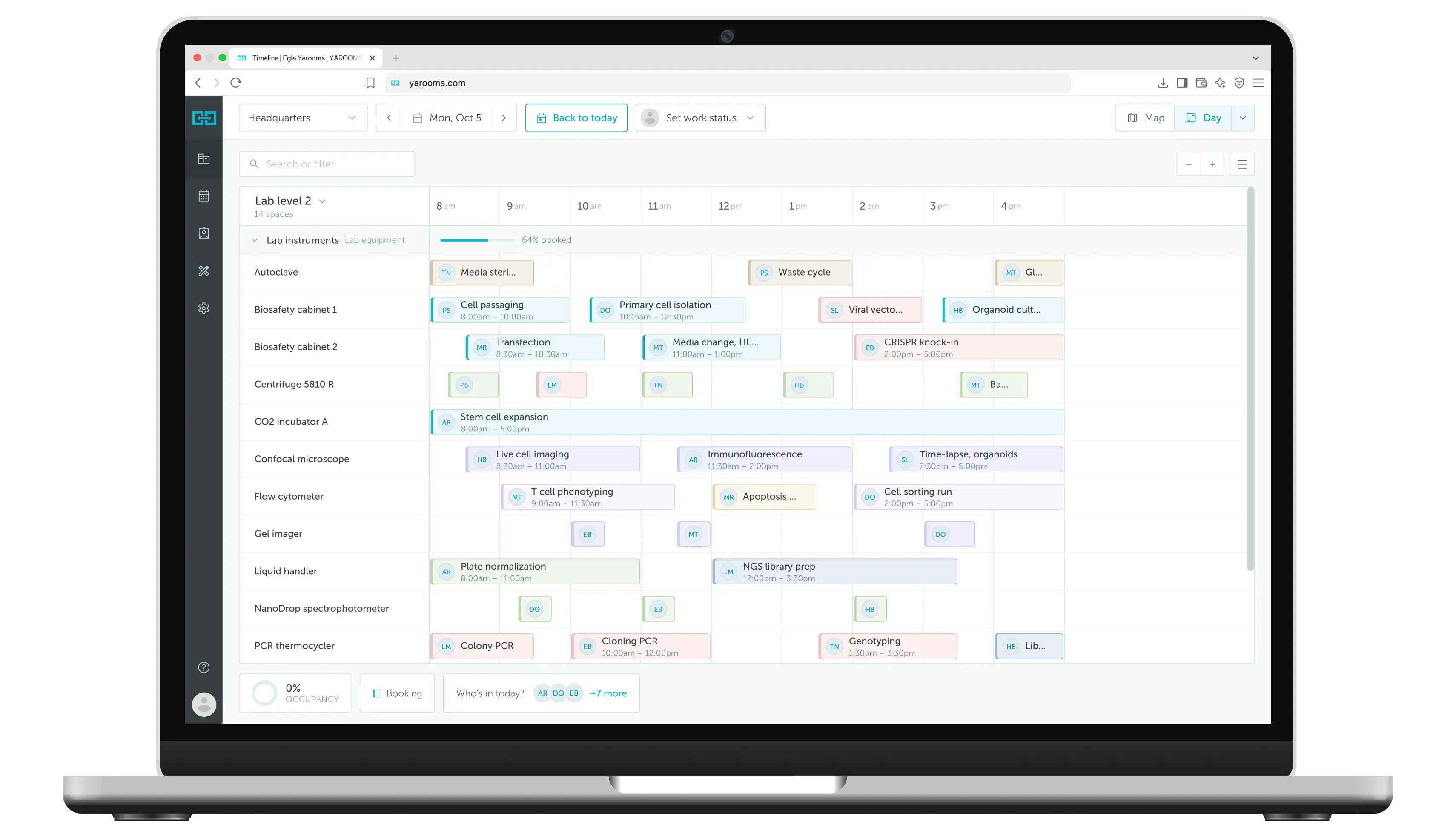
Book each instrument by the hour on a timeline
Add an equipment type, such as Lab equipment, and add every instrument as a bookable item on it. Researchers see the whole day on one timeline, pick a free slot and book it. Each instrument can be booked by only one person at a time.
Your own equipment types
Create types such as Lab equipment, AV kits or Pool cars, each with its own name and icon. See space types and groups.
Time slots that fit the work
Allow custom times in 15-minute steps, fixed slots, or full-day bookings. Set the hours each instrument can be booked.
Rules, check-in and approval
Limit bookings per team, ask people to check in, release no-shows and send selected instruments for approval.
Add equipment to the booking in the same step
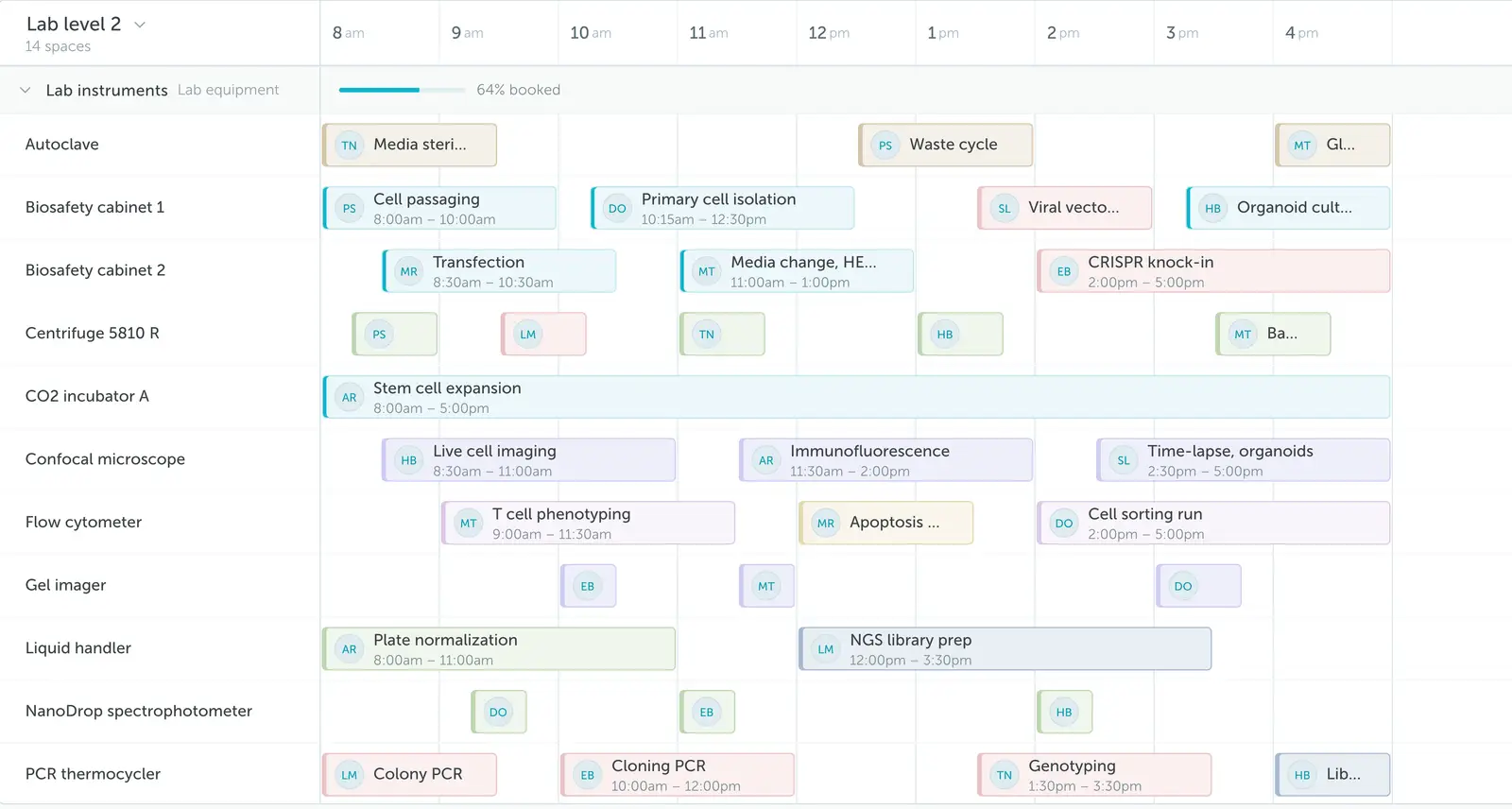
Employees choose a room or desk, then add the equipment they need before they confirm. The equipment times follow the booking, and employees can adjust them, for example to have a projector set up 15 minutes early.
Any equipment you lend out
Projectors, laptops, extra monitors, headsets, chairs, conference phones or any other item you define.
Quantity and notes
Employees enter how many items they need and add notes for the team that prepares them.
Available where people book
Add equipment in the web app, the mobile app and the Outlook add-in.
Stock per location stops double-booked equipment
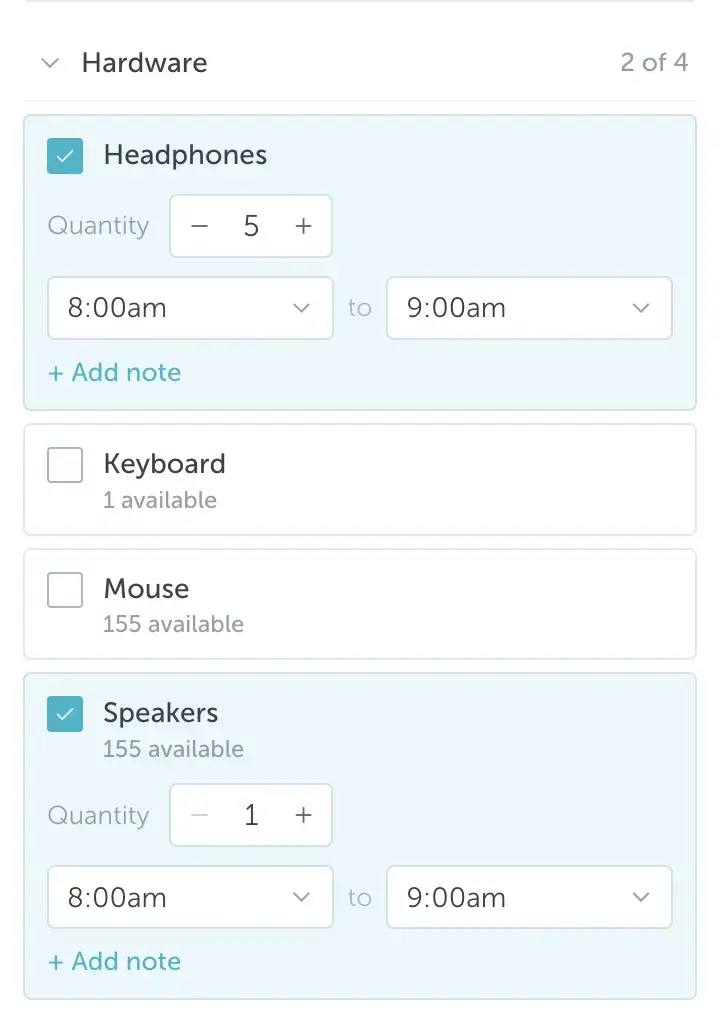
Each item has a stock count for every location. When an employee books it, YAROOMS checks how many units are already booked at that location for the same time. If none are left, the item cannot be booked.
Physical resources
Items with limited stock, such as laptops or projectors. YAROOMS counts every unit and prevents overbooking.
Shared services
Items with no stock limit, such as coffee or water, that many people can order for the same time.
Set per location and space type
Choose the locations and space types where each item is available, so people only see the equipment their office has.
The right team prepares every item on time
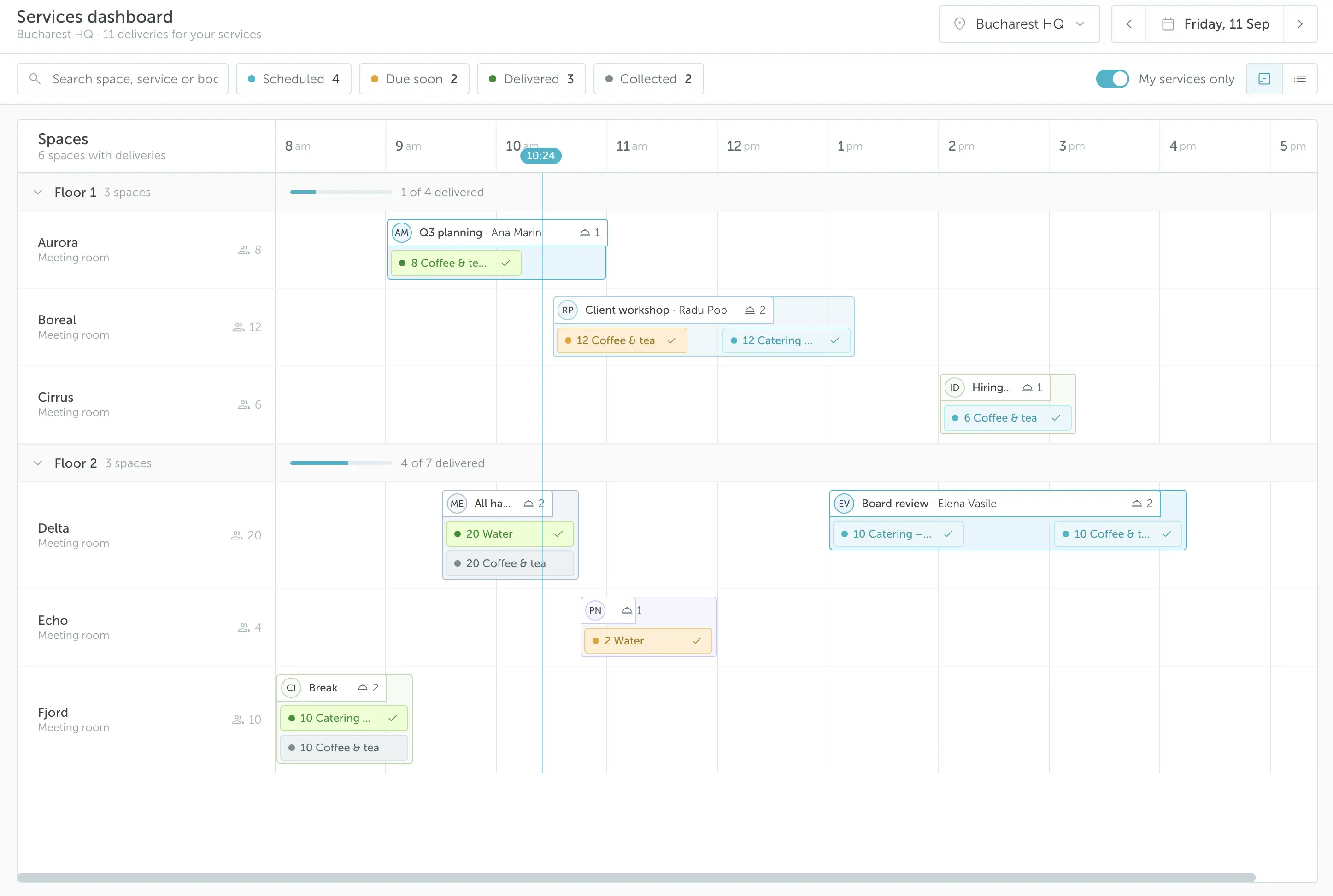
Each item has owners, for example the IT team for laptops or facilities for chairs. Owners get an email when someone books the item or changes the booking. The Services Dashboard shows every request for the day on a timeline by room and floor.
Owner notifications
Owners get an email for each new or changed equipment request.
Services Dashboard
A daily timeline of every request, with filters by category, item and space. See how the Services Dashboard works.
Approval workflows
Send bookings that include specific equipment for approval. YAROOMS checks stock again when the approver accepts. See how to create a workflow.
Track equipment use and cost by department
Set a price per item for each location, and employees see the cost when they book. Services analytics show how often each item is booked, how much of the stock is used and what it costs, split by cost center.
Price per location
The same item can cost a different amount in each office. YAROOMS calculates the total for the booking.
Cost centers
Assign a department name or accounting code, and see equipment spending by department in services analytics.
Usage and stock reports
See bookings, booked quantity and stock use per item, and export the data as CSV. See the services report.
Key benefits of equipment booking in YAROOMS
Who uses equipment booking in YAROOMS?
Any team that shares expensive or scarce equipment between many people. These are the most common setups:
Biotech and life sciences
Book biosafety cabinets, centrifuges, qPCR systems and flow cytometers by the hour. Each instrument has its own row on the timeline, so scientists plan runs around each other.
Research labs and core facilities
Share microscopes, sequencers and plate readers between groups. Limit bookings per team and send high-demand instruments for approval.
IT equipment lending
Lend loaner laptops, monitors, headsets and docking stations. Stock per location stops IT from promising a device it does not have.
AV and event services
Add projectors, microphones, cameras and conference phones to a meeting room booking. The AV team sees every setup for the day on the Services Dashboard.
Engineering and R&D
Book test rigs, 3D printers, oscilloscopes and prototyping tools, with a fixed slot length and check-in so unused slots go back to the team.
Facilities and workplace teams
Set up pool cars as their own equipment type, and add extra chairs and flip charts to room bookings, with service costs tracked by department.
Equipment booking is part of the YAROOMS workplace platform
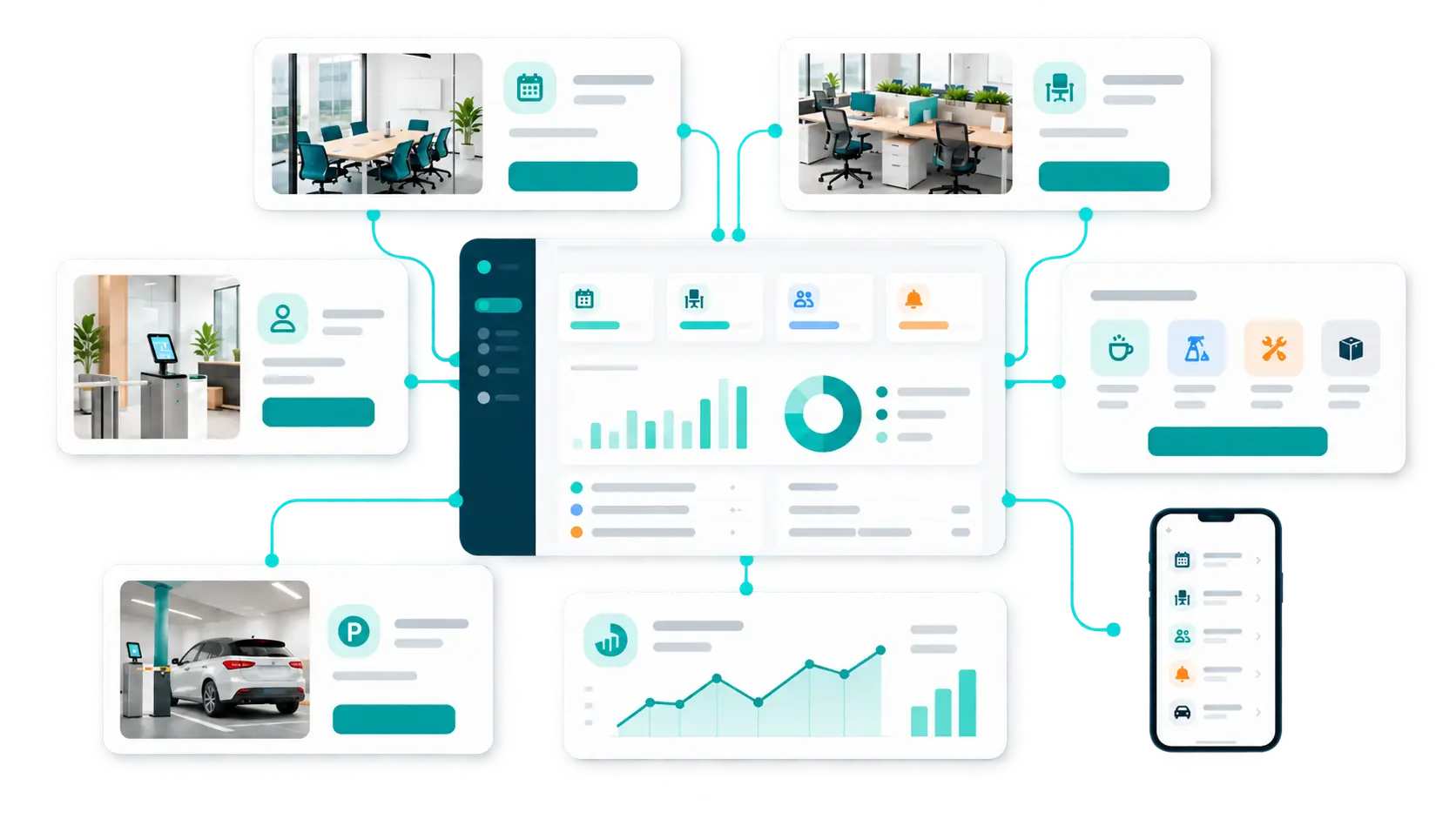
Equipment booking runs on the same services module that handles catering and cleaning orders, so one booking can hold the room, the projector and the coffee. The same platform covers room booking, desk booking, visitor management, digital signage and parking.
YAROOMS works with Microsoft 365, Outlook and Google Workspace. It runs as SaaS, in your own Azure or AWS tenant, or on-premise, and it is ISO 27001 certified and SOC 2 Type II audited.
Equipment booking: FAQ
Any instrument or device you add as its own equipment type, such as microscopes, centrifuges or pool cars, and any item you add as a service. Common examples are projectors, laptops, extra monitors, headsets, webcams, conference phones and extra chairs. Admins group items into categories and subcategories, such as Hardware or AV, under Settings → Services. See how to configure workplace services.
Set an item as a physical resource and give it a stock count for each location. When someone books it, YAROOMS subtracts the units already booked at that location for the same time. If the stock runs out, the item cannot be added to the booking.
Yes. Add the equipment as its own space type, such as Lab equipment, and each instrument becomes a bookable item with its own row on the timeline. People book it by time slot, with no room needed. Items that go with a meeting, such as projectors, are added to a room or desk booking instead.
The owners of the item get an email when someone books it or changes the booking. Owners and service managers also see every request for the day on the Services Dashboard.
Yes. Create an approval workflow with a condition on booked services. Bookings that include those items wait for approval, and YAROOMS checks the stock again when the approver accepts.
Yes. Set a price per item for each location and assign a cost center. Services analytics then show equipment cost by cost center, and you can export the data as CSV.
Yes. The YAROOMS Outlook add-in lets employees add equipment and other services when they book a room from an Outlook meeting. They can also do it in the web app and the mobile app.
See equipment booking in action
Book a live demo and see an employee book a meeting room with a projector and a laptop in one step.
Related Products
Room Booking System
YAROOMS is a room booking system for meeting rooms. Book from Outlook, Google Calendar, Microsoft Teams, the mobile app or a door display.
Desk Booking
YAROOMS desk booking system: employees reserve desks on an interactive floor map from the web, mobile app, Teams or Outlook, in one platform with rooms and visitors.
Yarvis AI Workplace Agent
Yarvis works where your people already work. In Teams, in email, and soon in SMS, it handles workplace coordination before friction starts.
We use cookies to analyze traffic and improve your experience.
Cookie preferences
Required for the site to function
Help us understand how visitors use the site
Used to deliver relevant ads