
How to Report a Problem

This article explains how to report a problem regarding your booking to the location manager using YAROOMS Mobile.

How to report a problem

Note: The “Report a problem” feature works only in the locations with assigned Location Managers. Read how Administrators can assign Location Managers to locations in this article.

To report a problem, open your YAROOMS Mobile app and locate your booking in the booking overview. Once you’ve found it, tap on the booking and select “Report a problem.”

On the Report a Problem page, choose the appropriate problem category, add a description, and set a priority. When you’re done, tap Send — your report will be sent directly to the user(s) responsible for managing issues at that location.
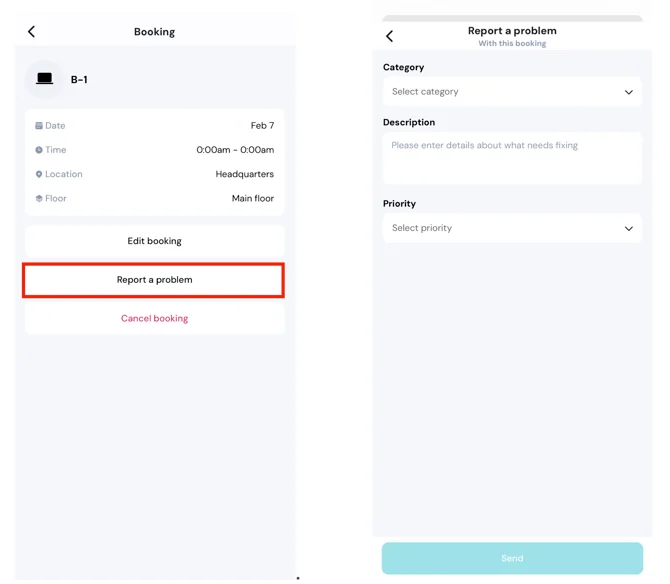
Screenshot

Related articles

Can't find what you're looking for?

Our support team is here to help. Reach out and we'll get back to you quickly.

Contact Support
YAROOMS

Become a partner

Join our growing network of partners worldwide

Application received!

We'll review your details and get back to you soon.

We use cookies to analyze traffic and improve your experience.

Cookie preferences

Essential

Required for the site to function

Always on
Analytics

Help us understand how visitors use the site

Marketing

Used to deliver relevant ads

Talk to Sales or Support