
How to Book a Space (Mobile)

This article explains how to use YAROOMS Mobile app to reserve a space.

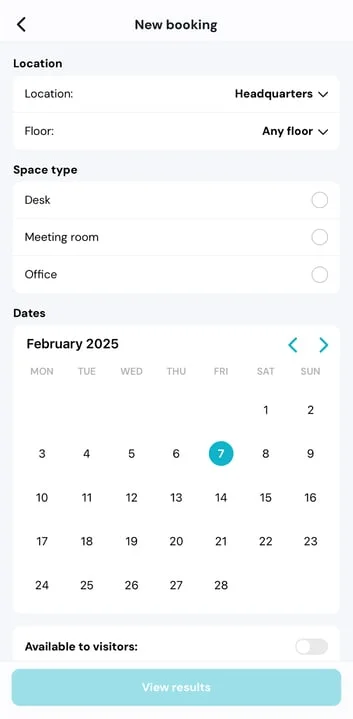
Open your YAROOMS Mobile application and press on the blue + sign on the bottom right corner. To narrow down the available spaces, make sure to select the following:

  • Location
  • Floor
  • Space Type
  • Requirements (if the selected space type has Features on them)
IMG_9D4588C8C706-1-jpeg

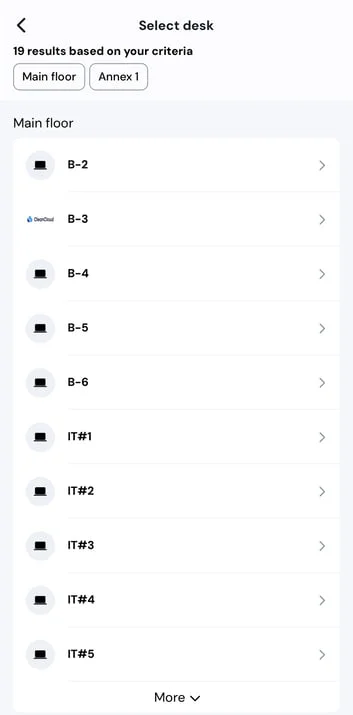
Once everything is set up, select the date for your booking and tap on View Results to view the available spaces:
IMG_EA474A152488-1-jpeg

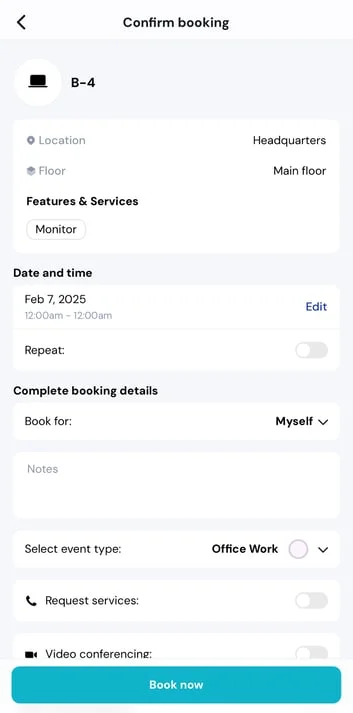
Continue the process tapping on your selected space. Once a space is selected, the Confirm Booking page will appear for you to customize:
IMG_BEDFD80209B9-1-jpeg

Press “Book now” to finalize. Your new booking will appear in the schedule overview.

Note: If you are looking for information about managing your schedule and canceling/editing bookings, read this article .

Can't find what you're looking for?

Our support team is here to help. Reach out and we'll get back to you quickly.

Contact Support
YAROOMS

Become a partner

Join our growing network of partners worldwide

Application received!

We'll review your details and get back to you soon.

We use cookies to analyze traffic and improve your experience.

Cookie preferences

Essential

Required for the site to function

Always on
Analytics

Help us understand how visitors use the site

Marketing

Used to deliver relevant ads

Talk to Sales or Support