
The “Global settings” page can only be accessed by administrators. From here, you can define organization-wide settings as well as manage several user registration settings.
Details
You can change the name of your organization, but if you want to change the domain name you were assigned when you created the account you will have to contact us at support@yarooms.com.

Schedule
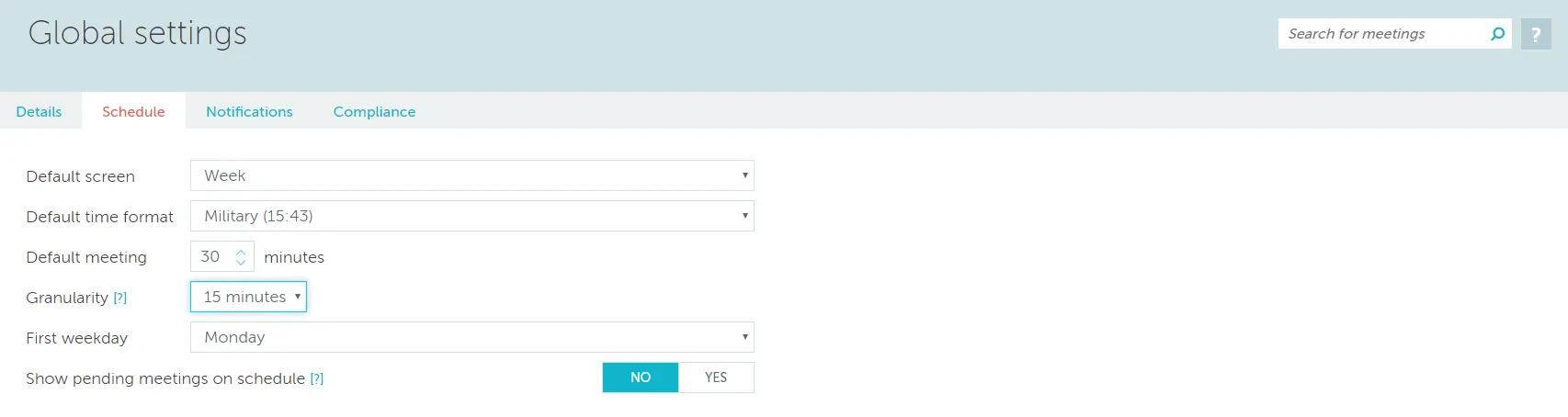
From this section you can change the following settings, which will apply to the entire platform.
- default screen (the screen automatically displayed when a user opens YAROOMS)
- default time format (you can toggle between military time and AM/PM)
- default meeting (the duration suggested automatically when making a booking)
- granularity (the length of the minimum bookable time slot)
- first weekday (you can toggle between Sunday and Monday)
- show pending meetings on schedule (this will display all meetings, including those still waiting for approval)
Reports Type
In this section you get to decide whether you want to display Reports using the initial parameters under which a meeting was saved, or with the current assets (rooms / locations / etc.) regardless of the initial values for these. For more on these please go to the Reports section.
