
Jump to:
1. What is a super-user
In YAROOMS, a super-user is a:
- Administrator
- Supervisor
- Team Manager
- Regular users who were given special capabilities by the Administrators.
2. “Bookings” page
The “Bookings” section (Workplace → Bookings) contains the list of all the user bookings (past and upcoming). The content in this section may vary based on what type of user you are. Regular users will exclusively see their personal bookings, while super-users will have access to both their personal bookings and bookings made by other users, over which they have authority.
3. How to edit or cancel bookings on behalf of other users
Super-users can edit and cancel bookings on behalf of someone else.
To edit the booking, go to Workplace → Bookings → click on the booking → Edit. You can change the day or the time interval of the booking, or the user who will use the space.
To cancel a booking, go to Workplace → Bookings → click on the booking → Cancel. If you want to cancel multiple bookings, go to Workplace → Bookings. Then, select the bookings to be canceled and use the Cancel button from the bottom of the page.
4. Booking on behalf of someone else
Super-users can also make bookings on behalf of other users. To do so, you should follow the usual space booking process, defined in this article.
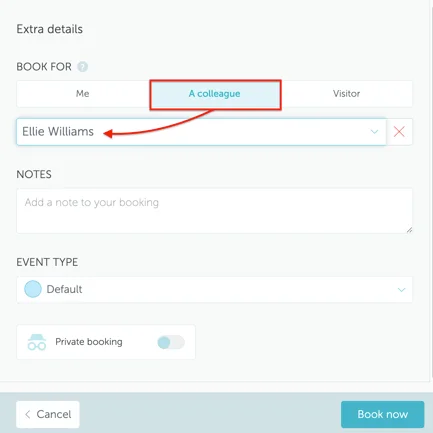
Whether the booking is made using the map / timeline views, or “Find a space” option, the name of the actual user can be specified in the “Book for” field.
When you finalize a booking on someone else’s behalf, it will be stored in both your “Bookings” section and the respective user’s. The user will also be notified about the booking.