
How to Pre-Register Visitors by Inviting visitors@yarooms.com from Your Calendar

This article explains the process of visitor pre-registration by inviting visitors@yarooms.com as a guest to your meeting.

How to pre-register visitors for your meeting:

  • Create a meeting in your calendar
  • Invite meeting guests, including visitors
  • To create an entry in the VM dashboard for each invited visitor, also send a meeting invite to visitors@yarooms.com
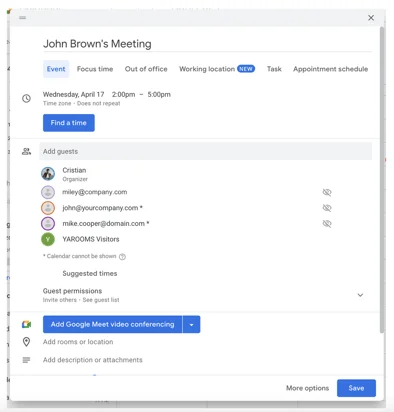
Screenshot of calendar invite

After completing these steps and your visitors accept the invitation, the visitor management dashboard will display the information accordingly.
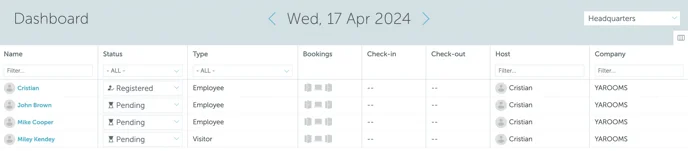
Screenshot of VM dashboard

Upon arriving at the office for the meeting, visitors will have their details pre-entered in the VM dashboard, facilitating a faster check-in process.

Can't find what you're looking for?

Our support team is here to help. Reach out and we'll get back to you quickly.

Contact Support
YAROOMS

Become a partner

Join our growing network of partners worldwide

Application received!

We'll review your details and get back to you soon.

We use cookies to analyze traffic and improve your experience.

Cookie preferences

Essential

Required for the site to function

Always on
Analytics

Help us understand how visitors use the site

Marketing

Used to deliver relevant ads

Talk to Sales or Support