
Jump to:
1. Scanning a QR code (YAROOMS Mobile app)
You can check-in to your booked space by scanning the unique space’s QR code with the YAROOMS Mobile app. Read this article for more information.
2. Simple check-in (YAROOMS Web / Teams / Mobile)
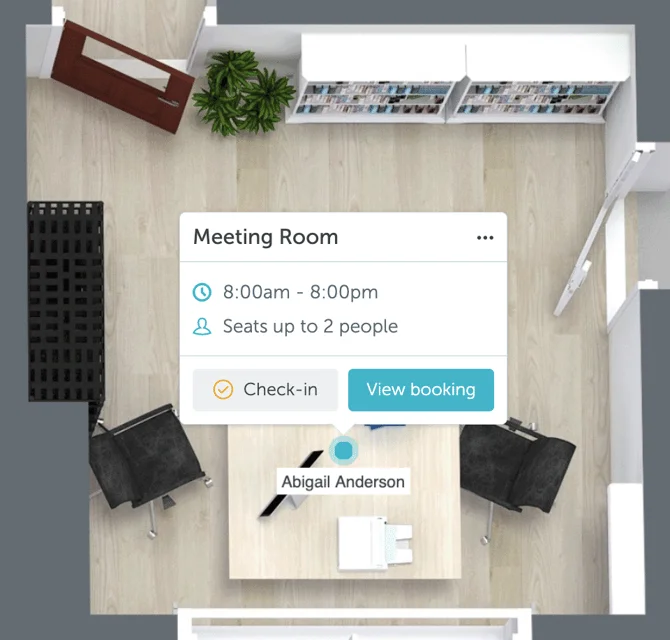
To check-in to spaces directly from your browser or another web-enabled interface, open the YAROOMS web application, go to Workplace → Map, select the space you reserved, and press the “Check-in” button.
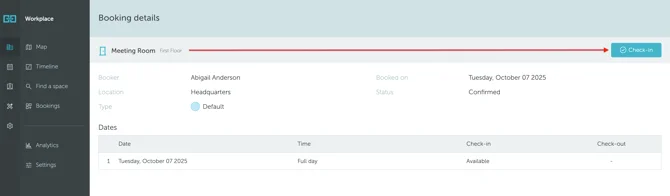
You can also go to the Workplace → Bookings → click on your booking number to view your booking’s detail page. In here, you can click the Check-in button to check-in.
3. Geo-fenced check-in (YAROOMS Web / Teams / Mobile)
If your organization has the geo-fenced check-in strategy enabled, you will only be able to complete the check-in within the set radius from the office (for example, 50 meters).
With this strategy, the check-in process is similar to simple check-in with just one additional step: you need to allow the location permission for the app on your device.
4. Automated Wi-Fi Check-in
If your organization has the automated Wi-Fi check-in enabled, you will be automatically check-in to your bookings once you connect to the office Wi-Fi and open your YAROOMS Mobile app.
5. What happens if I don’t check-in?
If you don’t check-in to a booked space, your reservation will be cancelled once the configurable amount of time passes. You will also receive a cancelation notification.