
Ticketing Center

This article explains how administrators can activate the ticketing module and how does it work.

Activation and Setup

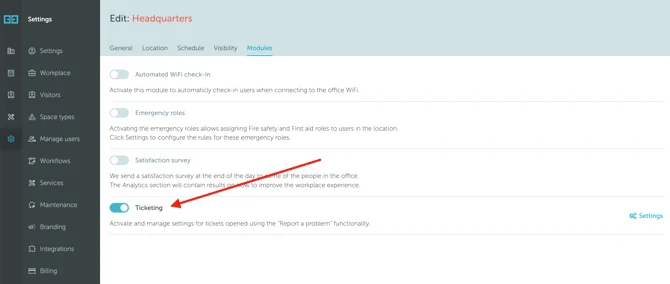
The “Report a problem” feature requires the “Ticketing” module to be activated at the location level. Access this by navigating to Settings → Workplace → [location name] → Edit → Modules → Ticketing.
Screenshot 2025-09-25 at 18.22.38

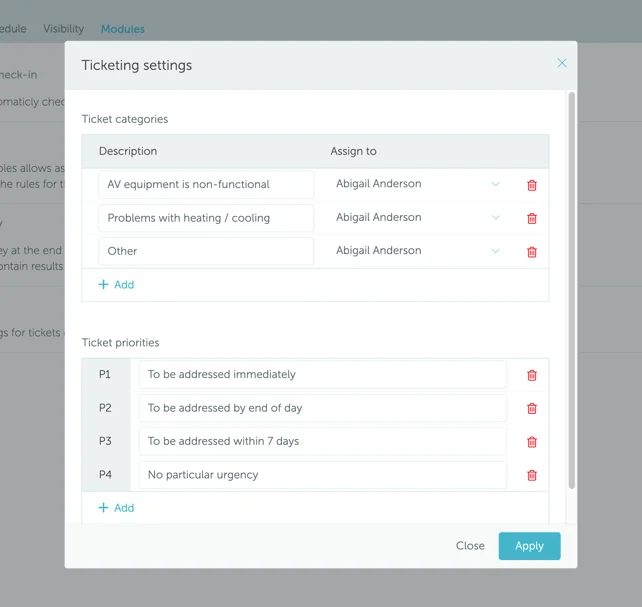
Activate the “Ticketing” module and press “Settings” to configure ticket categories and priorities:
Screenshot 2025-09-25 at 18.23.52

Ticket Management

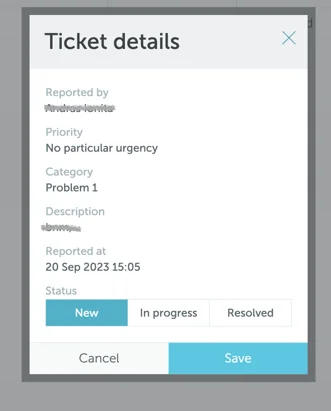
Once users create tickets through the “report a problem” feature in bookings, tickets appear under Services module - Tickets. This section displays a list of tickets with their details. Users can change ticket status by clicking the ticket ID to open a details popup.

Administrators may edit any ticket, while regular users can only edit tickets assigned to them.
ticket details

Can't find what you're looking for?

Our support team is here to help. Reach out and we'll get back to you quickly.

Contact Support
YAROOMS

Become a partner

Join our growing network of partners worldwide

Application received!

We'll review your details and get back to you soon.

We use cookies to analyze traffic and improve your experience.

Cookie preferences

Essential

Required for the site to function

Always on
Analytics

Help us understand how visitors use the site

Marketing

Used to deliver relevant ads

Talk to Sales or Support