
Team Managers

This article explains how to assign Team Managers to user groups.

1. What are Team managers

Team Managers have the exclusive authority to create, modify, and cancel reservations solely for users within their subordinate group.

If you are a Team Manager looking for information how to make, edit, or cancel bookings on behalf of someone else, read this article .

2. How to assign Team managers to groups

Settings → Manage Users → Teams → click on the name of the team you want to assign a manager for → Managers. Add the names of Team Managers in the “Managers” field and save your selection.
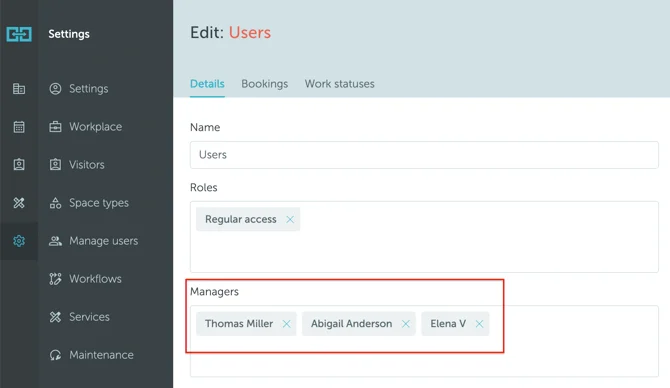
Screenshot 2025-09-18 at 00.32.42

Can't find what you're looking for?

Our support team is here to help. Reach out and we'll get back to you quickly.

Contact Support
YAROOMS

Become a partner

Join our growing network of partners worldwide

Application received!

We'll review your details and get back to you soon.

We use cookies to analyze traffic and improve your experience.

Cookie preferences

Essential

Required for the site to function

Always on
Analytics

Help us understand how visitors use the site

Marketing

Used to deliver relevant ads

Talk to Sales or Support