
Notification settings

This article explains how to manage global notification settings as an administrator.

How to manage notification settings

The notification setting for the YAROOMS account can be found at Settings → Account Settings → Notifications.

Here you can enable or disable email notifications for your users:
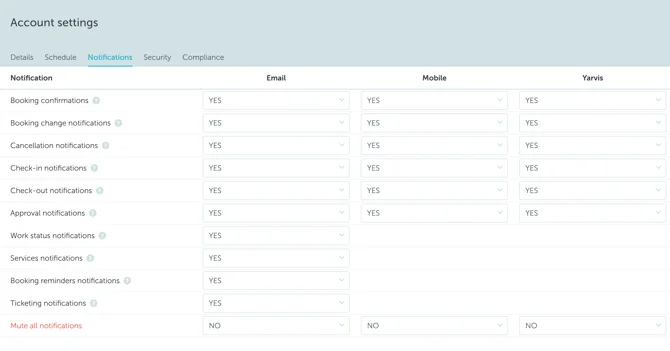
Screenshot 2025-09-18 at 01.43.58

The notification settings you defined will be default for all users. However, they can change their preferences themselves.

Note: If you are looking for details about other global account settings, read this article .
Note: Note: If you are an end-user seeking to adjust your personal notification preferences, please consult the dedicated guide .

Can't find what you're looking for?

Our support team is here to help. Reach out and we'll get back to you quickly.

Contact Support
YAROOMS

Become a partner

Join our growing network of partners worldwide

Application received!

We'll review your details and get back to you soon.

We use cookies to analyze traffic and improve your experience.

Cookie preferences

Essential

Required for the site to function

Always on
Analytics

Help us understand how visitors use the site

Marketing

Used to deliver relevant ads

Talk to Sales or Support