
Jump to:
Issue
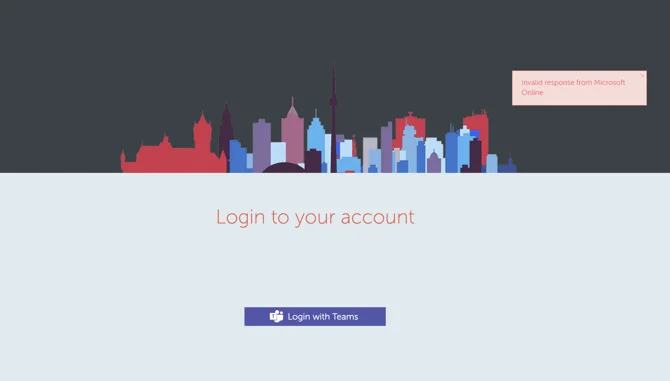
If you have the Microsoft Teams Integration set up from the Yarooms web app, you might encounter this error on your Main Login Page.
Cause
Note: In 90% of the cases where clients reported this error, it was related to the Client Secret from the Azure side of the MS Teams Integration.
There are 2 possible reasons for this error to show up:
- Either the Client Secret Value (not ID) has been incorrectly entered in the Yarooms Integration page
- Or the Client Secret has expired. Please, keep in mind that the client secret can be valid for a period of maximum 2 years.
How to Fix This
In the Azure Portal go to Azure Active Directory → App registrations (from the left sidebar).
Click on the Yarooms App (you might have it under a different name).
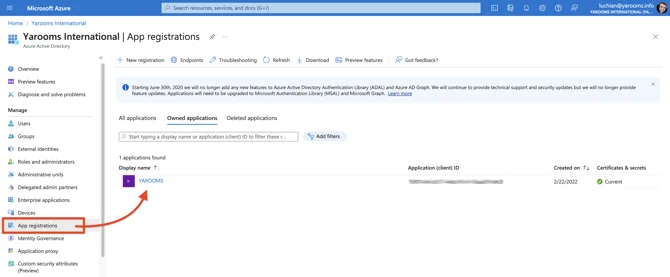
In the new window, click on Certificates & Secrets (left sidebar).
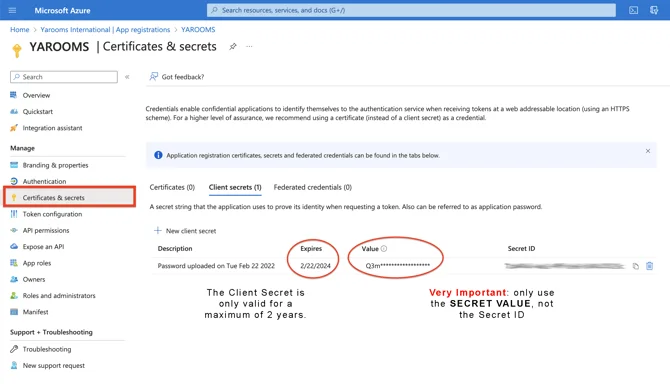
Verify if the Client Secret is expired. If it is, create a new one and copy-paste the value in the Yarooms MS-Teams Integrations page (Settings → Integrations → Microsoft Teams).
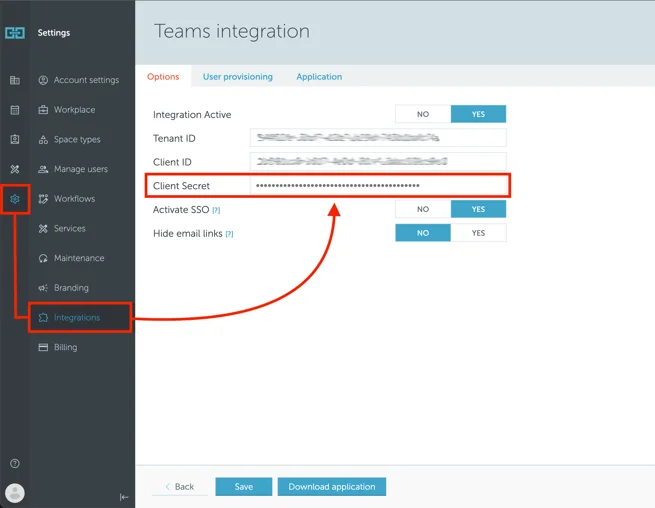
If the secret is still valid, ensure that the Client Secret Value matches your Yarooms MS-Teams Integration page. Copy-paste the value again and click Save.
Note: If the issue persists after following these steps, contact support@yarooms.com for further assistance.