
How to set up a maintenance event
To set up a maintenance event, go to Settings → Maintenance → Add+.
The Locations, Floor, Space, and Space group parameters help you define the spaces that will enter maintenance. For example, to disable bookings in the New York office for Winter Holidays, you only need to define the Location parameter:
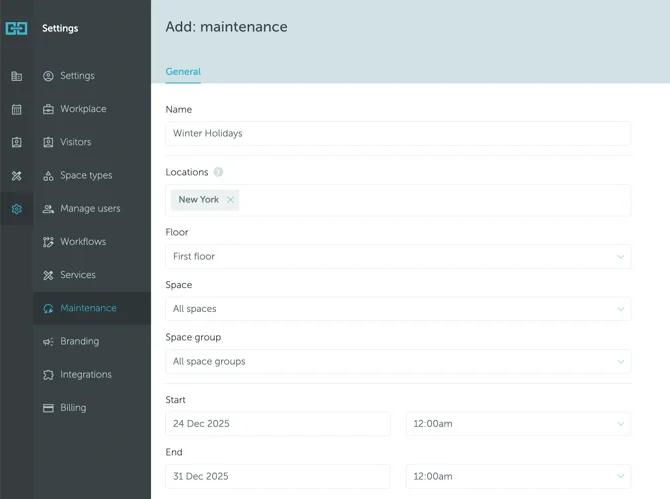
When users click on a disabled space(s) on the map, the name of the Maintenance event will appear, providing an explanation for why the space is unavailable.
Meanwhile, to disable a specific desk you’ll need to define the Location, Floor, and Name of the Space:
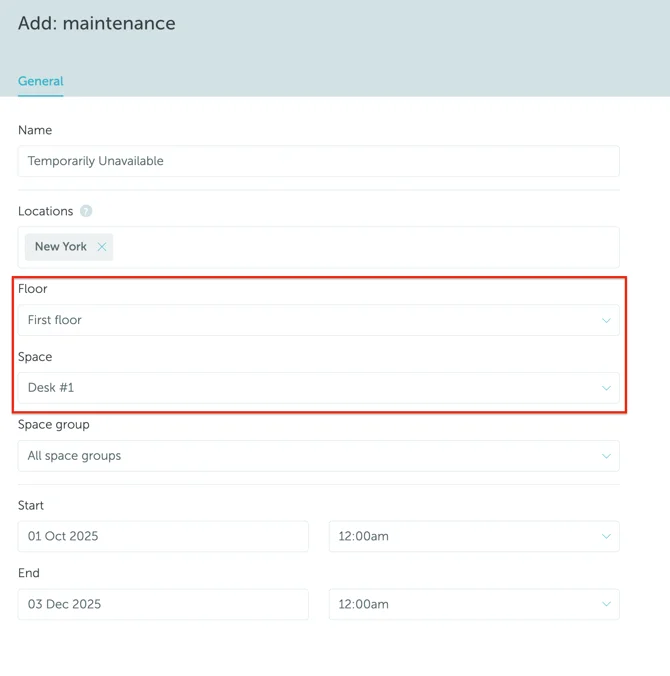
Don’t forget to save your selection.
If you want to disable just a few specific spaces without anything in common, we recommend to proceed as follows:
- Create a new space group named Maintenance;
- Add spaces to be disabled in the Maintenance space group;
- Create maintenance event just for the Maintenance space group.
If you are looking for more information about setting up space types and groups, read this article.