Part 1: Setting Up User Provisioning
1. Create a Slack App
- Visit Slack API Apps .
- Click Create a new app and choose From scratch.
- Give your app a name and select your Slack workspace.
- Your app is now created.
2. Configure Basic Settings
- Go to Settings -> Basic Configuration.
- Copy the Client ID and Client Secret—you’ll need these later.
3. Configure OAuth & Permissions
- Navigate to Features -> OAuth & Permissions.
- Under OAuth Tokens, copy the User OAuth Token.
- Scroll down to Redirect URLs, click Add New Redirect URL, and enter: https://[domain].yarooms.com/account/login . The domain value is the unique URL used by your company.
- Scroll down to Scopes -> User Token Scopes, and add the following scopes:
team:readusers:readusers:read.email
4. Enable Slack Login in YAROOMS
- Log in to your YAROOMS tenant and navigate to Settings -> Integrations.
- Under SSO & User Provisioning, find Login with Slack and click Configure.
- Switch Integration Active to Yes.
- Fill in the fields with the information you copied from Slack:
- Client ID (from Slack app)
- Client Secret (from Slack app)
- OAuth Token (from Slack app)
- Choose the User Group and Location where new users should be created.
- Click Save. If successful, you’ll see a confirmation message: “Settings successfully saved”.
Part 2: Enabling the YARVIS Smart AI Bot
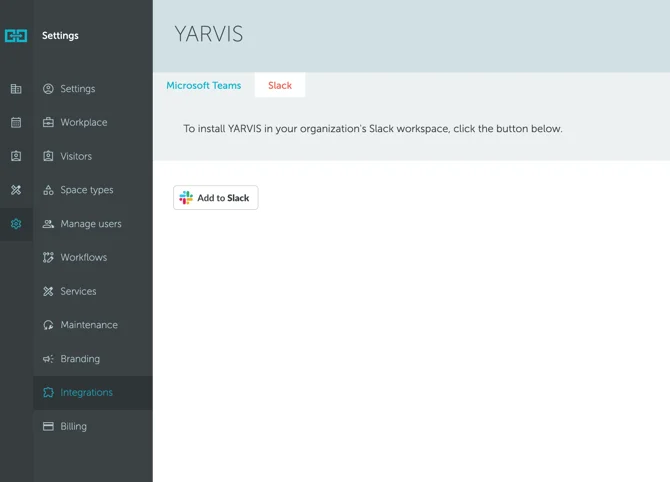
To add the YARVIS AI Bot to your Slack workspace, go to: Integration menu → Yarvis integration → Slack → “Add to Slack” button: