
How to Configure Location Schedule

This article explains how to configure the schedules of your locations.

1. What are location schedules

Location schedules define the time intervals representing work hours, such as 8am to 6pm. Establishing location schedules is essential for restricting space bookings on specific days.

2. How to define the schedule of a location

Navigate to Settings → Workplace → [select location] → Edit → Schedule.
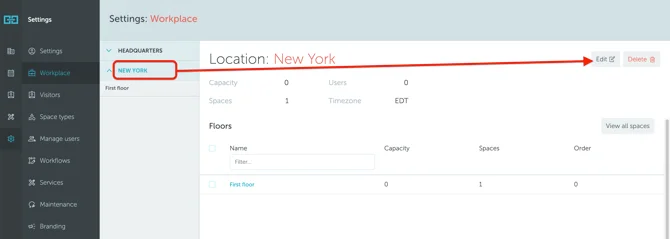
Schedule Configuration Screenshot

Specify working hours on a daily basis. You can also block certain days to make spaces non-bookable (such as weekends).
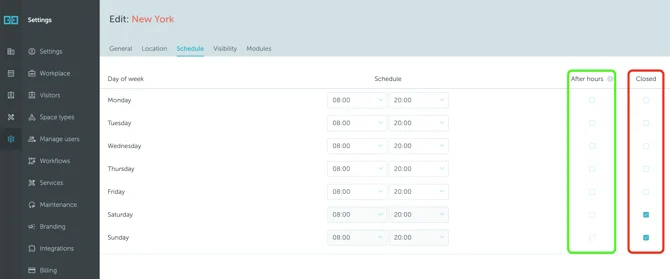
Schedule Details Screenshot

After hours: Enabling this option for one or more days allows your users to make bookings outside the defined working schedule.

Can't find what you're looking for?

Our support team is here to help. Reach out and we'll get back to you quickly.

Contact Support
YAROOMS

Become a partner

Join our growing network of partners worldwide

Application received!

We'll review your details and get back to you soon.

We use cookies to analyze traffic and improve your experience.

Cookie preferences

Essential

Required for the site to function

Always on
Analytics

Help us understand how visitors use the site

Marketing

Used to deliver relevant ads

Talk to Sales or Support