
Jump to:
Emergency roles are useful for organisations that must comply with workplace safety standards by ensuring a constant presence of Fire safety or First aid trained personnel in their locations.
1. How to define emergency role requirements per location
To enable the emergency roles and define how many Fire safety and First aid trained employees must be always present in the location, go to Settings → Workplace → click on a location name → Edit / Add location → Modules tab → Emergency roles.
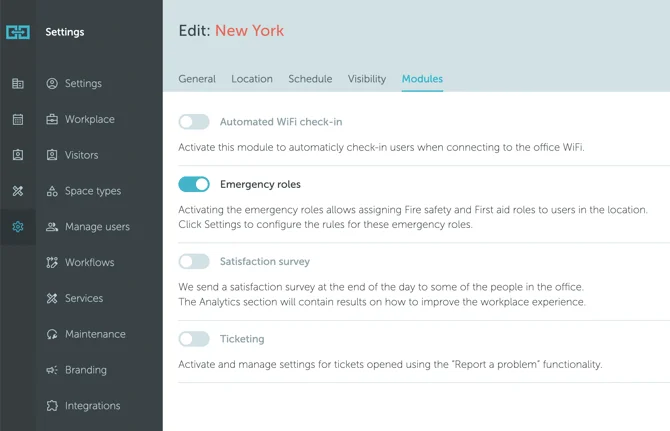
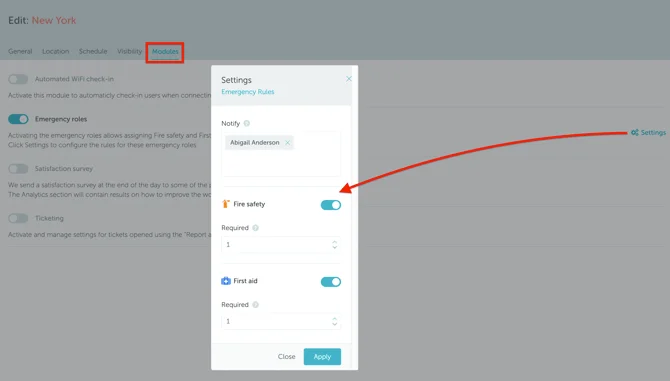
Once the Emergency role is enabled, a Settings icon will appear on the right side of your screen. Click on Settings and the Emergency roles window will be displayed where you can edit your preferences.
2. How to assign emergency roles to users
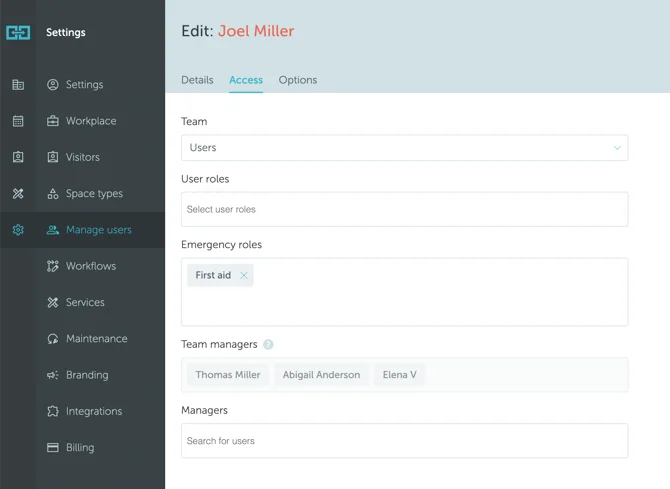
After the emergency roles are enabled in the location, they can be assigned to users. To do so, go to Settings → Manage Users → Edit / Add user. From here, you will see a new field called Emergency roles. Click on the field to choose a role and click Save:
3. Complying with workplace safety requirements
If the required number of users with emergency roles are not present (do not have bookings) in the location, location managers will be informed by email, a day before the rule is violated. To comply with workplace safety requirements, they can:
- Disable all bookings during the time emergency roles are not present;
- Discuss with users having emergency roles to make the booking and come to the office.