
You can manage assigned seating by designating a space for a specific user on selected weekdays.
Go to Settings → Workplace, select the floor that contains the space, open the space, then select the Assignment tab.
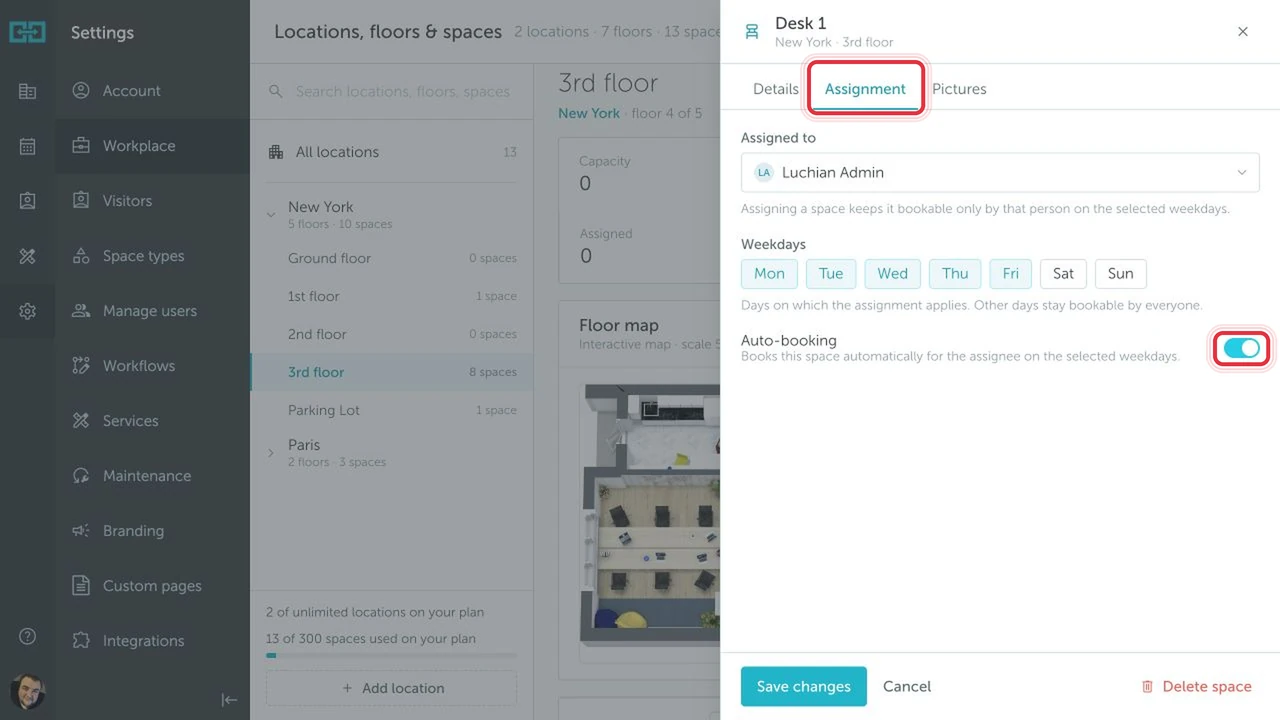
In the Assignment tab:
- Choose the user in the Assigned to field.
- Select the weekdays when the assignment applies.
- Enable Auto-booking if YAROOMS should automatically create bookings for the assignee on those weekdays.
- Click Save changes.
On the selected weekdays, the space is reserved for the assigned user. On other days, it remains available to other authorized users.
Auto-booking creates bookings for the assigned user on the selected days. At midnight, the system checks whether the user already has a booking. If they do, no additional booking is created.
Note: A space can be assigned to only one user at a time.