
Any user can receive custom admin rights for specific locations or business areas through Module Access. Administrators navigate to Settings → Manage Users → Roles → [select role] → Module access to specify which account sections are accessible.
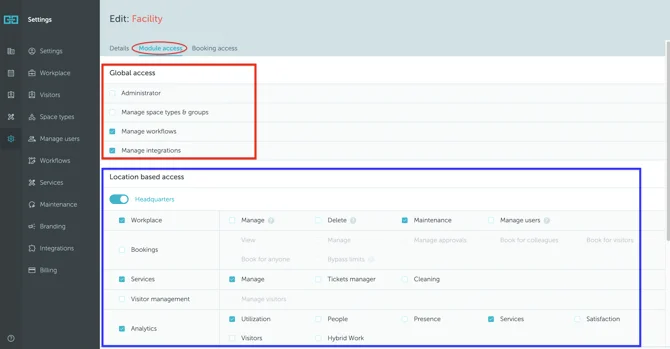
Global Access
Three global permission options exist:
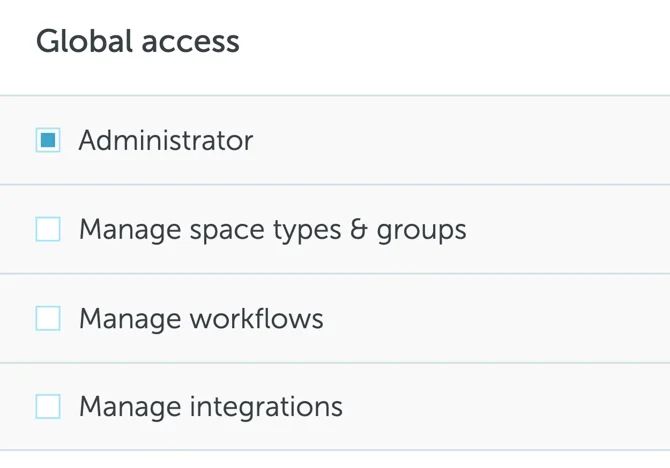
- Administrator: Full account access including creating locations, floors, spaces, adding users, and managing all bookings
- Manage space types & groups: Generate new space types and configure settings
- Manage workflows: Define rules across the entire account
- Manage integrations: Set up external integrations
Location-Based Access
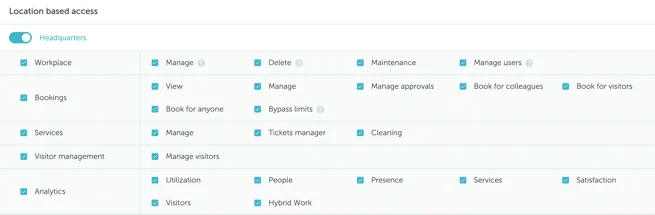
Five categories provide per-location customization:
Workplace
- Manage: edit location, floors, spaces, maps
- Delete: remove edited items
- Maintenance: create maintenance events
- Manage users: add and edit users
Bookings
- View: see all location bookings
- Manage: edit/delete bookings
- Manage approvals: approve/deny requests
- Book for colleagues, visitors, or anyone
- Bypass limits: override restrictions
Services
- Manage: create/edit services
- Tickets manager: access problem reports
- Cleaning: view daily cleaning schedules
Visitor management
- Manage visitors
Analytics (individual categories):
- Utilisation, People, Presence, Services, Satisfaction, Visitors, Hybrid work
Note: Once customized, roles can be assigned to individual users or entire teams.