
Office Relocation Guide 2026: How to Plan and Execute Your Office Move
Planning an office move, redesign, or refurbishment? This complete guide covers every phase - from building the business case to day-one setup - so your new workplace works from the start.
An office relocation is one of the highest-stakes projects a workplace team will ever run. Get it right and you have a space that attracts talent, supports hybrid work, and pays for itself in productivity. Get it wrong and you are stuck with empty desks, overbooked meeting rooms, and a workforce that would rather stay home.
The problem is that most companies treat the move as a logistics exercise: boxes, leases, movers, done. They forget the part that determines whether the new space actually works - the workplace setup. Which desks are bookable? How do visitors check in? Where does a team of six find a room at short notice? These decisions get made in the last week, and the next twelve months are spent fixing them.
This guide focuses on office relocation - but also covers overhaul and refurbishment, because understanding where your situation fits shapes every decision that follows. The core focus is what happens after the furniture arrives, because that is where most office moves quietly fail.
TL;DR
- Office transformations come in three forms: full relocation (new address), overhaul (same building, new layout), and refurbishment (cosmetic and functional upgrades). Each has different timelines, budgets, and triggers.
- 67% of employees report that office moves are challenging, mostly due to poor communication, unclear desk arrangements, and technology that was not ready on day one.
- The biggest mistake is designing a new office without utilization data. Average office utilization sits at just 54% (JLL 2025), which means most companies have far more desks than they need.
- Six stakeholders drive every office move: Facilities, IT, HR, Finance, Real Estate, and the C-Suite. Each has different priorities - and different definitions of success.
- Workplace technology (desk booking, room booking, visitor management, analytics) should be selected and configured months before the move, not bolted on after.
- Post-move adoption tracking at 30, 60, and 90 days is how you prove the investment was worth it and catch problems before they become permanent.
Three Types of Office Transformation (and When Each One Applies)
Not every office change requires a moving truck - and before committing to a full relocation, it is worth understanding where your situation actually falls. The type of transformation you choose shapes your timeline, budget, and technology decisions.
| Factor | Office Relocation | Office Overhaul / Redesign | Office Refurbishment |
|---|---|---|---|
| What changes | New physical address | Same address, fundamentally different layout | Cosmetic and functional upgrades |
| Common triggers | Lease expiry, cost savings, growth, hybrid-fit space needed | Poor utilization data, RTO mandates, team restructuring | Aging furniture, ESG commitments, talent attraction |
| Typical timeline | 6 to 18 months | 3 to 9 months | 1 to 3 months |
| Budget range | High (moving + new fit-out + downtime) | Medium to high | Low to medium |
| Operational disruption | Significant (full transition period) | Moderate (phased works while office stays live) | Low (usually done in stages or over weekends) |
| Technology impact | Full system migration or fresh deployment | Reconfiguration of floor plans and booking rules | Minimal - mostly cosmetic |
All three share one critical moment: the workplace technology decision. Every office transformation - whether it changes your address or just your floor plan - forces you to rethink how employees find desks, book rooms, check in visitors, and navigate the space. The specific decisions look different depending on the type of change:
- In a full relocation, you are starting from scratch. New floor plans need to be built in your booking system, every meeting room needs to be reconfigured with updated capacities and equipment tags, visitor management needs a new address and reception workflow, and integrations with access control and building systems need to be reestablished. This is your one chance to get the technology foundation right without legacy constraints.
- In an office overhaul, the address stays the same but the layout changes fundamentally. Desk zones shift from assigned to flexible, meeting rooms get split or merged, and new space types (focus pods, collaboration zones) appear on the floor plan. Your existing booking system needs to be reconfigured to reflect the new reality - old room names retired, new zones added, booking rules updated to match the new hybrid policy.
- In a refurbishment, the changes are smaller but still matter. A refreshed floor might get new room displays, updated wayfinding signage , or upgraded AV equipment that needs to be reflected in your room booking details so employees know what is available where.
In every case, the technology decisions made during the transformation window determine whether the new space runs smoothly from day one or spends the next twelve months in a state of workarounds and confusion.
Why So Many Office Moves Fail (and What to Do Instead)
An office move is not just a change of address. It is a change in how people work. And when the focus stays entirely on logistics - movers, furniture, IT cabling - the human and technology side gets neglected. Here is where things typically go wrong.

Designing without data. Most companies redesign their offices based on headcount, not actual usage. But average office utilization sits at just 54% according to JLL’s 2025 workplace data. That means nearly half of desks sit empty on any given day. If you build a 1:1 desk-to-employee ratio, you are paying for space nobody uses.
Technology as an afterthought. Booking systems, visitor management, and room displays get configured in the final week. Then employees show up on day one, cannot find a desk, cannot book a room, and visitors are stuck at a manual sign-in sheet. First impressions of a new office are hard to undo.
Change management ignored. According to workspace transition research , 67% of employees find office moves challenging. The top complaints are not about the physical space - they are about unclear rules, lost routines, and feeling unheard in the process. Getting employee experience right during a move is as important as getting the floor plan right.
No post-move measurement. The CFO approved a significant budget for the move. Three months later, nobody can say whether it worked. Without utilization tracking from day one, there is no way to prove ROI or catch problems early.
| Common Mistake | What Happens | Best Practice |
|---|---|---|
| 1:1 desk ratio based on headcount | 50%+ desks sit empty daily, wasted real estate spend | Audit utilization first, then set desk ratios at 0.6 to 0.8 per employee |
| No desk or room booking system in place | Confusion, manual bookings, employees revert to old habits | Configure and test desk and room booking 4+ weeks before move |
| No employee input on layout | Resistance, low adoption, complaints about "wrong" space types | Include employee reps on the move task force from month one |
| Visitor management left for later | Messy reception, compliance gaps, poor first impression for guests | Set up visitor registration, NDA flows, and host notifications before go-live |
| No baseline utilization tracking | Cannot prove ROI, cannot identify underused zones | Start tracking from week one - review at 30, 60, and 90 days |
| Unplanned lease overlap | Months of double rent that blow the project budget | Negotiate surrender terms early and sequence fit-out to minimize overlap |
The Key Stakeholders in Every Office Relocation
An office move touches every department. The reason so many relocations stall or go over budget is that each stakeholder defines success differently. Aligning them early is critical.
| Stakeholder | Role in the Project | Primary Concern | What They Need from Workplace Tech |
|---|---|---|---|
| Facilities / Workplace Manager | Project owner, coordinates all workstreams | On-time delivery, minimal disruption | Floor plan management, desk and room booking, analytics dashboards |
| IT Manager | Owns tech migration, network, hardware | Zero downtime, clean integrations | SSO, Microsoft 365 integration, room display compatibility, APIs |
| HR / People & Culture | Change management, employee experience | Morale, adoption, talent retention | Employee-facing booking apps, communication tools, feedback mechanisms |
| CFO / Finance Director | Budget owner and ROI validator | Cost control, provable savings | Utilization reports, cost-per-desk metrics, ROI tracking |
| CRE / Real Estate Director | Lease and space strategy decisions | Right-sizing the portfolio | Occupancy data, space utilization trends, scenario planning |
| C-Suite (CEO / COO) | Final approver, sets the vision | No drama, culture alignment | Executive dashboards, proof that the space supports company goals |
The Facilities or Workplace Manager typically becomes the central coordinator, but success depends on getting IT and HR aligned early. IT ensures everything integrates cleanly. HR ensures people actually use it.
Office Relocation Planning: A Phase-by-Phase Checklist
Phase 1: Pre-Move (6 to 12 Months Out)
This is where the real work happens. The decisions you make in this phase determine whether your new office runs smoothly or becomes a daily frustration.
Audit your current space. Before designing anything, you need to know how your existing office is actually used. How many desks are occupied on peak days? Which meeting rooms are booked but empty? Which floors are underutilized? Without this data, your new layout is an expensive guess. A workplace analytics platform can give you these numbers in weeks, not months.
Set your desk-to-employee ratio. With average utilization at 54% , a 1:1 ratio is almost always wrong. For most hybrid organizations, a ratio between 0.6:1 and 0.8:1 is the sweet spot. That means 60 to 80 desks for every 100 employees, backed by a desk booking system so everyone can reserve a spot.
Select your workplace technology. This is not a week-before decision. Your room booking system , desk booking platform, and visitor management tools need to be selected now so they can be configured to match your new floor plans. Look for platforms that handle all three in one - fragmented tools create fragmented experiences.
Plan the floor layout around work modes. Modern offices are not rows of identical desks. They are a mix of focus zones, collaboration spaces, meeting rooms of varying sizes, and social areas. Your layout should reflect how people actually work, not how an architect thinks they should.
Phase 2: Move Preparation (1 to 3 Months Out)
Configure your booking system. Floor plans should be uploaded, desk zones defined, room capacities set, and booking rules configured. Include room equipment details (screens, whiteboards, video conferencing gear) so employees can filter by what they need. If you are using hot desking , this is when you define which zones are flexible and which are assigned.
Set up visitor management. New address means a completely new reception workflow. Visitor registration , NDA signing, host notifications, badge printing, and emergency evacuation lists all need to be configured and tested before the first guest walks in. This is especially critical for companies with compliance requirements .
Train your team. Run walkthroughs for department leads. Show them how to book a desk, reserve a room, and check in a visitor. The goal is that on day one, at least 20% of your workforce already knows how the system works - enough to help their colleagues.
Build your employee communication plan. Communication is where most office moves lose employee trust - not because companies say nothing, but because they say the wrong things at the wrong time. Here is a structured approach:
- Month 3+ out: Announce the move with context - why it is happening, what the vision is, and what will get better. Invite questions publicly and answer them honestly.
- Month 2 out: Share the new floor plan. Walk through the space types, explain the hot desking policy (if applicable), and introduce the booking system with a short demo or walkthrough video.
- 4 weeks out: Send a practical “how to work in the new office” guide. Cover desk booking step by step, room booking, visitor check-in for those who host guests, parking, commute changes, and where to go for help on day one.
- 2 weeks out: Reminder with the floor plan, key contacts, and a link to book a desk for the first week.
- Day before: Short message confirming logistics - when to arrive, where to go, who will be on-site to help.
- Week one: Daily “did you know?” tips via email or Slack covering one practical feature per day (how to find a colleague, how to extend a room booking, how to check in a visitor).
The goal is that by the time the move happens, employees have seen the new space digitally, know how to book what they need, and have had their questions answered. First-day confusion drops dramatically when people are not learning the basics while also navigating a new building.
Phase 3: Day One and Beyond
Go-live checklist (see also: step-by-step office move checklist for HR and facility managers ):
- All floor plans live in the booking system
- Desk and room booking tested by at least 10 users
- Visitor management active with test check-in completed
- Room displays installed and connected
- Wi-Fi, printing, and AV tested in every room
- Welcome guide sent to all employees (digital and printed at reception)
- IT support desk staffed for the first week
Adoption tracking. From the first day, track how many desks are booked, which rooms are most popular, and where people are sitting. This is not surveillance - it is how you identify which zones work and which need adjustment.
30 / 60 / 90 day reviews. Schedule these in advance. At each checkpoint, review utilization data, gather employee feedback, and make adjustments. Common early fixes include converting underused large meeting rooms into smaller huddle spaces, adjusting quiet zone locations, and tweaking booking rules.
How to Design the Right Office Space (Using Data, Not Guesses)
The biggest shift in office design over the past three years is the move from assigned seating to activity-based working (ABW) . Instead of giving everyone an identical desk, you create distinct zones for different types of work. This approach is now standard for hybrid offices - 28% of working adults in Great Britain are hybrid, and that number continues to rise globally.

The key principles:
More room types, fewer identical desks. You need small huddle pods (2 to 4 people) for quick syncs, mid-size meeting rooms (6 to 8 people) for project work, large boardrooms for presentations and client meetings, and phone booths or focus pods for private calls. The mix depends on your team’s work patterns. See office layout types for a deeper breakdown of the options.
Hybrid-ready meeting rooms. Every room used for meetings with remote participants needs quality video, audio, and screen-sharing equipment. These are sometimes called “Teams-ready” or “Zoom-ready” rooms. If half your team is remote on any given day, half your meeting rooms need to support hybrid calls seamlessly. An AI workplace assistant can help employees find the right room for their specific needs.
Touchdown spaces for hot desking. Not everyone needs a full desk. Some employees come in for a few hours of collaboration and then leave. Touchdown zones with power outlets, comfortable seating, and laptop-friendly surfaces serve this use case without dedicating a full desk.
Focus zones with acoustic treatment. Open plan offices are great for collaboration but terrible for deep work. Dedicated quiet zones with sound-masking, minimal foot traffic, and a no-call policy give employees a reason to come in for focused work rather than staying home.
Data-driven ratios. Here is a starting framework based on industry benchmarks:
- Hot desks: 0.6 to 0.8 per employee (hybrid teams with 3+ days remote)
- Assigned desks: reserved for roles that require daily in-office presence
- Meeting rooms: 1 per 15 to 20 employees (mix of sizes)
- Focus pods or phone booths: 1 per 25 to 30 employees
- Collaboration zones: 15 to 20% of total floor space
These ratios should be validated against your own utilization data , not copied blindly.
Should You Refurbish Your Office or Move to a New One?
Sometimes a fresh coat of paint and new furniture is enough. Sometimes you need to start over. Here is a simple decision framework:
Refurbishment is enough when:
- Your lease has 3+ years remaining and the terms are favorable
- The building infrastructure (HVAC, electrical, network) is solid
- The layout can be reconfigured without structural changes
- Employee commute patterns are working well
- Your budget is limited and you need quick impact
Full relocation is needed when:
- Your lease is expiring and renewal terms are unfavorable
- The building cannot support hybrid infrastructure (poor Wi-Fi, no room for huddle pods)
- You are significantly over- or under-sized for your current headcount
- Employee commute patterns have shifted (post-pandemic, many teams are distributed differently)
- You need to consolidate multiple offices into one
The hybrid option: phased overhaul. Some companies take a middle path - staying in the same building but doing a floor-by-floor redesign over several months. This minimizes disruption and lets you test new layouts on one floor before rolling them out everywhere. It also lets you plan your facility changes based on real feedback rather than assumptions.
Managing a Multi-Location Relocation
If your organization is moving multiple offices simultaneously - or consolidating several sites into one - the complexity multiplies fast. Each location has its own lease timeline, floor plan, IT setup, and employee population. The biggest risk is treating each site as an independent project, which leads to inconsistent booking systems, different visitor flows, and no shared analytics across locations.
The better approach: standardize the workplace technology stack across all sites before any move happens. A single platform managing desk booking, room scheduling, and visitor management across all locations means employees get the same experience whether they are in London, New York, or Singapore - and leadership gets a unified view of utilization across the entire portfolio. When considering platforms, prioritize those with true multi-site management: centralized admin, location-level floor plans, and cross-site reporting in one dashboard. Space management capabilities become especially critical at this scale.
Building the Business Case for Your Office Move
Before a single box gets packed, someone has to get the budget approved. That means building a financial case that justifies the cost of moving - or redesigning - against the cost of staying put.
The numbers that typically win CFO sign-off:
Current cost baseline. What does your existing space cost per desk, per year? Include rent, service charges, rates, facilities management, and utilities. For most companies in major cities, this lands between $8,000 and $20,000 per desk annually.
Utilization gap. If your office is 40% utilized and you are paying for 200 desks, you are effectively overpaying for 120 of them. Presenting this as a dollar figure - rather than a percentage - tends to accelerate decisions.
Right-sizing savings. A move to a smaller, better-designed space with a 0.7:1 desk ratio can reduce real estate costs by 20 to 40% while supporting the same or larger headcount. This is often the primary financial justification for relocation. If downsizing is part of the goal, see how to approach downsizing office space without sacrificing employee experience.
Hidden costs of staying. Aging infrastructure, poor hybrid support, and low employee satisfaction have measurable costs too - recruitment, attrition, and productivity losses that rarely appear in the facilities budget but absolutely affect the P&L.
Technology investment vs. savings. A unified workplace platform (desk booking, room scheduling, visitor management, analytics) typically runs $5 to $15 per employee per month. Against the cost of wasted real estate and manual admin, the payback period is usually under 12 months.
The mistake most teams make is presenting the move cost in isolation. The business case lands when you show the total cost of the current situation versus the total cost of the future state - and let the numbers speak.
Watch out for the lease overlap. One of the most common budget surprises in office relocations is the period where you are paying for both your old space and your new one simultaneously. Fit-out works, move logistics, and handover periods mean double-rent is almost always unavoidable - but its duration is controllable. A well-sequenced project plan and early engagement with your outgoing landlord on surrender terms can compress this window from six months to six weeks.
Setting Up Workplace Technology in Your New Office
This section is not about which brand to choose. It is about what categories of technology must be in place before day one, and why each one matters.
Desk Booking
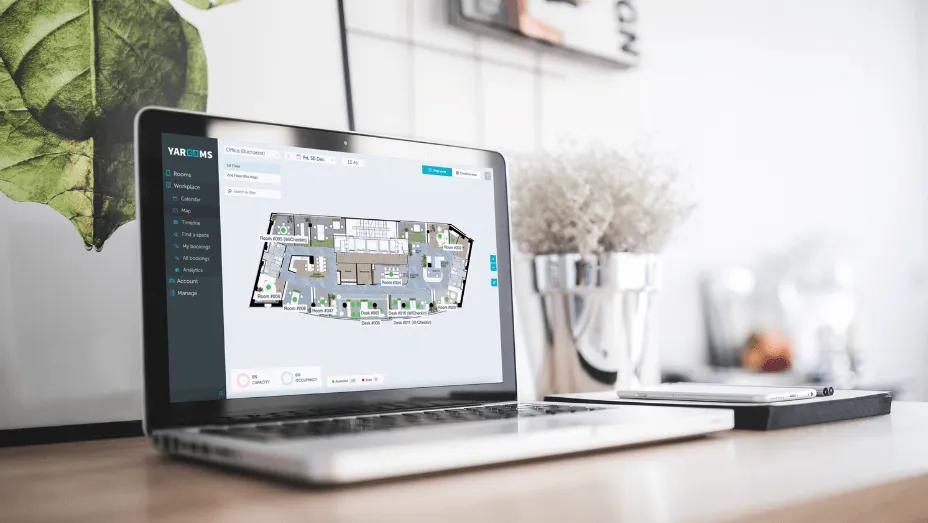
In a hybrid office, desks are a shared resource. Without a booking system, you get either empty floors on quiet days or turf wars on busy ones. A desk booking platform should show real-time availability on an interactive floor plan, let employees book from their phone or desktop via the mobile app , support recurring bookings for employees with fixed in-office days, and automatically release no-show desks.
The critical point: this must be configured and tested before the move, not after. If employees walk into the new office on day one and cannot find a desk, you have lost their trust in the system.
Room Booking
Meeting rooms in a new office are a blank slate. Configure them with accurate capacities, equipment lists (webcam, whiteboard, conference phone), and booking rules (maximum duration, buffer time between meetings, approval workflows for large rooms). Connect them to Microsoft 365 or Google Calendar so employees book rooms from the tools they already use.
Visitor Management
New address means new everything for visitors: new directions, new reception flow , new badge system. Your visitor registration system should be configured with your new address, updated NDA documents if applicable, host notification rules, emergency evacuation procedures, and any security and compliance requirements specific to your industry.
Workplace Analytics
Start tracking from day one. You need baseline data to prove the move was worth it and to identify problems early. Key metrics: daily desk utilization, room booking vs actual usage (no-show rate), peak day identification, and zone-by-zone occupancy. Without this, your 90-day review has nothing to work with.
The good news is you do not need a separate analytics tool. Modern workplace management platforms like YAROOMS have this built in - the same platform you use to manage desk and room bookings automatically captures utilization data in the background, so you get the reporting without any extra setup.
Digital Signage and Wayfinding
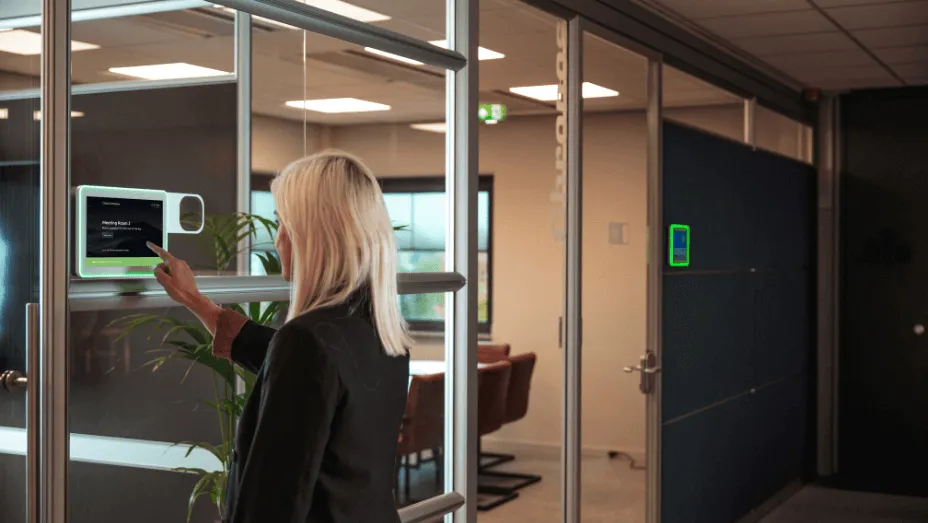
A new office is unfamiliar territory on day one. Digital signage solves two problems at once: it helps employees and visitors navigate the space, and it gives you a real-time surface for room availability and desk status. Room panels outside meeting rooms show current bookings and allow ad-hoc reservations with a tap. Lobby screens welcome visitors and direct them to the right floor. Wayfinding displays reduce the “where is meeting room C4?” question that clogs up the front desk for the first three months. This is especially valuable in large, multi-floor offices where the layout is genuinely unfamiliar.
Microsoft 365 and Calendar Integration
For hybrid offices, the workplace platform must integrate with the tools employees already live in. That means Outlook calendar sync for room bookings, Teams presence for finding colleagues, and single sign-on so there is no extra login to manage. If the workplace tech feels like a separate system, adoption will suffer. Hybrid work scheduling features built into the platform give employees visibility into who is in on which days - reducing the “is it worth coming in?” friction that kills office attendance.
The Post-Move Playbook: Driving Adoption and Proving ROI
The move is done. Boxes are unpacked. Now the real test begins: do people actually use the space the way it was designed?

Week 1: Be present and supportive. Have workplace team members stationed at key locations to help people navigate. Send a daily “did you know?” email with tips (how to book a room, where the quiet zone is, how visitor check-in works). Accept that the first week will be messy.
Week 2 to 4: Watch the data. Which floors are busiest? Which meeting rooms are always booked? Which ones are ghost towns? Are people booking desks or just showing up and sitting wherever? This data tells you what is working and what needs adjustment.
Day 30 review. First formal checkpoint. Compare utilization against your design targets. If you planned for 70% desk utilization and you are at 40%, something is off - either the booking system is not being used, or people are not coming in as expected. Adjust booking rules, reassign zones, or increase communication.
Day 60 review. Deeper analysis. Run an employee satisfaction survey alongside the utilization data. Are people happy with the space types available? Do they find it easy to book what they need? Is the commute working? This is where you catch the qualitative issues that data alone does not reveal.
Day 90 review. Build the ROI case. Compare cost-per-desk against the old office. Calculate space savings. Document employee satisfaction scores. Package this into a report for the CFO who approved the budget. If you used YAROOMS throughout the relocation - for desk booking, room management, visitor check-in, and analytics - all of that data is already in one place, ready to pull. No manual spreadsheets, no chasing reports from three different tools.
To get a sense of what the numbers could look like before you even start, use the calculator below:
YAROOMS ROI Calculator
What's the ROI of getting your workplace technology right?
Companies that use a unified platform for desk booking, room scheduling, visitor management, and analytics save significantly on real estate and admin overhead. Enter your details to see what that could look like for you.
Companies that do 30/60/90 reviews consistently report higher employee satisfaction and better space utilization within six months. Companies that skip them tend to discover problems a year later, when fixing them costs ten times more.
Frequently Asked Questions
See it in action
YAROOMS brings desk booking, room scheduling, visitor management, and analytics into one platform your team will actually use.