
How to Fix Meeting Room No-Shows and Ghost Bookings
Meeting rooms booked but empty? Learn 6 proven solutions for ghost bookings, including auto-release, check-in systems, analytics, and room display panels.
Ghost bookings, where meeting rooms show as reserved but sit empty, waste 30-40% of meeting room capacity in most offices. The root causes are predictable: back-to-back calendar habits, no accountability for unused bookings, and meetings that get canceled without releasing the room. This guide covers six proven solutions, from auto-release and check-in systems to analytics and cultural changes. Whether you manage 5 meeting rooms or 500, fixing ghost bookings recovers significant capacity without adding a single new room. The ROI is typically measured in weeks, not months.
Macro occupancy trends make this more urgent. CBRE reports global office utilization reached 53% in 2025, up from 38% in 2024, which increases competition for shared spaces on peak days. JLL also reports that employees now average just over three days in-office per week, concentrating room demand on specific weekdays.
TL;DR
- Ghost bookings can consume 30-40% of meeting room capacity in many offices.
- The fastest fix is auto-release plus mandatory check-in.
- Analytics identify recurring no-show patterns and policy gaps.
- Room panels and clear booking guardrails reduce friction and wasted capacity.
- Most teams recover meaningful room availability without adding new space.
The Ghost Booking Problem
Walk through any office on a Tuesday afternoon and you will see it: meeting rooms showing “reserved” on the calendar, doors closed, lights off, nobody inside. This is the ghost booking problem, and it is one of the most common (and most expensive) workplace inefficiencies.
The numbers are consistent across industries. Studies from workplace analytics firms and our own data at YAROOMS show that 30-40% of booked meeting rooms go unused in a typical week. In organizations without check-in systems, the rate can exceed 50%.
If you are seeing this pattern internally, this usually indicates a policy and tooling gap in your meeting room management setup, not a shortage of rooms.
The impact goes beyond wasted square footage:
- Employee frustration. Teams that genuinely need a room cannot find one, so they end up in hallways, at someone’s desk, or rescheduling entirely.
- Wasted real estate spend. You are paying rent, utilities, and maintenance on rooms that sit empty for a third or more of their booked time.
- False demand signals. When every room appears booked, facilities teams conclude they need more meeting rooms. In reality, they need better utilization of existing ones.
- Remote participant disadvantage. Hybrid teams often default to booking a room “just in case,” even when everyone ends up joining by video. The room sits empty while in-office colleagues who need it cannot get one.
The problem has gotten worse in the hybrid era. When fewer people are in the office on any given day, the gap between booked rooms and actually-used rooms widens.
Why Ghost Bookings Happen
Understanding the causes helps you target the right solutions. Ghost bookings are rarely malicious. They are the result of reasonable behaviors in a system with no accountability.
- Recurring meetings that outlive their purpose. A weekly sync gets created once and repeats indefinitely. The meeting stops happening after a few weeks, but nobody deletes the calendar event. The room stays booked every week for months.
- Back-to-back calendar culture. People book rooms for meetings that might happen. If your organization runs on packed calendars, employees pre-book rooms as “insurance” rather than searching for availability at the last minute.
- No cost to the individual. Booking a room is free, and not releasing it has zero consequences. When there is no friction or accountability, the rational behavior is to over-book.
- Meetings that move to virtual. Someone books a room, then three out of four participants decide to join from home. The meeting happens on Zoom, but the room stays reserved.
- Cancellations without room release. Even when a meeting gets canceled, the calendar event for the room often is not deleted. Most people cancel the meeting invite but forget to release the room separately, especially if it was booked through a different system.
- Optimistic scheduling. Meetings get booked for 60 minutes but end in 40. The room sits empty for the last 20 minutes, blocked from others who could use it.
- No visibility into actual usage. Without sensors or check-in data, nobody knows which rooms are actually empty. Employees see a “reserved” status and walk away, even though the room has been empty for 30 minutes.
6 Solutions to Fix Meeting Room No-Shows
Solution 1: Auto-Release for No-Shows
This is the single most impactful change you can make. Set a policy: if nobody checks into a room within 10-15 minutes of the booking start time, the reservation is automatically canceled and the room becomes available.
Auto-release works because it directly addresses the core problem, rooms booked but not used, without requiring people to change their behavior. The system handles it.
To implement auto-release, you need either a room display panel with a check-in button, a mobile app check-in, or occupancy sensors that detect presence automatically.
Solution 2: Mandatory Check-In
Require everyone to confirm their room booking when they arrive. This can be as simple as tapping a button on a display outside the room or confirming through a mobile app. The act of checking in creates accountability and data.
Check-in also gives you accurate utilization metrics. Instead of guessing how many bookings actually happened, you know exactly which rooms were used, for how long, and by whom.
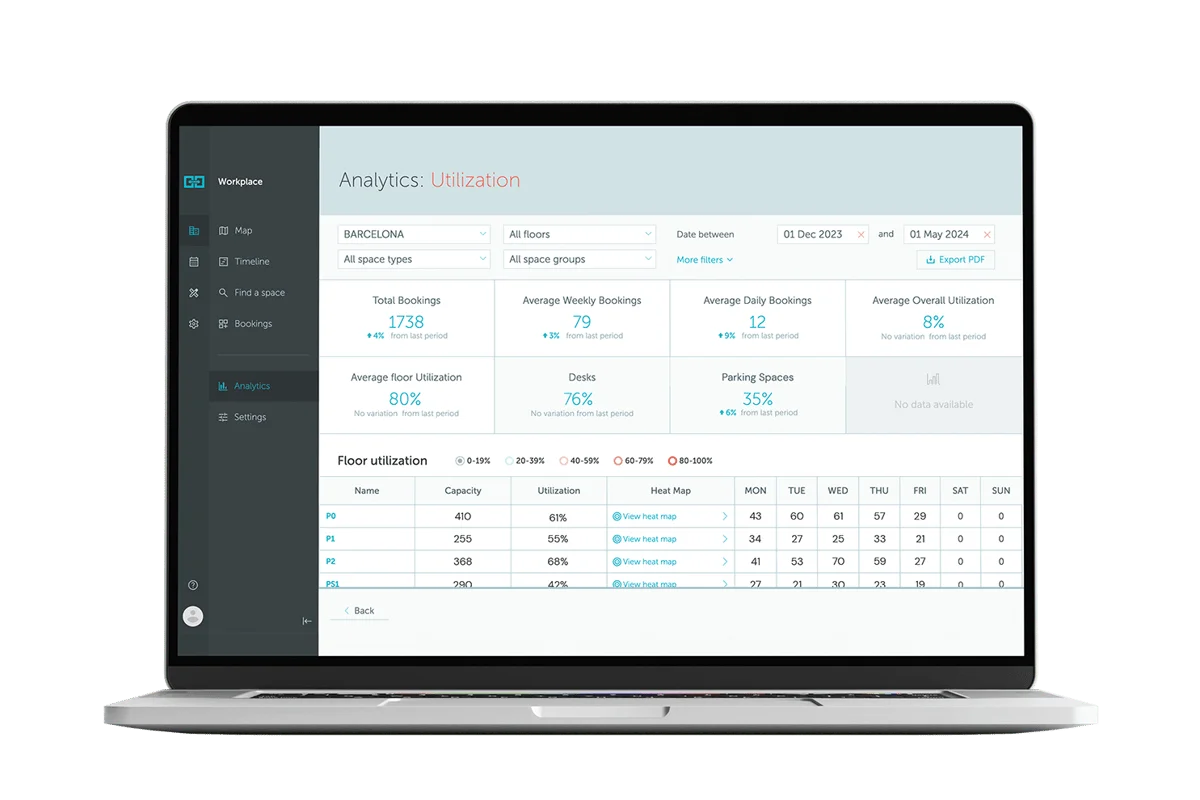
Solution 3: Utilization Analytics
You cannot fix what you do not measure. Room booking analytics reveal patterns that are invisible without data:
- Which rooms have the highest no-show rates?
- What times of day have the most ghost bookings?
- Are certain teams or recurring meetings the worst offenders?
- Which rooms are genuinely overbooked versus artificially scarce?
Armed with this data, you can have targeted conversations and make informed decisions about room allocation, size, and equipment.
Solution 4: Booking Limits and Guardrails
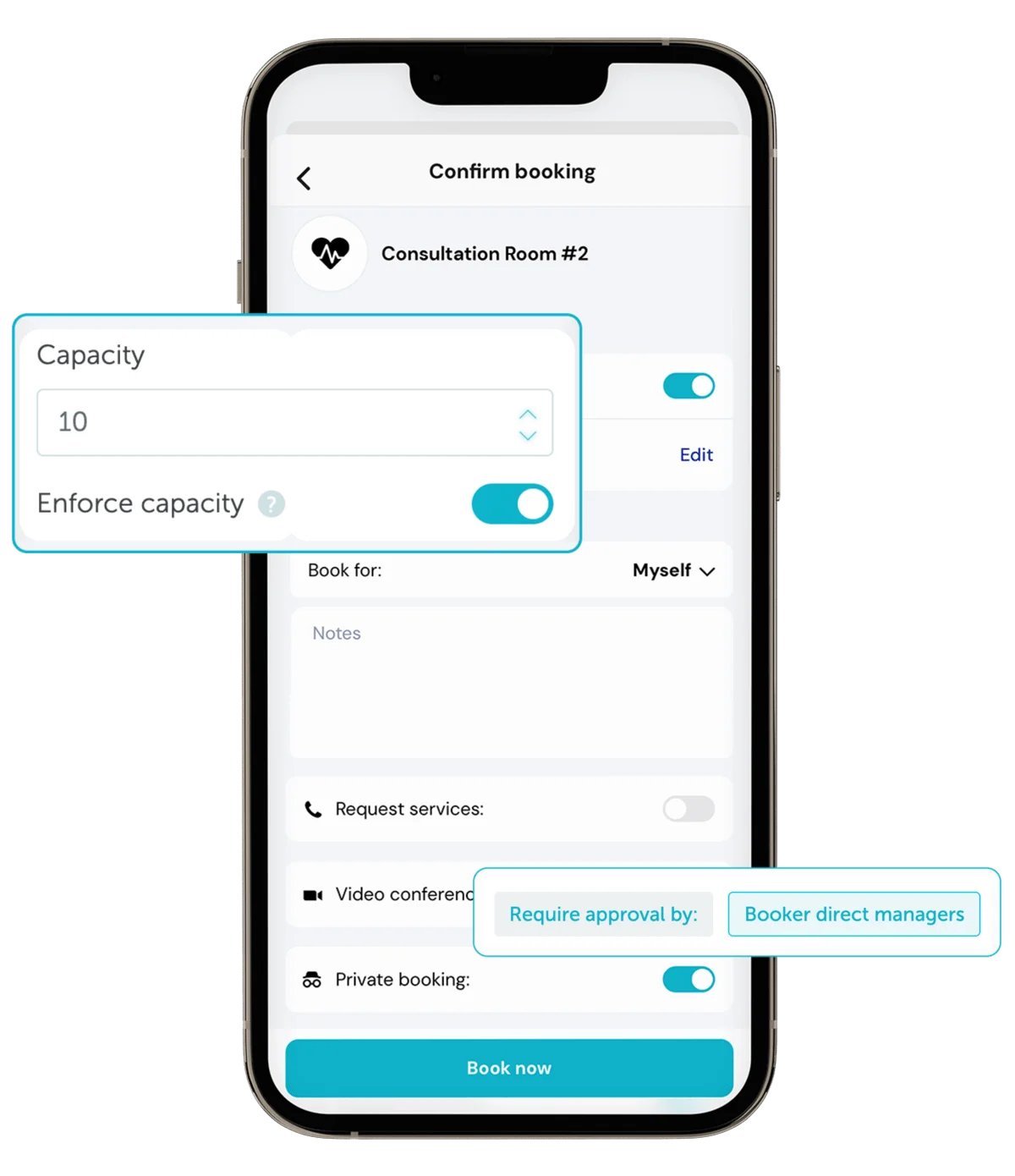
Implement policies that reduce over-booking:
- Limit advance booking windows. Allowing room bookings only 1-2 weeks ahead reduces speculative reservations.
- Cap recurring bookings. Require recurring room bookings to be re-confirmed monthly.
- Default to shorter meetings. Change your calendar defaults from 60 minutes to 25 or 50 minutes. Google and Microsoft both support this setting. Shorter default meetings mean rooms turn over faster.
- Limit rooms per person per day. If one person is booking 4 rooms a day, something is off.
If you need a policy baseline, use this practical template: how to create a winning meeting room policy.
Solution 5: Room Display Panels
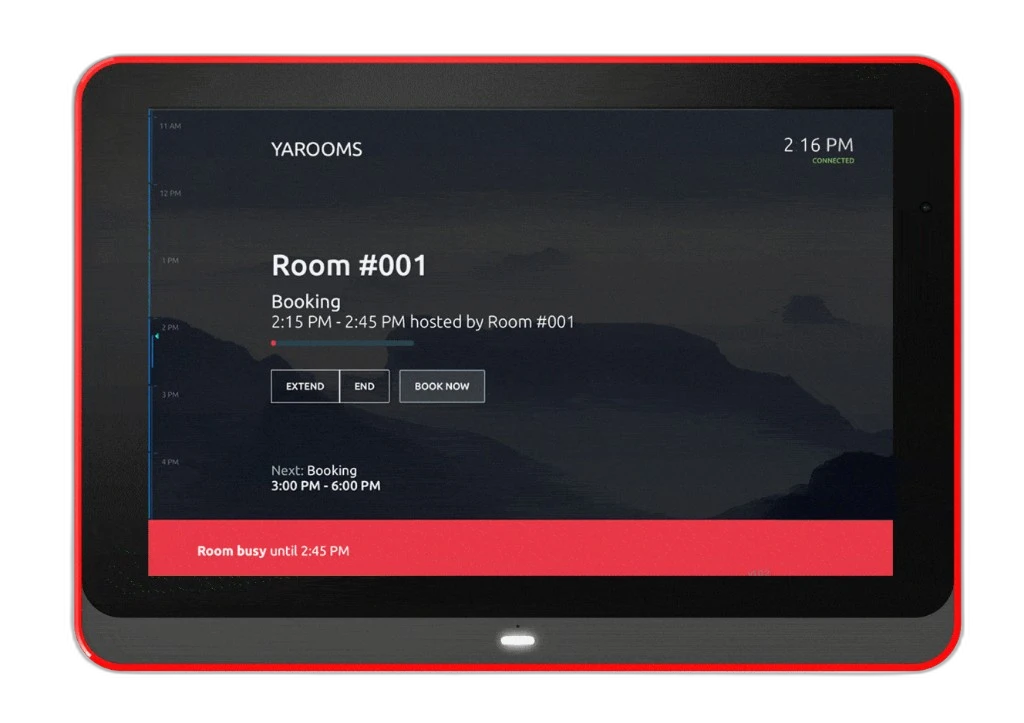
Digital displays mounted outside meeting rooms show real-time availability and allow walk-up booking. They make ghost bookings visible, literally. When a panel shows a room as “booked” but employees can see through the glass that it is empty, they can release it or book it on the spot.
Panels also serve as the check-in mechanism. A simple tap confirms the meeting is happening. No tap within the auto-release window, and the room opens up.
For hardware planning, see room panels and this use-case guide on digital meeting room signage.
Solution 6: Culture and Communication
Technology solves most of the problem, but culture fills the gaps. Communicate clearly:
- “Release rooms you will not use.” Make this part of your meeting etiquette guidelines.
- “End meetings on time.” Normalize ending 5 minutes early to allow room turnover.
- “Cancel means release.” When you cancel a meeting, release the room too.
- Highlight the impact. Share ghost booking statistics with the company. When people see that 35% of rooms sit empty while colleagues complain about availability, behavior shifts.
The cultural piece works best when supported by technology. Asking people to remember to cancel rooms is a losing strategy. Making it easy (one tap) and automatic (auto-release) is a winning one.
How Technology Solves Ghost Bookings
Modern room booking systems combine several of these solutions into one workflow. Here is how the technology typically works:
- Before the meeting: An employee books a room through the company’s booking system, which integrates with their Outlook or Google calendar. The booking appears on the room’s display panel.
- At meeting time: The room panel prompts for check-in. The organizer (or any attendee) taps the panel, scans a QR code, or the system detects presence through a sensor.
- If nobody shows up: After 10-15 minutes with no check-in, the system automatically releases the room. It sends a notification to the organizer and updates the calendar. The room immediately appears as available for others.
- After the meeting: When participants leave, sensors can detect the room is empty and release the remaining booked time. If a 60-minute meeting ends at 40 minutes, those last 20 minutes become available.
- In the analytics dashboard: Facilities managers see utilization rates by room, floor, time of day, and team. They can identify chronically underused rooms, peak demand periods, and which booking policies are working.
YAROOMS handles this entire workflow, from room booking and interactive floor maps to check-in, auto-release, and detailed analytics. The system integrates with Microsoft 365, Google Workspace, and Slack, so employees do not need to learn a separate tool.
For broader implementation criteria, this buyer guide is useful: buyer's guide to room scheduling software.
Software That Addresses Meeting Room No-Shows
Here is how the main room management platforms handle ghost bookings:
YAROOMS - Full room booking with check-in, auto-release, room display panel support, and detailed utilization analytics. Part of a broader workplace management platform that also covers desk booking , visitor management , and hybrid work planning . Integrates with Microsoft 365, Google Workspace, and Slack. The Yarvis AI agent can help employees find available rooms based on size, equipment, and location. ISO 27001 and SOC 2 Type II certified. Pricing starts at $99/month.
Robin - Room scheduling with presence detection, analytics, and integrations. Strong mid-market product with good Slack integration. Room display panel support through hardware partners. Pricing requires a sales conversation.
Joan - Specializes in room display panels and meeting room management. Clean hardware design that looks good outside conference rooms. Focuses specifically on the room booking and display use case rather than broader workplace management. Priced per display.
Envoy - Best known for visitor management but has expanded into room booking. The rooms product includes check-in and auto-release. Good option if you are already using Envoy for visitors and want one vendor. Less depth in room analytics compared to dedicated room management tools.
The best choice depends on whether you need room management alone or as part of a broader workplace platform. If you also need desk booking, visitor management, or hybrid scheduling, an all-in-one solution avoids the complexity of integrating multiple point solutions.
If you are comparing vendors, start with Best Workplace Management Software in 2026 and then drill into room-specific requirements.
ROI: Calculating the Cost of Wasted Meeting Rooms
Here is a straightforward framework to calculate what ghost bookings cost your organization.
Step 1: Determine your cost per room per hour
Take your annual real estate cost (rent, utilities, maintenance, insurance) for the floor or building where your meeting rooms are. Divide by usable square footage to get a cost per square foot. Multiply by each room’s square footage and divide by annual available hours (roughly 2,500 hours per year for a standard office schedule).
Example: An office pays $50/sq ft annually. A 200 sq ft meeting room costs $10,000/year, or about $4/hour.
Step 2: Measure ghost booking hours
If you have a booking system with check-in data, this is straightforward. If not, do manual spot-checks: walk by your meeting rooms at random times over two weeks and note which booked rooms are empty. A 35% ghost booking rate is a reasonable starting assumption.
Example: You have 15 meeting rooms, each booked an average of 6 hours/day. That is 90 booked room-hours/day. At 35% ghost bookings, 31.5 room-hours/day are wasted.
Step 3: Calculate annual waste
Example continued: 31.5 wasted hours/day x 250 working days x $4/hour = $31,500/year in direct real estate waste.
But the real cost is higher. Factor in:
- Productivity loss from employees unable to find rooms, estimated at 15-30 minutes per person per week searching for meeting space
- Meeting delays and rescheduling when rooms are not available
- Over-building when you add rooms to meet perceived (not actual) demand
For most mid-size companies (100-500 employees), the total cost of ghost bookings, including direct and indirect costs, ranges from $50,000 to $200,000 per year.
A room booking system with auto-release typically costs $1,000-$10,000/year depending on scale. The payback period is measured in weeks.
Calculate your ROI
Get a quick estimate of how much your organization could save by reducing meeting room no-shows and improving room utilization with YAROOMS.
Related reading
- Top Conference Room Schedule Display Tablets
- Why Meeting Room Analytics Matter in 2026
- Choosing Meeting Room Reservation Software
- Space Management Software: Key Features & How to Choose
- What Is Workplace Analytics? Space Utilization, Occupancy & Attendance Metrics Explained (2026)
- How to Choose Conference Room Scheduling Software
Frequently Asked Questions
See it in action
YAROOMS brings desk booking, room scheduling, visitor management, and analytics into one platform your team will actually use.