
Why Your Workplace Needs an AI Agent (Not Another App)

Your employees don’t hate technology. They hate having eleven apps to do one thing.
Book a desk? Open the workplace management platform. Message a colleague? Switch to the chat app. Check a project deadline? That’s in the project management tool. Join a video call? Another app. Submit a maintenance request? You guessed it. And when you need to find a parking spot before your 9am meeting? Good luck remembering which app handles that.
The modern workplace runs on software. But somewhere along the way, solving workplace problems became synonymous with adding more software. Every challenge got its own app, its own login, its own learning curve. The result? A more complicated office disguised as a more productive one.
Here’s the real question nobody is asking: what if one AI workplace agent could replace most of these apps entirely?
TL;DR:
- The average employee uses 11 apps daily and loses 44+ hours per year to tool fatigue
- 70% of digital transformations fail – mostly because employees stop using the tools
- AI workplace agents replace app interfaces with a single conversation inside Teams or Slack
- No new tools to learn, no behavior change required – adoption rates jump from ~40% to 75%+
The Workplace App Problem Nobody Talks About
The average company now deploys 101 apps across its organization, according to Okta’s 2025 Businesses at Work report – the first time that number has crossed triple digits. At the individual level, Gartner found that desk workers use 11 different applications to complete their tasks, nearly double the six apps they used in 2019.
Even within a single office day, an employee might touch a desk booking platform, a communication app, a project management tool, a video conferencing client, and an HR portal – each with its own login and interface. Each one made sense when it was adopted. Together, they create a compounding problem: digital tool fatigue.
The data backs this up. A 2025 Lokalise study of 1,000 U.S. professionals found that:
- 56% of workers say tool fatigue – toggling, alerts, and redundant platforms – negatively impacts their work each week
- Workers switch between tabs, apps, or platforms an average of 33 times per day, with 17% switching more than 100 times
- The average employee loses 51 minutes per week to tool fatigue alone, adding up to over 44 hours of lost time per year
- 79% of employees say their company hasn’t taken any steps to reduce tool fatigue or consolidate platforms
And that’s just the time cost. A joint study by Qatalog and Cornell University’s Ellis Idea Lab found it takes an average of 9.5 minutes to get back into a productive workflow after switching between digital apps. That means every time an employee toggles from the workplace platform to the project tracker to the communication app, they lose almost 10 minutes of productive focus – each time.
The result? Most workplace technology follows the same lifecycle: IT evaluates tools, leadership approves a budget, the platform gets rolled out, a training session happens, and then employees quietly go back to doing things the old way. They email the office manager. They walk to an open desk. They book a room by putting a sticky note on the door.
According to McKinsey, 70% of digital transformations fail, and enterprise software adoption failure rates range between 50% and 70%. The software works fine. People just don’t want to learn new tools for tasks that should be frictionless. Nobody wakes up excited to master a desk booking interface. They just want a place to sit.
The core problem: Most workplace tools work perfectly well. They fail because employees don’t want to learn yet another interface for something that should take five seconds.
What Is an AI Workplace Agent?
An AI workplace agent is an intelligent conversational interface that handles physical workplace operations – desk booking, room scheduling, visitor management, and office services – through natural language, inside the tools employees already use.
Unlike traditional workplace apps that require separate logins, dedicated interfaces, and training sessions, an AI workplace agent lives where employees already work: inside Microsoft Teams, Slack, email, or SMS. There’s no new platform to learn because the interface is a conversation.
Unlike general-purpose AI agents (Siri, Alexa, ChatGPT), a workplace AI agent is purpose-built for office operations. It understands floor plans, booking policies, team structures, office locations, and individual preferences. Beyond answering questions, it executes – bookings, registrations, schedule changes, all handled automatically.
Here’s what that looks like in practice:
- Desk booking: “Find me a desk near the marketing team on Tuesday” – the AI checks floor plans, team schedules, and availability, then confirms the booking
- Room scheduling: “Book a room with a projector for my 2pm meeting” – the AI handles the reservation, sends calendar invites, and confirms AV equipment
- Visitor management: CC the AI on a guest email, and it creates a visitor pass, books a meeting room, and sends directions to your office
- Workplace services: “The printer on floor 3 isn’t working” – the AI logs a maintenance request and notifies facilities
- Proactive suggestions: The AI scans your calendar, notices you have meetings in different buildings, and suggests an optimally located desk before your day starts
The key distinction: A traditional workplace app waits for you to open it and navigate its interface. An AI workplace agent works through a single conversation that handles everything.
How AI Agents Solve App Fatigue in the Workplace
AI workplace agents address the root causes of digital tool fatigue: context switching, learning curves, multi-step workflows, and low adoption rates. Here’s how each one gets solved.
Context Switching Drops to Zero
Instead of toggling between a workplace platform, a project tracker, a communication app, and an HR portal, employees interact with one conversational interface for all their workplace needs. Booking a desk, scheduling a room, registering a visitor – it all goes through the same channel. No more losing 9.5 minutes of focus every time you switch tools.
Multi-Step Workflows Become Single Messages
Booking a desk through a traditional app typically requires: open the app, select a date, choose a floor, browse available desks, filter by amenities, check who else is nearby, confirm. That’s six to eight steps.
With an AI workplace agent, it’s one message: “Book me a desk near James tomorrow.” The AI handles every step behind the scenes and confirms in seconds.
Proactive Intelligence Replaces Reactive Searching
The best AI workplace agents don’t wait for requests. They analyze calendar data, team schedules, and usage patterns to make suggestions before employees even think to ask:
- Noticing you have three meetings in different buildings and suggesting a central desk
- Flagging that your usual meeting room is already booked and offering alternatives
- Detecting a visitor on your calendar and preparing the check-in process automatically
- Alerting you when your preferred floor is fully booked so you can plan ahead
Adoption Rates Increase Dramatically
This is the most significant advantage. Traditional workplace software requires employees to change their behavior – learn new tools, build new habits, follow new processes. That’s why adoption rates for enterprise software hover between 30% and 50%.
An AI workplace agent that lives in Microsoft Teams or Slack requires zero behavior change. Employees already know how to type a message. That’s the entire onboarding. When the barrier to adoption is literally “send a message,” usage rates climb far above what traditional apps achieve.
According to Microsoft’s 2024 Work Trend Index, 75% of knowledge workers are already using AI at work, with 90% saying it helps them save time. The conversational interface is no longer a novelty – it’s an expected way of interacting with workplace technology.
AI Agent vs. Traditional Workplace Apps
Both can book a desk. Both can schedule a room. The real gap shows up in how they interact with people – and how that impacts daily productivity.
| Capability | Traditional Workplace App | AI Workplace Agent |
|---|---|---|
| Interface | Dedicated app or web portal | Conversation in Teams, Slack, or email |
| Learning curve | Training sessions, documentation, onboarding | Type a message (no training needed) |
| Scope | Separate platforms for different workplace functions | All workplace operations through one conversation |
| Interaction model | Reactive (user navigates to the tool) | Proactive (assistant suggests and acts) |
| Context switching | Requires toggling between multiple platforms | Single interface for everything |
| Personalization | Manual preferences and filters | Learns habits, preferences, and patterns automatically |
| Behavior change required | High (new interface, new workflows) | None (uses existing communication channels) |
| Typical adoption rate | 30-50% of employees | 75%+ of employees |
The bottom line: The adoption gap costs more than the license fee ever will. When half your workforce doesn’t use the tool, you’re paying full price for half the value. An AI workplace agent eliminates this gap by meeting employees where they already are.
What to Look for in a Workplace AI Agent
Not every AI chatbot qualifies as a true AI workplace agent. Here are the five capabilities that separate effective workplace AI agents from generic chatbots.
1. Lives Where Employees Already Work
If the AI workplace agent requires its own app, it has missed the point entirely. Look for deep, native integration with Microsoft Teams, Slack, email, or SMS. The best workplace AI agents feel like messaging a colleague, not logging into another platform.
2. Handles Multiple Workplace Domains
An AI that only books desks is just a chatbot with a booking API. A real AI workplace agent covers desk booking, room scheduling, visitor management, parking, maintenance, catering, and office services – all through one conversation. The more domains it covers, the fewer standalone apps your organization needs.
3. Understands Workplace Context
The AI workplace agent should know your office layout, floor plans, booking policies, team structures, and individual preferences. “Book my usual” should just work. Context awareness is what transforms a basic chatbot into an intelligent workplace agent that improves over time.
4. Takes Action, Not Just Answers Questions
What separates a workplace FAQ bot from an AI workplace agent is execution. When an employee says “register a visitor for Thursday,” the assistant should actually create the registration, send the invite email, prepare the access credentials, and book a meeting room – not link to a form.
5. Enterprise-Grade Security and Compliance
Workplace data includes employee locations, visitor information, building access patterns, and organizational structures. Your AI workplace agent needs SOC 2 Type 2, ISO 27001, and GDPR compliance as a baseline, not an afterthought. (See how YAROOMS handles security and compliance.) Any vendor that can’t demonstrate these certifications should be ruled out.
The Future of Workplace Management Is Conversational
The direction is clear. Workplace management is shifting from “an app for every function” to “an assistant for everything.”
Gartner predicts that by 2028, over 20% of digital workplace applications will use AI-driven personalization for adaptive worker experiences. And according to Gallup, AI use in the workplace has grown to 45% of employees in 2025, up from just 11% the year before. The adoption curve is accelerating.
Hybrid work forced the issue. When employees split their time between home and office, workplace tools need to be effortless. Nobody is going to open three apps to plan one office day.
The companies getting this right are the ones rethinking the interface itself. Instead of building better workplace apps, they’re removing the need for most workplace apps entirely.
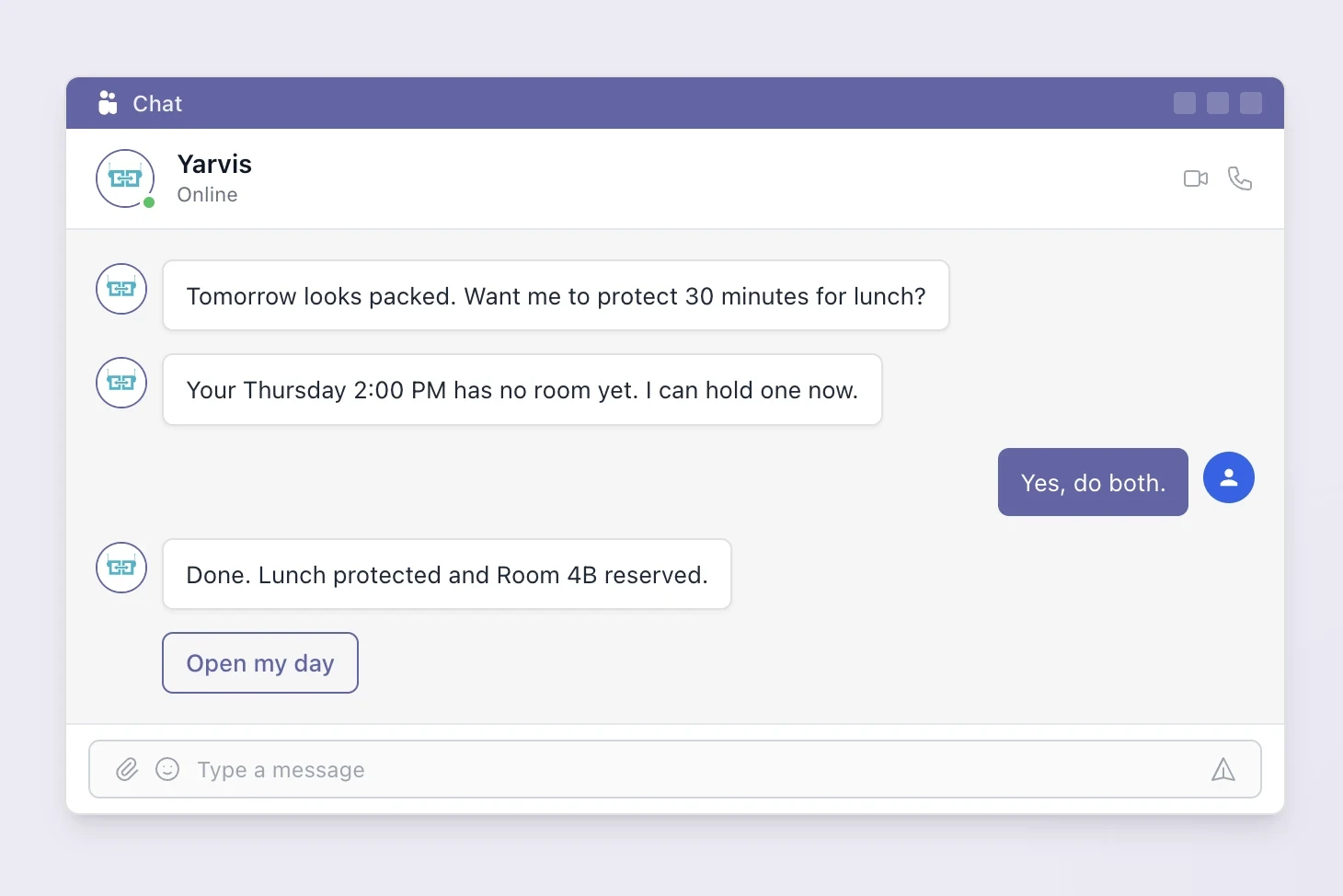
At YAROOMS, we built Yarvis for exactly this reason. Yarvis is an AI workplace agent that handles desk booking, room scheduling, visitor management, and workplace services through a single conversation – right inside Microsoft Teams or email. No new app to install. No training sessions to schedule. Just ask.
Because the best workplace technology is the kind your employees actually use. And the easiest technology to use is the one that already speaks their language.
Ready to see what an AI workplace agent can do? Meet Yarvis – or schedule a demo to see it in action.
Workplace of the future. Today.
See how YAROOMS integrates with Microsoft 365 to create a seamless workspace booking experience.