
Visitor Management System Integrations: The 2026 Buyer’s Guide & Vendor Comparison

Visitor management system integrations connect your visitor software with the tools your workplace already runs on - access control, calendars, Teams or Slack, identity providers, and booking platforms. When these connections are in place, visitor data flows automatically between systems: a meeting invite becomes a pre-registration, a check-in triggers a host notification, and your visitor directory stays current without anyone maintaining a spreadsheet.
Without them, even the most polished visitor management system is essentially a digital log book. It records who came in, but it doesn’t talk to the systems that actually run your building.
We’ve been building workplace management software at YAROOMS for over a decade, and one question comes up in almost every sales call: “Is that integration included?” People ask because the industry makes it hard to know - VMS integration details hide in help docs, vary by pricing tier, and change without notice.
So we put the answers in one place: this guide covers the seven integration categories that matter in nearly every buying process, how best visitor management systems compare, and the questions we’d ask any vendor (ourselves included) before signing.
Why Do Integrations Matter in Visitor Management?
Think about everything one visit involves: someone lets the guest in, notifies the host, prints a badge, files the signed documents, and logs the whole thing. Without integrations, a front desk manager does all of this by hand for every single visitor. That’s slow, and it’s where security and compliance mistakes happen.
VMS integrations takes these tasks off the list:
Access control handles the badges. The visitor’s badge is created at check-in, works only where it should, and switches off at sign-out.
Teams and Slack handle the notifications. The host gets an instant message the moment their visitor arrives - wherever they are in the building.
Connected records handle the paperwork. Check-in data, signed NDAs, and access logs land in one place, so a compliance report is a two-minute export.
Directory sync handles the host list. When employees join or leave, the list updates itself - so host notifications never go to someone who left the company.
What Does This Look Like in Practice?
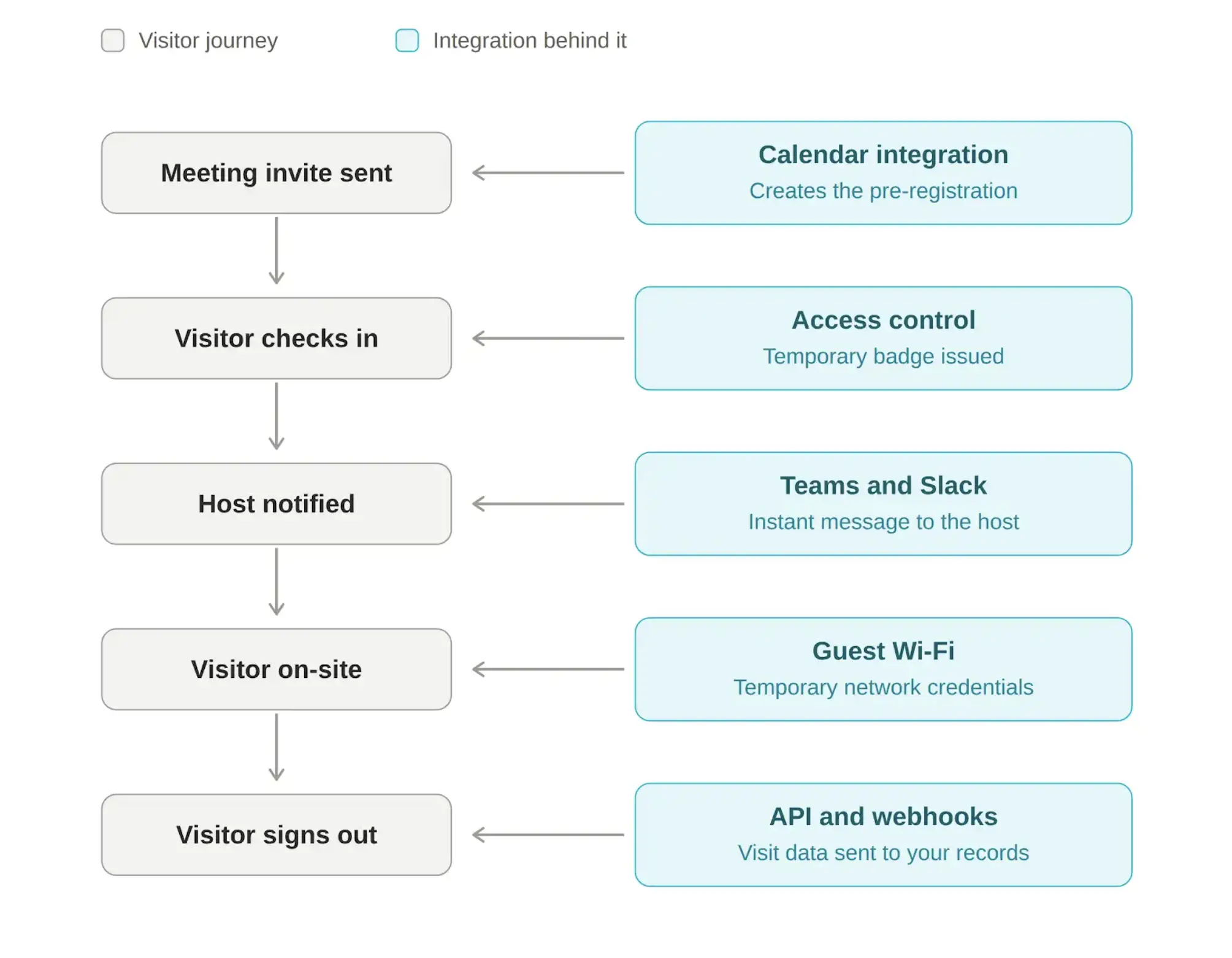
Imagine you’re inviting a customer to your office for a meeting. Here’s what happens behind the scenes when your visitor management system is connected to the rest of your workplace technology:
You send a meeting invitation in Outlook or Google Calendar. The calendar integration automatically creates a visitor pre-registration and sends the guest their confirmation, arrival instructions, and QR code.
The visitor arrives and checks in. The access control system automatically issues a temporary badge with the right permissions for the duration of the visit.
The host is notified instantly. Microsoft Teams or Slack sends a message letting you know your visitor is waiting, so no receptionist needs to call or track you down.
The visitor is on-site. A guest Wi-Fi integration provides temporary network credentials, giving them secure internet access without sharing a permanent guest password.
The visitor checks out. Their temporary building access is revoked automatically, while APIs and webhooks send the visit data to your reporting, compliance, or other connected business systems.
As you can see, instead of five separate manual tasks across different systems, the entire visitor journey runs as one connected workflow.
The 7 Core VMS Integration Categories Every Buyer Should Evaluate
Most visitor management integrations fall into seven categories:
Different stakeholders in your organization care about different ones, so we’ve noted who typically owns each evaluation.
Access Control Integration
An access control integration pushes visitor data from your check-in flow to your physical security system, so approved visitors receive temporary, time-bound credentials - a QR code, RFID card, or mobile pass - that work only for designated doors and only for the duration of the visit.
This is the highest-stakes integration in the entire category, and the one security teams evaluate first. It’s also the one that most often turns out to be tier-gated or missing after the contract is signed, which is why it belongs at the top of your requirements list.
The providers you’ll see supported most often across vendor catalogs include Kisi, Brivo, Salto, Avigilon Alta (formerly Openpath), Paxton, Gallagher, LenelS2, Genetec, and AMAG. If your building already runs one of these, native support should be a hard requirement.
Who evaluates it: physical security and IT security teams.
What to verify:
Is your specific access control system natively supported, or does it require custom API work?
Do visitor credentials expire automatically at sign-out or at a scheduled end time?
Do access events (badge swipes, door entries) flow back into the visitor log for a complete audit trail?
Is the integration included in your pricing tier?
Calendar and Email Integration (Outlook, Google Calendar)
Calendar integration is the one your employees will notice most. When a host invites a guest to a meeting in Outlook or Google Calendar, the visitor gets registered with reception automatically - one action instead of two.
Here’s how it works: an employee creates a meeting in Outlook and adds an outside guest. The visitor management system spots the guest, registers the visit, and emails them everything they need - arrival instructions, directions, and a QR code for quick check-in. Reception knows who’s coming before anyone walks in.
In our experience, this integration decides whether employees use the system at all. If registering a visitor means logging into a separate tool, most people won’t bother and unregistered guests pile up at the front desk.
Who evaluates it: workplace experience teams and, honestly, every employee who hosts guests.
What to verify:
Is it true calendar sync (invite changes and cancellations update the visit) or a one-way add-in?
Does it work with your specific setup - Microsoft 365, Google Workspace, or both?
Can the pre-registration carry meeting context, like the room booking, so reception can direct guests?
Communication Tools Integration (Microsoft Teams and Slack)
Communication integrations send the host an instant alert - in Microsoft Teams, Slack, SMS, or email - the moment their visitor checks in. No one sits in the lobby while a receptionist tracks down their host.
Almost every vendor offers this one; Teams, Slack, or email notifications are standard across the market. The differences are in what the notification can do. On some platforms it’s just an alert. On others, the host can act on it directly - sign the visitor out, acknowledge a delivery, or, where an access control integration is also in place, unlock the door for their guest without leaving their desk.
Who evaluates it: reception and office management teams - though this one rarely needs much convincing.
What to verify:
Which channels are supported, and are they included in base pricing? Notification channels are sometimes split across tiers.
Can notifications include context (visitor photo, purpose of visit, meeting room)?
What’s the fallback if a host doesn’t respond - escalation to a delegate, reception, or a group channel?
Identity and Directory Integration (SSO and SCIM)
Identity integrations do two jobs that often get mixed up, so let’s separate them:
SSO (single sign-on) is about logging in. Employees and admins access the visitor management system with the same corporate account they use everywhere else - no separate password to create, forget, or leave active after someone quits. Most systems support this through SAML 2.0, connecting to providers like Microsoft Entra ID, Okta, or Google.
Directory sync (SCIM) is about keeping the employee list current. It connects the visitor system to your company directory, so when people join, switch teams, or leave, the host list updates on its own - no one maintains it by hand.
Who evaluates it: IT, and they will have opinions.
What to verify:
SAML 2.0 SSO support, and on which pricing tier (SSO is very frequently gated to top tiers across the industry)
SCIM 2.0 provisioning with your specific identity provider
Sync frequency and behavior: what happens to deprovisioned users? Can groups map to host groups?
Workplace Management Integration (Desk and Room Booking)
Hosting a visitor usually means three separate tasks: invite the guest, book a meeting room, arrange a desk. Connecting visitor management with desk booking and room scheduling turns them into one.
Here’s the flow: an employee invites a client for Thursday and, in one motion, books the room, registers the visitor, and reserves a guest desk. The visitor gets a single email with everything - arrival time, directions, host, room. At check-in, the host gets a Teams notification and the visit is logged for reporting.
You can get here two ways:
Separate tools, connected. A standalone visitor system integrated with a separate booking platform. Deeper features in each, but two vendors, two databases, and an integration to maintain.
One platform. Visitor management, desks, and rooms built into the same system. One database, one admin console, one vendor.
We’re obviously not neutral on this one - YAROOMS is built on the second model - so we’ll simply say: the right answer depends on whether visitor management is a security function for you (specialists may win) or a workplace experience function (unified platforms usually win).
Who evaluates it: facilities and workplace experience teams.
API, Webhooks, and Automation (Zapier)
An API and webhooks connect the visitor system to tools your vendor doesn’t support out of the box - your CRM, ERP, compliance archive, or reporting tools. The API lets you pull visitor data out; webhooks push it automatically when something happens, like a sign-in, a sign-out, or a watchlist match.
This is the “everything else” category - if a connection you need isn’t in the vendor’s catalog, this is how you build it. Most vendors also offer Zapier, which lets you set up simple automations without any coding.
One development worth watching in 2026: AI agents are becoming a new way to connect with these systems. Instead of clicking through a dashboard, employees increasingly expect to type “register Anna from Acme for Thursday at 2” into Teams and have it happen. Some platforms (YAROOMS among them, through the Yarvis AI agent and an MCP server for AI agents) already support this. It’s early days, but if your company is adopting AI tools, ask vendors about it now rather than in two years.
Who evaluates it: IT and any team with custom systems to connect.
What to verify:
Is API access included, or gated to enterprise tiers?
Which webhook events are exposed?
For Zapier: fine for convenience workflows, but be cautious about routing security-critical processes through a third-party automation layer (more on this below).
Hardware Integration (Tablets, Kiosks, and Badge Printers)
Visitor management software doesn’t run in a vacuum - it runs on physical devices at your front desk: a check-in tablet or kiosk, a badge printer, and sometimes a dedicated reception display. Hardware integration determines which devices the software works with, and how much they’ll cost you.
There are two models in the market:
Vendor-supplied hardware. The software comes bundled with specific devices - often an iPad with a mount and a pre-configured printer. Setup is fast, but you pay for the bundle and you’re locked to their hardware choices.
Hardware-agnostic software. The system runs on standard tablets and works with common badge printer brands, so you can use devices you already own or buy them at retail prices.
Neither is wrong - bundles suit teams that want zero setup work, while hardware-agnostic systems suit teams that want flexibility and lower costs. What matters is knowing which model you’re buying into before you budget.
Who evaluates it: facilities and office management, with IT on device security - and procurement, since hardware is often the biggest upfront cost.
What to verify:
Which tablets and operating systems does the check-in app support - iPad only, or Android too?
Which badge printer brands and models are supported?
Is hardware included in the visitor management system price, sold separately, or is it bring-your-own?
If a device fails, who supports it - the software vendor or the hardware manufacturer?
Secondary Visitor Management System Integrations Worth Checking
Beyond the core seven, a few specialized visitor management integrations come up regularly - usually driven by industry or building type:
Guest Wi-Fi integration generates unique network credentials for each visitor at check-in - no more guest password taped to the reception desk. Common providers include Cisco Meraki and Aruba ClearPass.
E-signature integration (such as DocuSign) extends built-in document signing for organizations with heavier legal workflows.
Watchlist and visitor screening integration checks guests against internal or third-party security lists before access is granted - essential in regulated and high-security environments.
Emergency notification integration connects visitor records to alerting platforms, so evacuation lists include everyone on site - not just employees.
Elevator integration (destination dispatch) automatically directs visitors to the right floor in high-rise buildings.
None of these should drive your vendor decision on their own. But if one is a hard requirement in your industry, verify it early - these are exactly the integrations that tend to surface after the contract is signed.
How Do Popular Visitor Management Vendors Compare on Integrations?
To ground this guide in real examples, we reviewed the public integration documentation of six visitor management vendors in July 2026 - deliberately chosen from different corners of the market: enterprise visitor management systems (Envoy, Eptura Visitor), visitor management within workplace management platforms (YAROOMS, Archie), and lightweight, budget-friendly systems (Visitly, Vizito).
This is a high-level orientation, not a feature-by-feature teardown - integration catalogs change constantly, so treat the linked vendor pages as the source of truth and verify anything that’s a hard requirement for you.
Envoy
Envoy runs an app marketplace with over 100 integrations - one of the largest catalogs in visitor management. Some examples:
Access control: 20+ systems, including Kisi, Brivo, Gallagher, Genetec, Avigilon, LenelS2, and Verkada
Directory and SSO: Okta, Microsoft Entra ID, Google Workspace, OneLogin
Calendar and communication: Outlook, Google Calendar, Teams, Slack
Other: DocuSign, guest Wi-Fi (Cisco Meraki, Aruba), webhooks, Zapier, Power Automate
Keep in mind: the most powerful integrations - access control especially - are tied to the Enterprise pricing tier, so check plan requirements against your must-haves before budgeting.
Best fit: enterprises with existing security infrastructure that want the widest choice of ready-made connections.
Eptura Visitor (Formerly Proxyclick)
Eptura Visitor organizes its integrations around six areas, with the deepest coverage in physical security:
Access control: AMAG, Brivo, Gallagher, Genea, Genetec, Lenel, Paxton, and more
Calendar: Outlook and Google Calendar for creating and syncing visits
Communication: check-in notifications in Microsoft Teams and Slack
Identity: single sign-on across the platform
Guest Wi-Fi: unique credentials generated automatically at arrival
Other: badge printing from any AirPrint printer, e-signed documents (NDAs) routed to your data storage system
Keep in mind: Eptura Visitor is one module of the larger Eptura worktech suite - powerful for large estates, but potentially more platform than a smaller organization needs.
Best fit: large, multi-site enterprises and campuses where access control integration is the deciding factor.
YAROOMS
YAROOMS takes the unified-platform approach: visitor management is a native module of the same system that runs desk booking, room scheduling, and hybrid work planning - so the visitor-to-workspace workflow needs no integration at all. The integration catalog covers:
Microsoft 365: native sync with Microsoft Teams, Microsoft 365, and the Outlook add-in, plus Google Calendar sync
Communication: notifications and bookings in Teams; Zoom, Google Meet, and Teams meeting links
Identity: SAML 2.0 SSO, Microsoft Entra ID for SSO and user management, plus one-click login with Google or Slack
Wayfinding: MappedIn for easy wayfinding
Hardware: YAROOMS is hardware-agnostic - the digital reception app runs on standard tablets and kiosks, with partner badge printer support
Custom and AI: REST API for custom integrations, Yarvis AI agent for plain-language bookings and visitor registration inside Teams and email, and an MCP server for AI agents
Keep in mind: visitor management is a paid add-on ($99 per location per month), and the integration catalog is built around Microsoft 365 and workplace workflows first - teams with specific access control requirements should raise them during a demo.
Best fit: organizations running on Microsoft 365 that want visitor management as part of one workplace platform, not another standalone tool in the stack.
Archie
Just like YAROOMS, Archie is a workplace platform (visitor management, desk and room booking) with a compact but practical integration catalog:
Door access: Kisi, Salto, Brivo, Tapkey, DoorFlow, plus custom door access connections
Calendar and productivity: two-way sync with Google Calendar, Outlook, Microsoft 365
Communication: visitor notifications in Slack and Microsoft Teams; SMS via Twilio
Identity: SSO via SAML and automatic user sync via SCIM
Guest Wi-Fi: Cisco Meraki, Aruba, and Ubiquiti - supported through IronWifi
Custom: open API and Zapier
Keep in mind: the catalog is smaller than enterprise players’ - door access covers modern cloud systems like Kisi and Brivo rather than legacy enterprise platforms (Lenel, Gallagher, Genetec), and Wi-Fi runs through a third-party layer (IronWifi) rather than direct connections.
Best fit: small and mid-sized offices - and coworking spaces, which the platform also serves - that want visitor management connected to booking tools without enterprise complexity.
Visitly
Visitly is a leaner, budget-friendly visitor management system with a compact integration catalog organized in five groups:
Notifications: real-time host alerts on visitor sign-in and sign-out via Slack, Microsoft Teams, Google Chat, and Webex
Single sign-on: Microsoft Entra ID, Okta, OneLogin, Google Workspace, and generic SAML 2.0
Staff directory: automatic host list sync from Entra ID, Okta, OneLogin, on-premises Active Directory, or any SCIM 2.0 provider
Guest Wi-Fi: temporary visitor credentials through Cisco Meraki and Arista Networks
Custom: webhooks covering sign-ins, sign-outs, watchlist hits, emergencies, and pre-registrations
Keep in mind: the integration catalog is smaller than the enterprise players’ - verify your must-haves against the listed set, as anything beyond it means custom work via webhooks.
Best fit: cost-conscious teams with some technical capacity that want solid directory sync and notification coverage without enterprise pricing.
Vizito
Vizito is a European (Belgian) visitor management system that keeps its integration catalog small but well-chosen:
Identity and directory: automatic host sync from Microsoft Entra ID, on-premise Active Directory, or Google Workspace; SAML SSO and OpenID Connect for login
Calendar: meeting invitations automatically create pre-registered visitors, who receive a confirmation email with directions and a QR code
Communication: host notifications through Microsoft Teams, Slack, email, and SMS
Guest Wi-Fi: temporary tokens through Aerohive, revoked at sign-out
Custom: REST API and real-time webhooks for pushing sign-in events to access control panels, badge printers, CRMs, or BI tools
Keep in mind: the catalog is lean by design - connections beyond the listed set (including access control) run through webhooks and the API rather than ready-made integrations, so factor in some technical setup for anything custom. Reviewers also note some integrations are tied to higher tiers, so verify plan requirements for your must-haves.
Best fit: European small and mid-sized offices that want GDPR-first visitor management with directory sync and calendar pre-registration, without enterprise pricing.
Native Integration vs. Zapier vs. API: Which Do You Actually Need?
Visitor management systems connect to other tools in three ways: native integrations, APIs and webhooks, or automation platforms like Zapier. Each fits a different job:
Native integrations are built and maintained by the vendor - tested, supported, and updated when the connected system changes. The limitation: you only get what’s in the catalog. Best for security-critical connections like access control, SSO, and directory sync.
APIs and webhooks connect the visitor system to anything the catalog doesn’t cover - your ERP, CRM, or compliance archive. The trade-off: your team builds and maintains the connection. Best for custom systems.
Zapier offers huge reach with no coding, but adds subscription cost, sync delays, and a third party in your data flow. Best for convenience workflows, like logging visits in a spreadsheet.
Our rule of thumb: anything touching physical access or identity should be native; anything custom goes through the API; everything else can run on Zapier.
Integration Questions to Ask Vendors Before You Buy a Visitor Management System
The most expensive integration problems are the ones discovered after the contract is signed - when you learn the connection you need sits in a higher tier, requires custom work, or doesn’t exist. The fix is simple: make integrations part of vendor evaluation from the start, and get tier-specific answers in writing.
Here’s the checklist we’d use, grouped by who should ask:
IT teams
- Do you support SAML 2.0 SSO, and on which pricing tier?
- Do you support SCIM 2.0 provisioning with our identity provider specifically (Entra ID, Okta, other)?
- How often does directory sync run, and what happens to deprovisioned users?
- Is API access included in our tier? What are the rate limits, and where's the documentation?
Security teams
- Which access control systems do you integrate with natively - and is ours on the list?
- Do visitor credentials expire automatically, and can expiry rules differ by visitor type?
- Do access events write back into the visitor log for a unified audit trail?
Facilities and reception teams
- Which notification channels are included in base pricing?
- Which badge printers do you support?
- Does calendar pre-registration work from a standard Outlook or Google Calendar invite, without a separate portal?
Procurement teams
- Of the integrations on our requirements list, which are tier-gated - and what does the required tier cost per location?
- How does integration pricing change as we add locations?
How to Implement VMS Integrations Successfully
A successful integration rollout follows a consistent pattern: map requirements before selecting a vendor, involve every affected stakeholder early, pilot on one site, and monitor the failure modes that don’t announce themselves.
In practice:
Map integrations to requirements before the demo stage. List every system the VMS must connect to, mark each as must-have, should-have, or nice-to-have, and evaluate vendors against that list - not against their glossiest feature.
Bring four groups to the table: IT (identity, API), security (access control), facilities (hardware, workflows), and reception (the people who live with it daily). Each group catches requirements the others miss.
Pilot on one location. Validate the directory sync with real personnel changes and the access control flow with real visitors before rolling out company-wide.
Monitor the silent failures. The two most common are stale host records (a sync quietly stopped) and undelivered notifications (a host left a channel, changed teams, or was never mapped). Both are invisible until a visitor is stranded - so check them proactively, not reactively.
Frequently Asked Questions: VMS Integrations
What Integrations Should a Visitor Management System Have?
A visitor management system should have, at minimum: calendar integration (Outlook, Google Calendar) for pre-registration, communication integrations (Microsoft Teams, Slack) for host notifications, SSO via SAML 2.0, and access control integration if your building uses electronic entry systems. Larger organizations should also require SCIM directory provisioning and API/webhook access.
How Does a Visitor Management System Integrate With Access Control?
At check-in, the visitor management system pushes the visitor’s details and approved access level to the access control system, which issues a temporary credential such as a QR code, RFID card, or mobile pass. The credential works only for designated doors, expires automatically at sign-out, and its access events are logged back to the visitor record for auditing.
Can Visitor Management Integrate With Outlook and Google Calendar?
Yes. With calendar integration, adding an external guest to a meeting invitation automatically creates a visitor pre-registration, sends the guest arrival instructions and a check-in QR code, and notifies reception of the expected arrival. Cancellations and time changes sync automatically in well-built implementations.
How Do Microsoft Teams and Slack Visitor Notifications Work?
When a visitor checks in, the visitor management system sends the host an instant alert in Teams or Slack - typically with the visitor’s name, photo, and purpose of visit. Some platforms support actions inside the notification, such as signing the visitor out or unlocking a door where access control is also integrated.
Should Visitor Management Integrate With Desk and Room Booking?
Yes, if your organization manages hybrid work or shared spaces. The integration lets an employee book a meeting room, pre-register a visitor, and reserve a guest desk in one workflow, and connect visit data to room and space analytics.
What Is SCIM Provisioning in Visitor Management?
SCIM (System for Cross-domain Identity Management) provisioning automatically synchronizes your employee directory from an identity provider (such as Microsoft Entra ID or Okta) into the visitor management system. When employees join, change roles, or leave, the host list updates automatically, ensuring visitor notifications always reach a current, valid host.
What’s the Difference Between Native Integrations and Zapier Integrations?
Native integrations are built and maintained by the vendor, offering the highest reliability - essential for security-critical connections like access control and SSO. Zapier integrations run through a third-party automation platform, adding flexibility but also cost, latency, and an extra dependency. Use native for security, Zapier for convenience workflows.
Do Visitor Management Integrations Work Across Multiple Office Locations?
Generally yes, though behavior varies by vendor. Look for centralized integration management with per-location configuration - for example, different access control systems or notification rules per site - and confirm how integration pricing scales as you add locations, since several vendors price integrations per location or gate them by tier.
Workplace of the future. Today.
See how YAROOMS integrates with Microsoft 365 to create a seamless workspace booking experience.