
Visitor Management System Hardware: The Complete Buyer's Guide for 2026

Most organizations spend weeks evaluating visitor management software and then buy hardware in an afternoon. That’s usually where things go wrong.
The wrong tablet creates compatibility headaches. The wrong printer requires a label format your software doesn’t support. A stand that looks great in a product photo turns out to be wobbly in a real lobby. And if you buy all your hardware from a vendor that bundles it with their software, switching platforms later means replacing everything from scratch.
This guide covers the full picture of visitor management hardware - what components make up a complete system, how to choose the right setup for your specific office, and what it actually costs. It’s written to be software-neutral where possible, with practical notes on how YAROOMS fits in as a hardware-agnostic platform - meaning you choose the hardware that works for your space, not the hardware a vendor happens to sell.
TL;DR:
- A complete visitor management system needs four hardware layers: a kiosk device, a stand or enclosure, a badge printer with compatible label rolls, and connectivity hardware - plus access control integration for most modern offices
- iPad, Android, and dedicated kiosk units are all valid device options - some VMS platforms support all three, others are iPad-only
- Stand type follows location: countertop for staffed desks, floor stand for self-serve lobbies, wall mount for tight spaces
- Badge printer compatibility goes beyond the printer model - confirm the exact label roll format your VMS requires before ordering stock in bulk
- Hardware costs range from $400 for a basic setup to $5,000+ for a dedicated enterprise kiosk - hidden costs like label rolls, spare devices, and installation labor are rarely included in vendor estimates
- Choose your VMS software first, then buy hardware - a hardware-agnostic platform gives you the most flexibility to do this
What Hardware Does a Visitor Management System Need?
A complete visitor management system needs four hardware layers: a kiosk device and stand, a badge printer with compatible label rolls, connectivity hardware (network and power), and - for most modern offices - access control integration hardware. Most buyers only plan for the first layer and discover the others after installation.
Here is the full hardware taxonomy, organized by layer:
Core kiosk hardware - what every visitor interacts with directly:
- Tablet or touchscreen device (the check-in interface)
- Stand, mount, or enclosure (what holds the tablet securely and deters theft)
- Badge printer (if you issue visitor badges)
- Label rolls (must match your printer model and your software’s required format exactly)
Connectivity hardware - what keeps everything running:
- Stable Wi-Fi access point, or Ethernet cabling to the printer
- Network switch if multiple devices share a wired connection
- Permanent power outlet with concealed cable routing
Access control integration hardware - how VMS connects to physical security:
- Door controllers or access control panels (Kisi, Brivo, Salto, and similar)
- Electric strikes, magnetic locks, or smart locks
- QR code or barcode scanners for pre-registered visitor passes
- Turnstiles or barrier gates in higher-security environments
Identity and verification hardware - for regulated or high-security sites:
- Tablet front camera for visitor photo capture (typically built into the tablet)
- ID or passport scanners for document verification
- Touchscreen signature capture for NDA signing (no additional hardware required)
Optional additions:
- Digital signage or directional displays near the kiosk
- Intercom or video doorbell for unmanned entry points
- Host-side reception monitor showing incoming visitor activity
Not every office needs all of this. A small office with a full-time receptionist may only need a tablet and a printer. A multi-site enterprise with unstaffed lobbies and compliance requirements needs most of the full stack. The sections below map each office scenario to the hardware it actually requires.

Which Visitor Management Kiosk Setup Is Right for Your Office?
The right visitor management kiosk setup depends on three variables:
- How many visitors arrive daily
- Whether a receptionist is present during arrival hours
- Whether badge printing happens at the kiosk or at reception
Your answers to these three questions determine your stand type, printer placement, and whether you need signage.
Work through these questions in order:
1. How many daily visitors do you receive? Under 20 is low volume. 20–100 is moderate. Over 100 is high volume and typically requires multiple kiosks or a dedicated badge printing station to prevent queuing.
2. Is a receptionist or staff member present at the front desk during arrival hours? A staffed reception allows the printer to stay behind the desk, simplifies the kiosk to a countertop stand, and provides a fallback if visitors get stuck. An unstaffed lobby requires a self-contained, self-explanatory setup.
3. Do visitors print their own badges at the kiosk? If yes, the printer must be physically integrated with or immediately adjacent to the kiosk stand, not on a separate table. If no (printer is at reception), the kiosk hardware is simpler.
What Visitor Management Hardware Does a Staffed Front Desk Setup Require?
A staffed front desk setup requires:
- A tablet on a countertop stand
- A badge printer at the reception desk
- Stable Wi-Fi and power
The receptionist has a host-side view of incoming check-ins on their screen and can assist visitors who need help. No floor stand, signage, or printer mount is necessary.
What Hardware Does a Self-Serve Lobby Require?
A self-serve lobby requires:
- A tablet on a floor stand, visible from the entrance
- A printer mounted to the stand or positioned directly alongside it
- Clear signage at the station
- Concealed power and network cabling
Without staff to guide visitors, every element of the hardware setup needs to communicate “check in here” without explanation.
What Visitor Management Hardware Works in a Tight Space or Narrow Entrance?
A wall-mounted tablet is the right hardware for tight spaces where a floor stand would obstruct foot traffic. The tradeoff is visibility - wall mounts are easier to miss than floor stands, so signage immediately adjacent to the mount is essential. If badge printing is required, placing the printer at a nearby desk is simpler than mounting it to the wall.
What Hardware Do High-Volume or Event Arrivals Require?
High-volume and corporate event arrivals require:
- A floor stand with an integrated sign holder
- A fast Wi-Fi connection
- A second kiosk in most cases, to prevent queuing
Pre-registration with QR code check-in - where visitors scan a code from their phone rather than entering details manually - cuts per-visitor check-in time significantly and is the most effective hardware-plus-software solution for large arrival waves.
What Visitor Management Hardware Does a Multi-Entrance Facility Need?
A multi-entrance facility needs different hardware configurations at each entry point, all running the same software platform:
- A main visitor entrance might use a staffed countertop setup
- A secondary entrance might use a self-serve floor stand
- A loading dock might use a wall-mounted tablet only
Hardware-agnostic software like YAROOMS makes this practical - each entrance runs the right hardware for that space, not a uniform configuration imposed by the vendor.
iPad or Android: Which Tablet Is Best for a Visitor Management Kiosk?
The best device for a visitor management kiosk is whichever your VMS software fully supports - and if your software is hardware-agnostic, you have genuine flexibility to choose based on budget, existing device fleet, and IT environment.
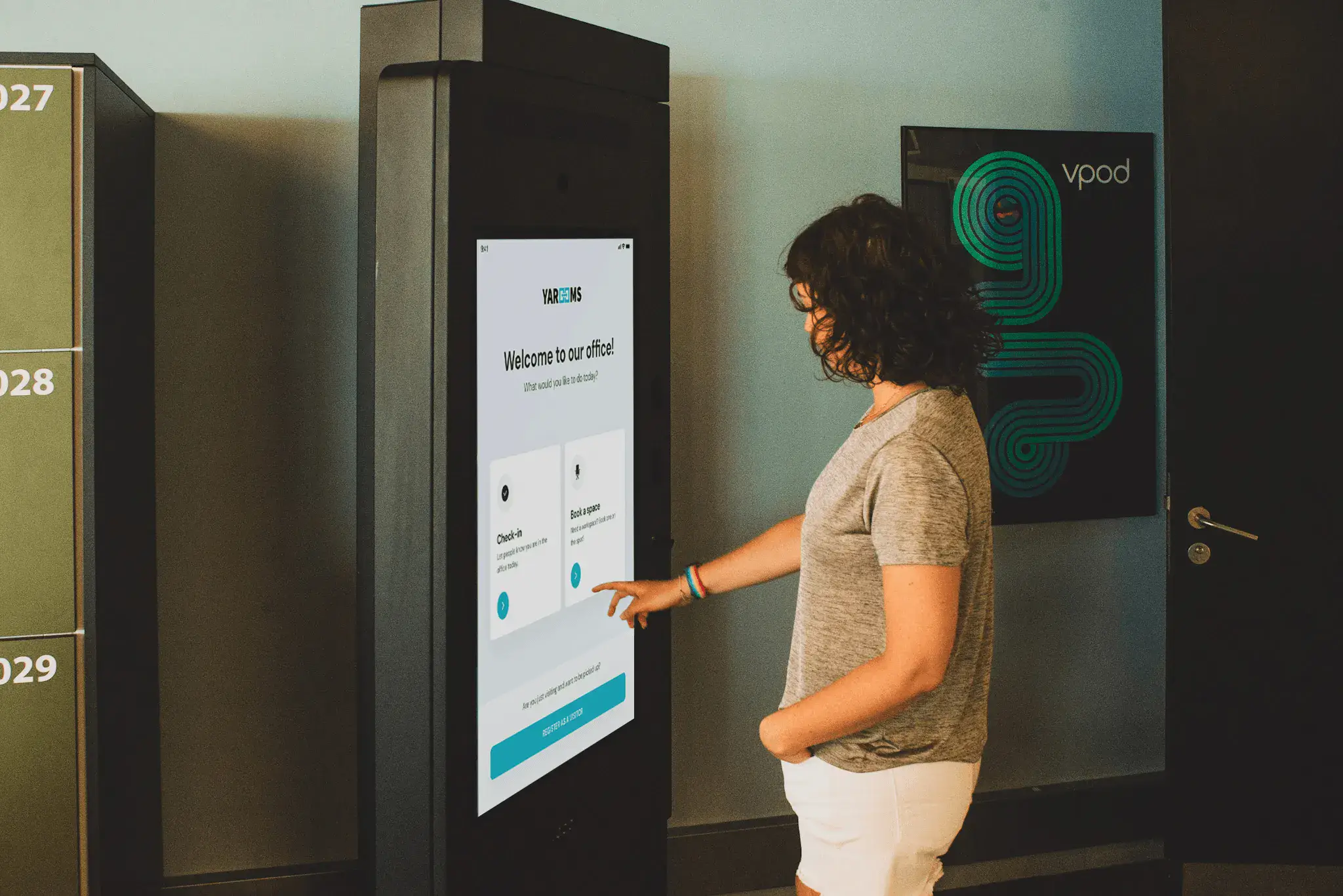
Most visitor management systems run on one of three hardware types: iPads (iOS), Android tablets, or purpose-built visitor kiosk devices like the Vpod’s VGreet, which runs on a secure Windows operating system and comes as a fully enclosed, self-contained unit.
YAROOMS supports all of them - iPadOS, Android, as well as custom kiosk hardware - so your device choice is driven by what fits your space and budget, not by what the software requires.
Why Are Most Visitor Kiosks Built on iPads?
Most visitor kiosks use iPads because iOS offers consistent behavior across devices, reliable kiosk mode lockdown via Guided Access, and a stable ecosystem that IT teams are familiar with.
Several major VMS platforms are iPad-only by design (Envoy, VisitorOS, and The Receptionist among them) which has historically made iPad the default choice simply because the software left no alternative.
The tradeoff is cost and flexibility: even entry-level iPads carry a price premium over comparable Android tablets, and when the software mandates the hardware, that premium becomes non-negotiable.
When to Choose an Android Tablet?
An Android tablet makes more sense when budget is a constraint, when you’re equipping multiple locations, or when your organization already manages an Android device fleet.
Android tablets offer a wider range of price points and form factors - a Samsung Galaxy Tab A-series or Lenovo M-series tablet can run a visitor kiosk at significantly lower cost than an iPad.
When Does a Dedicated Visitor Management Kiosk Device Make Sense?
A dedicated visitor management kiosk device ( such as the previously mentioned Vpod VGreet) makes sense when security, durability, and a fully self-contained setup take priority over flexibility and cost.
Unlike iPads or Android tablets, purpose-built kiosk units come in a fixed enclosure designed specifically for reception environments, and require no separate stand or mount purchase. They typically include a built-in camera, badge printer connectivity, and sometimes an integrated intercom or access control interface - everything in one unit.
The tradeoff is cost and configurability. Dedicated kiosk hardware is significantly more expensive than a tablet-based setup, and because the hardware and enclosure are fixed, you have less flexibility to adapt the physical setup to your space.
They are best suited to enterprise environments, regulated industries, or high-security facilities where a polished, purpose-built appearance and a hardened OS matter more than cost efficiency.
| iPad | Android tablet | Dedicated VM kiosk | |
|---|---|---|---|
| Hardware cost | $$ | $ | $$$ |
| Requires separate stand/enclosure | Yes | Yes | No - fully self-contained |
| Kiosk mode lockdown | Guided Access (reliable) | Varies by device/OS | Built-in by design |
| Device fragmentation risk | None | Moderate | None |
| Best for | Most office environments | Budget-conscious or multi-site deployments | Enterprise, regulated industries, high-security facilities |
| Flexibility to adapt setup | High | High | Low - fixed enclosure |
| Supported by YAROOMS | ✅ | ✅ | ✅ |
Visitor management kiosk device comparison: iPad vs Android tablet vs dedicated kiosk hardware
What Stand, Mount, or Enclosure Does a Visitor Kiosk Need?
A visitor kiosk needs a lockable enclosure with internal cable management, matched to its deployment location:
- Countertop stand for reception desks
- Floor stand for self-serve lobbies
- Wall mount for tight spaces
The enclosure transforms a consumer tablet into a secure, purpose-built check-in station, and a poor enclosure choice is one of the most common reasons kiosk setups look and feel unfinished.
What Should You Look for in a Countertop Visitor Kiosk Stand?
A countertop visitor kiosk stand should have:
- A lockable faceplate
- Internal cable routing so the power cable is not exposed
- A weighted or screw-down base that does not tip when visitors tap firmly on the screen
If you capture visitor photos, confirm the enclosure does not clip or obstruct the front camera.
What Should You Look for in a Floor Stand?
A floor stand for visitor management should have:
- A properly weighted base
- A lockable enclosure
- A mounting bracket for a badge printer, if visitors print their own badges at the kiosk
Stability is more important than aesthetics - a stand that wobbles under repeated tapping creates a poor first impression and a physical liability.
When Is a Wall Mount the Right Choice?
A wall mount is the right choice when:
- Floor space is constrained
- The kiosk is at a secondary entrance where a floor stand would obstruct foot traffic
The limitation of wall mounts is visibility - a tablet flush to the wall is easily missed, especially in a busy entry. Always pair a wall-mounted kiosk with signage positioned directly adjacent to the mount, at eye level.
What Else Should You Check Before Buying Any VMS Kiosk Stand?
Before purchasing any stand, confirm:
- The enclosure does not block the tablet camera (critical for photo capture)
- Cable routing is internal rather than exposed
- The lock type is compatible with your facilities management approach (standard key vs. proprietary lock)
- The stand supports the correct tablet orientation (most visitor management system interfaces run in portrait mode)
| Countertop stand | Floor stand | Wall mount | |
|---|---|---|---|
| Best for | Staffed reception desks | Self-serve lobbies, open entrances | Tight spaces, secondary entrances |
| Visibility | Medium - desk level | High - visible from distance | Low - easily missed |
| Signage needed | Rarely | Sometimes | Always |
| Badge printer placement | At reception desk | Mounted to stand (recommended) | At nearby desk |
| Space required | Desk surface only | Floor footprint | Wall fixing only |
| Stability risk | Low if weighted or screwed down | Medium - weighted base essential | None once fixed |
| Camera obstruction risk | Check enclosure fit | Check enclosure fit | Check angle carefully |
Visitor management kiosk stand comparison: countertop stand vs floor stand vs wall mount
What Badge Printer Do You Need for Visitor Management?
The best visitor management badge printer is a thermal label printer - specifically, a model confirmed as compatible with your VMS software and configured with the exact label roll format your software requires. The most commonly used brands and models are:
- Brother - especially the QL series (e.g. QL-820NWB), the closest thing to an industry standard in visitor management
- Zebra Technologies - ZD and GK series, common in enterprise and regulated environments
- Epson - thermal and ColorWorks models, used where higher print quality or color badges are a priority
Compatibility goes beyond the printer model itself - the label roll format must also match exactly what your VMS software requires, regardless of which brand you choose. For example, YAROOMS visitor badge printing software is tested with the Brother QL-820NWBc and DK-2251, DK-22205 and DK-11202 label rolls.
Why Do Most Visitor Management Systems Use Thermal Label Printers?
Most visitor management systems use thermal label printers because they:
- Print without ink
- Output a badge in two to three seconds
- Require minimal maintenance
- Handle the intermittent print pattern of a reception kiosk without issues
They are quiet, compact, and well-suited to both counter and floor stand mounting.
What Is the Most Common Badge Printer Compatibility Mistake?
The most common badge printer compatibility mistake is buying the correct printer model but the wrong label roll format. Different visitor management platforms require specific label roll dimensions and types - buying the right printer with an incompatible label roll produces errors, malformed badges, or misaligned printing. Always confirm both the printer model and the exact label roll format with your VMS provider before ordering label stock in bulk.
Wi-Fi, Bluetooth, or Ethernet: Which Printer Connection Is Most Reliable?
Wi-Fi is the most reliable connection method for a fixed visitor management badge printer. It maintains a stable background connection, reconnects automatically after interruptions, and avoids the pairing issues that Bluetooth connections can produce, particularly after the kiosk tablet restarts or the printer enters sleep mode. Ethernet is equally reliable where cabling is feasible. Bluetooth works but is more prone to “printer not found” errors in practice and is best avoided for always-on reception deployments.
Do You Need Visitor Badge Holders or Lanyards?
Badge holders or lanyards are worth providing when visitors stay for more than a few hours (sticker badges peel off), when visitors wear clothing that stickers do not adhere to well, or when you need badges to be visible and readable from a distance. For short visits in a standard office environment, a printed sticker badge is typically sufficient.

How Does Visitor Management Hardware Integrate With Access Control?
Visitor management hardware integrates with access control systems by connecting the VMS to a door controller or access panel - when a visitor is approved at check-in, the system sends a signal that unlocks the corresponding door, issues a temporary access credential, or releases a barrier. This integration is where visitor management hardware moves from a logging tool to an active security layer.
What Access Control Hardware Works With a Visitor Management System?
The access control hardware that works with visitor management systems includes:
- Door controllers and panels
- Electric strikes and magnetic locks: the door hardware that receives the unlock signal
- QR code and barcode readers, for pre-registered visitor pass check-in at the door
- Turnstiles or barrier gates in environments that require physical enforcement of access
The VMS does not interact with locks directly - it communicates with the access control panel, which then controls the lock. Confirm with your IT or facilities team which panel brand and model is installed in your building before evaluating VMS integration options.
Why Does Hardware-Agnostic Software Matter for Access Control Integration?
Hardware-agnostic visitor management software matters for access control integration because it is more likely to support a wider range of access control brands through open integrations. A VMS that is proprietary or closed is more likely to support only a small number of access control systems - which means if your building runs a system that is not on that list, you are either replacing access control hardware or replacing your VMS.
When Is a QR Code Scanner Worth Adding to the Hardware Setup?
A QR code scanner is worth adding when you pre-register visitors before their arrival and want to eliminate manual data entry at the kiosk. The visitor receives a confirmation with a QR code, arrives, scans at the kiosk or door reader, and is checked in instantly. This configuration significantly reduces per-visitor check-in time and is particularly effective for high-volume arrival windows - interview days, client events, or regular contractor access.
Does Visitor Management Hardware Differ by Industry?
Visitor management hardware requirements differ significantly by industry - the right setup for a corporate office is often inadequate in a healthcare facility, impractical on a construction site, and undersized for a government building. If you work in one of the industries below, here is what to factor into your hardware decision before you buy.
Healthcare and Life Sciences
The two questions healthcare buyers need to answer before choosing hardware:
- Who is touching the kiosk?
- What data are you collecting at check-in, and where does it go?
In clinical or patient-facing environments, a standard touchscreen kiosk means every visitor touches the same surface. Hardware options that address this:
- Antimicrobial screen protectors or enclosures on standard tablets
- Contactless check-in hardware - QR scanners or NFC readers - to eliminate surface contact entirely
If you collect patient or vendor identity data at check-in, your hardware setup also needs to support HIPAA-compliant data handling. This affects how data moves from the kiosk to your network and where it is stored - confirm this with your VMS provider before purchasing any hardware.
Construction and Industrial Sites
The primary hardware question for construction and industrial buyers: will standard consumer hardware survive your environment?
Dust, moisture, and temperature variation that are routine on a construction site will damage a standard iPad or Android tablet within months. What to look for instead:
- Ruggedized Android tablets with IP-rated enclosures rated for your specific site conditions
- A thermal printer at a site office rather than a kiosk-mounted unit - badge printing requirements on construction sites are typically simpler than in offices
Access control integration on construction sites tends to be more complex than in offices, often covering:
- Vehicle access management
- Contractor credentialing
- Induction completion verification
Factor these requirements into your hardware and software evaluation early - they affect which access control panels and readers you need at each entry point.
Coworking and Flexible Workspaces
Coworking spaces typically have more daily check-ins than a comparable corporate office, multiple reception points, and a mix of members, guests, and drop-in visitors. The hardware implications:
- A single kiosk at the main entrance is rarely enough - plan for multiple self-serve floor stand configurations
- Fast badge printing matters more than in a low-traffic lobby
- Access control integration with your member management system is almost always required
- Hardware that is easy to source and replace quickly saves significant operational headache at scale - avoid proprietary or hard-to-find models
Durability and replaceability matter more here than in a standard corporate office. The kiosk that handles 20 check-ins a day has a different wear profile than one handling 150.
Government and Regulated Industries
If you are procuring hardware for a government building, financial institution, or regulated environment such as pharma or defense, standard consumer tablets are likely to fail your security procurement requirements before installation. What these environments typically require:
- Dedicated kiosk units with a hardened OS rather than consumer tablets
- ID or passport scanning hardware for identity verification at check-in
- Mandatory badge printing with expiring or voiding labels
- Deep access control integration covering multiple entry points and clearance levels
Two practical implications for buyers in this category:
- Budget and procurement timelines for this tier of hardware are significantly longer than for a standard office setup - factor that in at the project planning stage, not the purchasing stage
- Purpose-built kiosk hardware is more commonly specified in these environments because the fixed enclosure and hardened OS meet security requirements that consumer tablets do not
Education
The defining hardware consideration for schools and universities is safeguarding - and in most educational institutions, it is a compliance requirement, not a preference. What this means in practice:
- ID scanning hardware is not optional - visitor identity verification and database screening are required at check-in in most educational settings
- Self-serve floor stand configurations are more practical than staffed countertop setups given the visitor volume relative to reception staffing
- Badge printing is typically mandatory, with badges that show visitor type and a visible expiry time so staff can immediately identify who should and should not be on site
The single most common hardware gap in education: badge printing setups that do not include an expiry time on the badge, leaving staff unable to tell at a glance whether a visitor’s access is still valid.
| Industry | Key hardware implication | Watch out for |
|---|---|---|
| Corporate office | Standard tablet + badge printer covers most needs | Over-specifying hardware for low visitor volume |
| Healthcare | Contactless or antimicrobial hardware for clinical areas | Touchscreen kiosks in patient-facing environments without infection control measures |
| Construction / industrial | Ruggedized, IP-rated hardware for site conditions | Standard consumer tablets in dusty or wet environments |
| Coworking | Multiple kiosks, easy to source and replace | Single kiosk setups that create bottlenecks at peak times |
| Government / regulated | Dedicated kiosk units, ID scanning, expiring badges | Consumer tablets that fail security procurement requirements |
| Education | ID scanning hardware for safeguarding compliance | Badge printing setups without visible expiry time |
Choosing the right visitor management hardware for your industry
How Much Does Visitor Management System Hardware Cost?
The hardware cost for a standard visitor management system ranges from approximately $400–750 for a digital sign-in only setup to $800–1,300 for a sign-in plus badge printing setup.
Dedicated purpose-built visitor management kiosk hardware - self-contained units with a fixed enclosure, built-in camera, and integrated peripherals - typically starts at $2,500–3,500 per unit and can exceed $5,000 for enterprise-grade configurations.
| Setup type | Hardware included | Estimated cost |
|---|---|---|
| Digital sign-in only (Android) | Android tablet + stand | $400–650 |
| Digital sign-in only (iPad) | iPad + stand | $550–750 |
| Sign-in + badge printing (Android) | Android tablet + floor stand + printer + label stock | $790–1,005 |
| Sign-in + badge printing (iPad) | iPad + floor stand + printer + label stock | $840–1,255 |
| Dedicated kiosk unit | Self-contained unit with built-in camera and integrated peripherals | $2,500–5,000+ |
Visitor management hardware cost by setup type. Prices are estimates for budgeting purposes. Excludes software licensing, installation labor, and ongoing consumables.
Access control integration hardware costs vary significantly by building infrastructure and existing systems, and can range from $500 to $2,000 or more in hardware alone, separate from software licensing.
| Integration type | Estimated hardware cost |
|---|---|
| QR code / barcode reader at door | $80–200 |
| Smart lock or electric strike | $200–600 |
| Access control panel / door controller | $500–1,500 |
| Full access control integration (panel + locks + readers) | $500–2,000+ |
Access control integration hardware cost. Costs vary significantly by building infrastructure, existing systems, and number of doors. Excludes installation and software licensing.
What Hidden Costs Do Most Visitor Management Hardware Guides Miss?
The hidden costs most visitor management hardware guides miss:
- Ongoing label roll consumption - a busy office can use one roll per week, adding $150–200 per location per year
- Spare and replacement device budget - tablets and printers fail; knowing which model to reorder quickly matters
- Cable management and installation labor - running power cleanly through walls or under floor mats takes time and sometimes a contractor
- IT setup time - kiosk mode configuration, printer pairing, and network setup across multiple locations
How Does a Hardware-Agnostic VMS Reduce Total Hardware Cost?
A hardware-agnostic visitor management system like YAROOMS reduces total hardware cost by:
- Eliminating vendor markup on hardware bundles
- Allowing you to reuse compatible devices you already own
- Letting you make different hardware choices at different locations based on local budget and requirements
At multi-site scale, this flexibility is significant - locations can use different tablet models, different stand configurations, and locally sourced label supplies, all running the same software platform, rather than being locked into a uniform hardware specification that may not suit every site.
How Long Does Visitor Management Hardware Last?
Visitor management hardware has different lifecycle expectations depending on the component. Tablets typically last three to five years in a kiosk environment before performance degradation, battery swelling, or OS support limits justify replacement. Badge printers last longer - five to seven years is common for a well-maintained thermal printer in a moderate-traffic office. Stands and enclosures are effectively indefinite unless physically damaged.
The practical implication: your tablet and your printer will not need replacing at the same time, and your software should not force either.
| Component | Typical lifespan | Replacement trigger |
|---|---|---|
| Tablet (iPad or Android) | 3–5 years | OS support dropped, performance degradation |
| Badge printer | 5–7 years | Print quality, parts availability, firmware support |
| Stand / enclosure | 7+ years | Physical damage, tablet model change requiring new fit |
| Label rolls | Consumable | Reorder when stock drops below 2 rolls per location |
| Power cable / adapter | 2–3 years | Fraying, intermittent connection |
Hardware refresh planning by component
For multi-site deployments, staggering hardware purchases across locations - rather than buying everything at once - naturally distributes your refresh cycle and avoids a situation where every location needs new tablets in the same budget year.
Should You Lease or Buy Visitor Management Hardware?
Most organizations buy visitor management hardware outright - but leasing is a legitimate alternative worth evaluating, particularly for larger deployments or environments where hardware refresh cycles matter. The right answer depends on how you account for capital expenditure, how quickly your hardware requirements are likely to change, and whether you want hardware support bundled into a recurring cost.
Reasons to buy outright:
- Lower total cost over the hardware lifecycle - you own the asset and replace it on your own schedule
- No dependency on a leasing provider’s terms, support model, or continued existence
- Hardware-agnostic VMS works equally well with owned hardware, so there is no software-side pressure to lease
- Better suited to stable environments where hardware requirements are unlikely to change significantly
Reasons to consider leasing:
- Converts a capital expenditure into a predictable operating expense - relevant if your budget structure favors OpEx over CapEx
- Shifts hardware refresh responsibility to the leasing provider - useful if internal IT capacity to manage hardware replacement is limited
- Some dedicated kiosk hardware providers (including purpose-built units) offer hardware-as-a-service models that bundle the device, enclosure, maintenance, and swap-out into a monthly fee
- Better suited to high-growth environments where the number of locations (and therefore hardware requirements) is likely to change within the next two to three years
What to watch out for when leasing:
- Leasing contracts that tie hardware to a specific software platform - if the hardware lease is bundled with a VMS subscription, switching software mid-contract means paying for hardware you are no longer using
- Minimum term commitments that outlast the useful life of the hardware
- Support and replacement SLAs - confirm exactly how quickly a failed device gets replaced and who covers the cost
A practical rule of thumb: for one to three locations with stable visitor management requirements, buying outright is almost always the better financial decision. For larger multi-site rollouts (particularly in high-growth companies or enterprises with strong OpEx preferences) a leasing or hardware-as-a-service model is worth a formal evaluation alongside the outright purchase cost.
Pre-Purchase Checklist: What Should You Confirm Before Buying Visitor Management Hardware?
Before purchasing any visitor management hardware, confirm:
- Your VMS compatibility
- Your kiosk setup type
- Your badge printer model and label format
- Your access control integration requirements
- Your network and power infrastructure
- Your compliance obligations
Buying hardware before confirming any of these creates avoidable rework.
Software Compatibility
- Does your VMS support iPad, Android, or both?
- What are the minimum supported OS versions? (Confirm with the vendor - these change with software updates)
- Is the VMS designed for tablets only, or does it also support phones?
Visitor Management Kiosk Setup
- Staffed reception or self-serve? → Determines stand type
- Tight space or narrow entrance? → Consider wall mount
- Do visitors print their own badges at the kiosk? → Floor stand with printer mount required
- Does the kiosk need to capture visitor photos? → Confirm the enclosure does not obstruct the camera

Badge Printing
- Which printer models does your VMS officially support?
- What is the exact required label roll format? (Confirm before buying stock in bulk)
- Wi-Fi, Ethernet, or Bluetooth? (Wi-Fi recommended for fixed installations)
- Do you need expiring or voiding labels for security reasons?
Access Control
- What access control system is installed in the building? (Brand, model, controller type)
- Does your VMS integrate with it? What additional hardware is required?
- Do you want QR code pre-check-in at the door? What scanner hardware does that require?
Network and Power
- Is there a stable Wi-Fi access point at the kiosk location? (Test signal strength, not just coverage)
- Can Ethernet reach the printer? Is that simpler than Wi-Fi in this environment?
- Is there a permanent power outlet? Can cables be routed cleanly?
- Are kiosk devices and printers on a secure network segment, not guest Wi-Fi?
Compliance
- What personal data is being collected at the kiosk? (Name, photo, ID scan, signature?)
- Does the VMS support automated data deletion after a configurable retention period?
- Is the kiosk screen angle private enough in the deployment location?
- Is kiosk mode lockdown configured on all devices before deployment?
Scale and Resilience
- How many locations need hardware?
- Is the hardware choice consistent enough across locations to simplify maintenance and spare parts?
- Do you have a spare device plan - or at minimum, a recorded model number for fast reorder?
- Are spare label rolls on hand so a stock-out does not take the kiosk offline?
The right order is software first, hardware second. Once you know what your VMS supports (and what it doesn’t) every hardware decision becomes simpler: the right device, the right stand, the right printer, bought once and installed correctly. The rest is just matching hardware to the space it lives in.
Workplace of the future. Today.
See how YAROOMS integrates with Microsoft 365 to create a seamless workspace booking experience.