
What Is a Visitor Management System? A Complete Guide for Enterprise Teams

Every person who walks into your building without being properly identified, verified, and tracked represents a security gap, a compliance liability, and a missed opportunity to make a strong first impression. For enterprise organizations managing hundreds of visitors per week across multiple locations, the stakes are even higher. This guide covers everything you need to know about visitor management systems - what they are, what to look for, and how to choose the right one for your organization.
TL;DR
- A visitor management system (VMS) replaces paper sign-in sheets with a secure digital workflow - covering pre-registration, ID verification, badge printing, host notifications, and audit trail reporting.
- Paper logbooks create real security and compliance risks: unverifiable identities, exposed personal data, no GDPR data retention controls, and no reliable emergency headcount.
- Core features to evaluate include digital check-in kiosks, ID scanning, NDA signing, visitor pre-registration, and real-time occupancy dashboards.
- Enterprise VMS requirements go further: SSO and directory sync, multi-site management, ISO 27001/SOC 2 certifications, access control integration, and configurable data retention policies.
- The best deployments integrate VMS with Microsoft 365, Teams, calendar systems, and physical access control - reducing friction for hosts and improving security posture.
- Implementation follows four phases: hardware setup, workflow configuration, staff training, and a phased rollout starting with a pilot location.
- YAROOMS Visitor Management System is built for enterprise teams needing compliance, multi-location support, and native Microsoft 365 and Teams integration.
What Is a Visitor Management System?
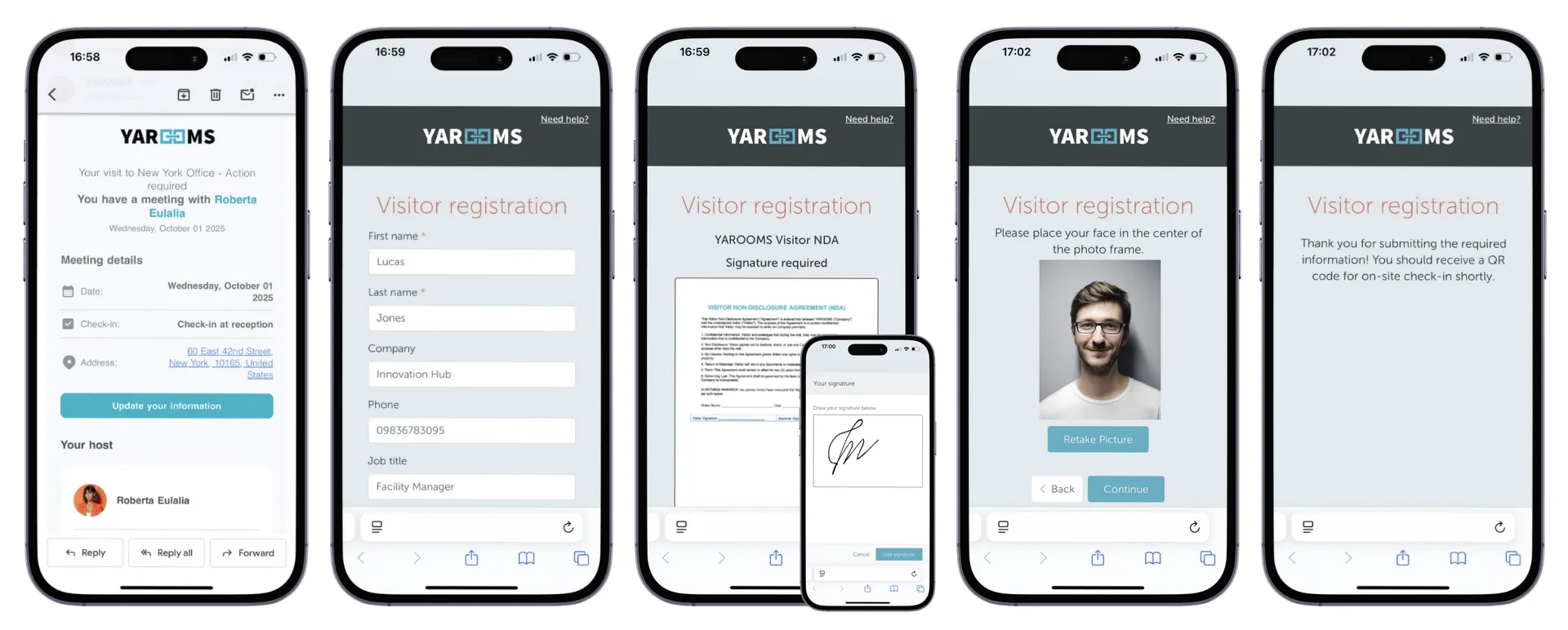
A visitor management system (VMS) is software that replaces paper sign-in sheets with a digital workflow for pre-registering, checking in, tracking, and checking out every person who visits your workplace. It captures visitor identity, notifies hosts in real time, enforces security policies like NDA signing, and maintains a complete audit trail for compliance reporting.
At its simplest, a visitor management system is the digital backbone of your front desk. Instead of asking guests to scribble their name in a binder, a VMS guides them through a structured check-in flow on a tablet or kiosk. That flow can include scanning a government-issued ID, capturing a photo, printing a badge, signing an NDA, and sending an automatic notification to the host - all in under 60 seconds.
But modern visitor management system software does far more than digitize sign-in. It gives facilities, security, and IT teams a centralized platform to:
- Pre-register visitors so credentials and access permissions are ready before arrival
- Verify identities through ID scanning and photo matching
- Enforce policies by requiring document signing or safety briefings for specific visitor types
- Track occupancy with a real-time dashboard showing exactly who is in the building
- Generate audit reports that satisfy internal security reviews and external compliance audits
For enterprise teams, a VMS is not a “nice to have.” It is the system of record for physical access, the same way an identity provider is the system of record for digital access. The two should work together, and in the best implementations, they do.
Why Paper Logbooks Fall Short in 2026
If your organization still relies on a paper visitor log or a basic spreadsheet, you are accepting risks that most compliance frameworks explicitly warn against. Here is what goes wrong.
Security Gaps
A paper logbook sitting on the reception desk is readable by every visitor who signs in after the first one. Names, companies, phone numbers, and the identity of every person someone is meeting with are all visible. This is not a theoretical concern; it is a data exposure incident waiting to happen.
Paper logs also cannot verify identity. A visitor writes whatever name they choose, and there is no mechanism to confirm it. There is no photo, no ID scan, and no cross-reference against a watchlist. For organizations with sensitive intellectual property or regulated data, this level of trust is unjustifiable.
Compliance Failures
Regulations like GDPR require organizations to protect personal data, provide a lawful basis for processing it, and delete it when it is no longer needed. A paper logbook fails on every count. You cannot enforce data retention policies on a binder. You cannot redact a single entry without destroying the page. And you certainly cannot demonstrate to an auditor that visitor data is handled in accordance with ISO 27001 or SOC 2 controls.
For organizations subject to HIPAA, the problem is even more acute. Patient and visitor information must be safeguarded with administrative and technical controls that paper simply cannot provide.
Poor Guest Experience
First impressions matter, especially when visitors are prospective clients, investors, or partners. A cluttered reception desk with a dog-eared logbook sends the wrong message about your organization’s professionalism and attention to detail.
Beyond optics, paper sign-in is slow. Visitors wait while the receptionist manually pages through the log, calls the host, and writes out a temporary badge by hand. During peak hours or events, this creates a bottleneck that frustrates everyone involved.
No Emergency Visibility
When a fire alarm sounds or a security incident occurs, the first question is always: who is in the building right now? A paper logbook cannot answer that question reliably. Visitors who forgot to sign out appear to still be on-site. Visitors who entered through a side door never appeared in the log at all.
An enterprise visitor management system maintains a real-time occupancy list that can be pulled up in seconds, printed for first responders, or pushed to emergency notification systems. In a crisis, that data saves time and potentially saves lives.

Core Features to Look For in a Visitor Management System
Not every visitor management system is built for enterprise use. When evaluating solutions, prioritize these capabilities. For a side-by-side comparison of leading platforms, see our best visitor management systems guide .
Digital Check-in Kiosk
A self-service kiosk or tablet in the lobby lets visitors check in without waiting for a receptionist. The best systems support multiple check-in methods: QR code from a pre-registration email, ID scan, or manual entry. The kiosk should be configurable per location, with custom branding, welcome messages, and visitor type workflows.
ID Scanning and Verification
The system should be able to scan a government-issued ID (driver’s license, passport) and extract the visitor’s name, photo, and ID number. This eliminates manual data entry errors and creates a verified record of who entered the building. Some systems also support photo capture at check-in for badge printing and security matching.
Badge Printing
Temporary visitor badges should print automatically at check-in, showing the visitor’s name, photo, host name, date, and any access restrictions. Color-coded badges can indicate visitor type (client, contractor, delivery) so staff can identify who belongs and who might need assistance.
Host Notifications
When a visitor checks in, their host should be notified immediately through the channels they already use: email, SMS, or Microsoft Teams. The notification should include the visitor’s name, company, and check-in time, with a one-tap option to confirm or acknowledge. This eliminates the “your guest is waiting in the lobby” phone tag that wastes everyone’s time.
NDA and Document Signing
For visitors entering areas with sensitive information, the system should present legal documents like NDAs, safety waivers, or acceptable use policies during check-in. Digital signatures are captured and stored alongside the visitor record , creating a verifiable compliance trail.
Visitor Pre-registration
Hosts should be able to pre-register visitors through a visitor registration portal, calendar integration, or mobile app. Pre-registration triggers a welcome email to the visitor with directions, parking information, Wi-Fi credentials, and a QR code for express check-in. This reduces lobby wait times and demonstrates organizational professionalism.
Audit Trail and Reporting
Every visitor event - check-in, badge print, document signing, check-out - should be logged with timestamps and stored in a searchable digital visitor log . Facilities and security teams need the ability to generate reports by date range, location, visitor type, or host. This data is essential for compliance audits, occupancy analysis , and incident investigations.
Enterprise Requirements for VMS
The features above cover the basics. Enterprise organizations have additional requirements that separate a lobby tablet app from a true enterprise visitor management system.
SSO and Directory Sync
Your VMS should integrate with your identity provider, whether that is Microsoft Entra ID (Azure AD), Okta, or another SSO solution. This means hosts authenticate with their corporate credentials, visitor pre-registration pulls from the company directory, and user provisioning is automated. Without directory sync, IT teams end up manually managing yet another user database.
Multi-site Management
Organizations with multiple offices need a single VMS platform that supports location-specific configurations (different check-in flows, badge designs, and compliance requirements) while providing centralized reporting and administration. A system that requires separate instances per location creates silos and increases administrative overhead.
Compliance Certifications
For regulated industries, the VMS vendor’s own security posture matters as much as the product’s features. Look for certifications that match your requirements (see our workplace security and compliance overview for what these cover in practice):
- ISO 27001 for information security management
- ISO 27701 for privacy information management
- SOC 2 Type II for service organization controls
- GDPR compliance for data protection and right-to-erasure support
- HIPAA compliance for healthcare environments
The vendor should also support configurable data retention policies so visitor records are automatically purged after a defined period, keeping your organization in compliance without manual intervention. For a deeper look at GDPR obligations in the workplace, see our guide to GDPR-compliant workplace management .
Access Control Integration
A visitor management system becomes significantly more powerful when it connects to your physical access control system. Upon check-in, the VMS can activate a temporary badge or grant time-limited access to specific zones. Upon check-out or badge expiry, access is automatically revoked. This closed-loop integration eliminates the risk of orphaned access credentials.
Data Retention Policies
Enterprise data governance requires that visitor records be retained only as long as necessary. Your VMS should allow you to configure retention periods per data type and per location, with automatic deletion or anonymization when the period expires. This is not optional under GDPR - it is a legal requirement.

Integrating VMS with Your Workplace Stack
A visitor management system should not operate in isolation. The most effective deployments integrate the VMS with the tools your organization already uses every day.
Microsoft 365 and Teams
For organizations running on Microsoft 365, the VMS should integrate natively with Teams and Outlook. This means host notifications arrive as Teams messages, visitor pre-registration syncs with Outlook calendar invites, and IT can manage VMS permissions through the Microsoft 365 admin center. Deep Microsoft integration eliminates context switching and ensures adoption, because employees do not need to learn a new tool.
This is an area where platform choice matters. A VMS that treats Microsoft integration as an afterthought - offering only basic email notifications instead of rich Teams cards with action buttons - will see lower adoption and slower host response times. Look for native Teams integration that feels like a natural extension of the tools your team already uses.
Calendar Systems
Pre-registration should happen automatically when a host adds a visitor to a meeting invite. The VMS should parse calendar events, identify external attendees, and trigger the pre-registration workflow without requiring the host to visit a separate portal. This “zero-friction” approach dramatically increases pre-registration rates, which in turn speeds up lobby check-in.
Access Control Systems
As discussed above, the VMS should communicate with your access control platform to grant and revoke temporary physical access. The integration should support the major access control vendors and protocols so you are not locked into a single hardware ecosystem.
Emergency and Mustering Systems
During an evacuation, the VMS should export or push a real-time occupancy list to your emergency notification or mustering system. This list should include all checked-in visitors along with their host contacts, so evacuation coordinators know exactly who to account for. Some systems also support direct SMS or push notifications to visitors during an emergency, providing instructions and assembly point information.
Visitor Management System Implementation Guide
Deploying a visitor management system across an enterprise requires planning, but it does not need to be a multi-month project. Here is a high-level roadmap.
Phase 1: Hardware Setup
Start with the physical infrastructure. Each lobby or reception area needs a check-in device (tablet on a stand or a purpose-built kiosk) and, optionally, a badge printer and ID scanner. Work with your VMS vendor to determine the right hardware for your visitor volume and lobby layout. Most modern systems support standard iPad or Android tablets, keeping hardware costs manageable.
Phase 2: Workflow Configuration
Define your check-in flows for each visitor type. A client visit might require only name and company, while a contractor visit might require ID scanning, NDA signing, and a safety video. Configure host notification channels, badge templates, and pre-registration email content. Map out your integration points with Active Directory, access control, and calendar systems.
Phase 3: Staff Training
Receptionists and front-desk security need hands-on training with the new system. Hosts across the organization need a brief introduction to pre-registration and how they will receive visitor notifications. Most VMS platforms are intuitive enough that a 15-minute walkthrough is sufficient for hosts. Prepare a short internal FAQ covering common scenarios: what to do when a visitor arrives without pre-registration, how to handle group check-ins, and how to manage VIP guests.
Phase 4: Go Live and Iterate
Launch at a pilot location first. Collect feedback from receptionists, hosts, and visitors during the first two weeks, then adjust workflows and notification settings before rolling out to additional sites. Monitor key metrics: average check-in time, pre-registration adoption rate, and host notification response time. Use these metrics to demonstrate ROI and build the case for expansion.
YAROOMS Visitor Management System
YAROOMS Visitor Management System is built for enterprise teams that need security, compliance, and a seamless visitor experience across multiple locations. It replaces paper sign-in with a fully digital check-in flow: visitors pre-register via a host invite, arrive at a branded kiosk, sign any required NDAs or policy documents, get a badge printed, and trigger an instant host notification - all in under 60 seconds.
The platform gives facility and security teams a real-time dashboard of everyone on site, exportable audit logs for compliance reporting, and configurable data retention policies for GDPR and other regulatory requirements. For enterprises managing multiple buildings or offices across countries, YAROOMS supports centralized administration with per-site configurations - so your global security policy stays consistent while local teams retain operational flexibility.
Explore the full set of visitor management system features , see how it works for schools and universities , or request a demo to see it in action.
Workplace of the future. Today.
See how YAROOMS integrates with Microsoft 365 to create a seamless workspace booking experience.