
Visitor Management Platforms With Mobile Check-In: What to Choose in 2026

Mobile check-in lets your office visitors sign in from their own phones: they scan a QR code, confirm a few details, and walk in. Nothing to download, no queue at reception, no paper logbook.
People are used to moving through airports and hotels with nothing but their phone, and they now expect the same ease when visiting an office. That’s why mobile check-in has become one of the features to look for in a visitor management system.
This guide explains how it works and how to choose it well.
You will learn:
- How mobile check-in works, step by step, from the visitor’s side
- When a QR code on the guest’s phone is enough, and when you still need a lobby tablet or a wallet pass
- How secure phone-based check-in really is
- What to look for when choosing a visitor management platform with mobile check-in
What Is Mobile Visitor Check-In?
Mobile visitor check-in is a visitor management system feature that lets guests register and confirm their arrival using their own smartphone, typically by scanning a QR code in the phone’s browser. No paper logbook, shared kiosk, or app download required.
How Mobile Check-In Works, Step by Step
A mobile check-in visit runs in three stages: before arrival, at the door, and after the guest leaves. Here’s what happens at each:
Before the Visit: Pre-Registration on the Guest’s Phone
It starts with an email. The host schedules the visit, and the visitor management platform sends the guest an invitation with the date, address, directions, parking details, and a personal QR code.
Everything that normally clogs up a front desk, contact details, NDA signing, screening questions, even a photo, gets done from the guest’s own phone, at their own pace, before the visit. By the time they walk in, the paperwork is already history.
At the Door: Scan, Verify, Walk In
On arrival, the visitor scans their emailed QR code at the reception tablet, and check-in confirms in seconds. The speed gap is real: digital self-check-in takes about 20-45 seconds per visitor, while a paper logbook can turn 10-15 arrivals in one busy half-hour into a 20-40 minute queue.
The host is notified the moment check-in completes.
After the Visit: Check-Out and the Audit Trail
Check-out is the step everyone forgets, until an auditor, a fire marshal, or a GDPR request asks who was in the building and when. A good visitor management system records departures automatically: a QR scan on the way out, a check-out link, or auto sign-out at a set time, so the visitor log always reflects reality.
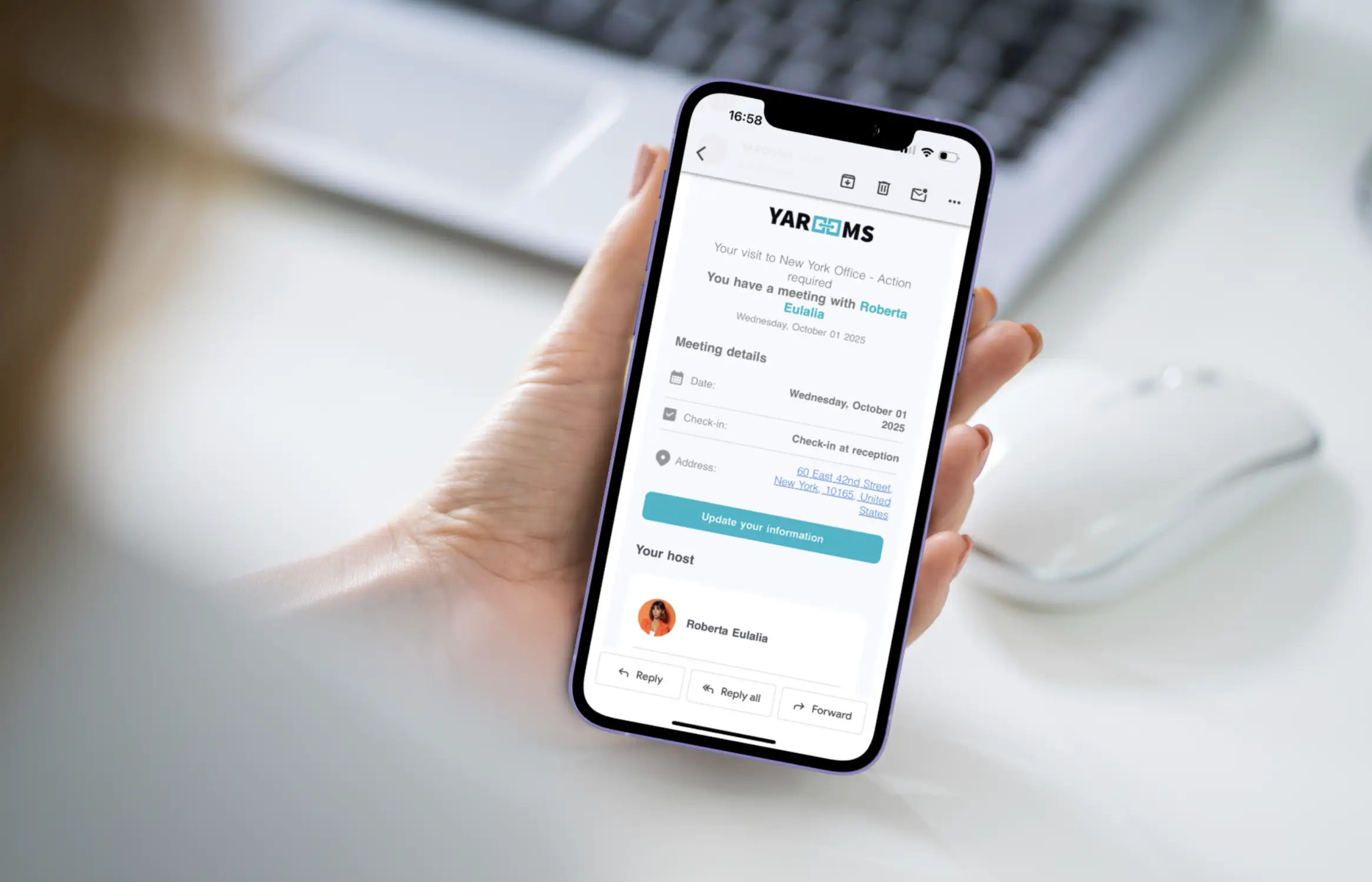
YAROOMS sends pre-registered guests a mobile check-in email with their visit details, host, and address - so they arrive ready to scan and go.
QR Code, Lobby Kiosk, or Wallet Pass: Which Check-In Method Fits Your Office?
There’s more than one way to get a visitor into your office, and mobile check-in is just one of them. Most modern offices don’t pick a single method, they combine a couple, matching each to the kind of visitor arriving. Here’s a quick breakdown of the setups we see working best in 2026.
| Check-In Method | Best For | Watch Out For |
|---|---|---|
| QR code on the guest’s phone | Pre-registered business visitors, hybrid offices, lightly staffed receptions | Depends on guests actually completing pre-registration |
| Lobby tablet kiosk | Walk-ins, deliveries, large offices with high foot traffic | Hardware to buy, charge, clean, and maintain |
| Wallet pass / NFC | Recurring visitors, contractors, multi-visit projects | Overkill for one-time guests; not every platform supports it |
When QR Check-In From the Guest’s Phone Is Enough
QR code check-in on mobile works best when most of your visitors are scheduled, clients, candidates, partners. They arrive with the code already in their inbox, sign-in takes seconds, and no one queues behind a shared screen. Hybrid offices benefit most, because the check-in system keeps running even on days when reception is unstaffed.
When You Still Want a Tablet Kiosk
A mobile-first workplace still needs a lobby kiosk, especially larger offices with steady foot traffic, where not every visitor arrives pre-registered. Walk-ins have no code to scan, delivery drivers turn up unannounced, and now and then a guest’s phone is simply dead. A lobby kiosk gives all of them a way in. That’s why the two methods work best together: mobile QR handles the visitors you expect, and the kiosk catches everyone you don’t.
When Wallet Passes and NFC Make Sense
Wallet passes make sense for people who visit often, the contractor who comes every Tuesday, say, where re-registering each time is pointless friction. A time-limited credential lives in the visitor’s Apple or Google Wallet, works at the door on every visit, and can be revoked centrally the moment the engagement ends.
This is where visitor management overlaps with access control, and it’s moving fast: spending on touchless entry tech is rising about 25% as offices rebuild lobbies around phone-based credentials.
Is Mobile Visitor Check-In Secure?
Yes, done right, mobile check-in is more secure and more auditable than the paper logbook or open tablet it replaces. Signing in from a phone doesn’t mean looser security; it means the visitor registration system behind it can verify and record far more than a paper sheet ever could.
A logbook confirms no one’s identity, keeps no photo, and can’t tell you who’s still in the building. A mobile check-in backed by a proper platform can confirm a visitor’s phone number, expire QR codes after a set time, screen names against a watchlist before entry, and store every visit as a timestamped, encrypted record.
To make sure your choice is a secure one, ask the vendor four questions before committing to a VMS with mobile check-in:
- Do check-in links and QR codes expire?
- Can a screenshot of a QR code be forwarded and reused?
- Is visitor data encrypted at rest and in transit?
- Can individual visitor records be deleted for right-to-erasure (GDPR) requests?
A platform with confident answers to all four is a security upgrade over both paper logbooks and unmanaged tablets.
How to Choose a Visitor Management Platform With Mobile Check-In
Before comparing VMS vendors, agree on what you actually need. These seven requirements are the ones that decide whether you’re still happy six months in:
- A no-app, browser-based check-in flow, non-negotiable for guest experience
- Full pre-registration, documents, NDAs, and custom forms completed on the guest’s phone, not just a calendar invite
- Host notifications on channels your team already watches, email, SMS, Slack, or Teams
- A fallback for walk-ins and phoneless guests, usually a tablet kiosk running alongside the QR flow
- Expiring codes and identity verification matched to your security level
- A searchable, exportable visitor log that satisfies an audit without manual work
- Honest pricing, check that the tier including these features is the one you’re quoted, not just the entry price
5 Examples of Visitor Management Platforms With Mobile Check-In
Most visitor management systems now offer mobile check-in, what differs is how they do it. The five platforms below show the range.
1. YAROOMS
YAROOMS keeps mobile check-in refreshingly simple: pre-registered visitors get an email with their visit details and can complete everything they need before they arrive, capturing a photo, signing an NDA, answering screening questions, even uploading documents. At the office, they scan a QR code with their phone and they’re checked in.
- No app required, the entire flow, from pre-registration to the arrival scan, runs in the visitor’s own phone browser.
- Touchless by design, guests never share a screen or tap a kiosk, which keeps busy lobbies moving.
- Host notified instantly, the moment a visitor scans in, their host gets an automatic alert.
Best for: offices that want a frictionless, app-free mobile check-in that guests can use without any instruction.
2. Sine (by Honeywell)
Sine (by Honeywell) offers two different mobile check-in methods:
- Sine Pro app (iOS/Android) is a downloadable app for people who visit often. It uses geofencing to check them in and out automatically as they arrive and leave, and adds push notifications and photo-ID verification. It’s the fastest option for regulars, but because it needs a download, it doesn’t suit one-time guests.
- Web check-in (mobile browser) needs no app at all. The visitor scans a QR poster or opens a link, then checks in through their phone’s browser, entering details, choosing a host, signing, adding a photo, and getting a digital pass. The limit: Sine’s browser check-in can’t scan IDs, print badges directly, or check people out automatically.
Best for: offices that host a mix of regular contractors and one-off guests, and want both an app-based and an app-free path, particularly those already inside the Honeywell ecosystem.
3. Archie
Archie handles check-in without a shared tablet: guests scan a QR code or open an emailed link on their phone, complete any forms, and check in from their own device. The host is notified through the Archie app, email, Slack, or Teams.
Pre-registration can send directions, parking, and forms ahead of time, and the dashboard shows who’s currently on site, with automatic check-out for anyone who forgets.
- QR codes, mobile links, or emailed invites, no shared screen needed
- Live on-site list with automatic check-out and CSV export
- Optional access control integration to sync visits with door systems
Best for: offices that want a straightforward touchless check-in and place a high value on ease of use.
4. VisitorLog
VisitorLog is a free visitor management system built around QR check-in. Each facility gets its own code that guests scan with a phone camera, filling in a short browser form to check in. Checkout happens through a unique link sent by email or SMS, and auto-close rules end any session a visitor forgets to close.
- Check in by phone scan, or manually from the dashboard for guests without a phone
- Pre-registration and bulk CSV import for up to 500 guests at once
- Visitor categories and custom form fields for cleaner records
Best for: small offices trying visitor management for the first time that want a free, no-frills option before committing to a paid platform.
5. Eptura Visitor
Eptura Visitor (formerly Proxyclick) is the guest management component of a broad enterprise workplace platform. Guests are invited by email to pre-register, then receive condition-based building access as a QR code or RFID card. They sign in on their own phone or at a branded tablet kiosk, and the host is notified automatically by SMS or email.
- Pre-arrival invitations with QR-code or RFID access
- Self-service sign-in on mobile or kiosk, with photo capture and badge printing
- Host notifications, a live visitor dashboard, and custom branding
Best for: large enterprises and multi-site organizations that are comfortable with demo-based pricing.
The Bottom Line
Mobile check-in has become a standard feature of visitor management platforms in 2026, QR-based, app-free sign-in from the visitor’s own phone is something you can expect from nearly every credible system, free or enterprise. The differences that matter are in the details: whether check-in runs fully in the browser or adds an app for regulars, whether badge printing and ID scanning come at entry level or a higher tier, how security is handled, and what the whole thing costs.
For most offices, the setup that works is phone-first and kiosk-backed: pre-registered guests scan a QR code from their own phone and are in within seconds, while a lobby tablet covers walk-ins, deliveries, and anyone without a smartphone.
When choosing a platform, look past the mobile check-in feature itself and weigh what surrounds it, a no-app flow, real pre-registration, expiring and verifiable codes, an exportable visitor log, and honest pricing for the tier that actually includes what you need.
Get those right, and mobile check-in becomes the fastest and most accountable way to run a front desk.
For a wider comparison beyond mobile check-in, see our guide to the best visitor management systems of 2026.
FAQ: Mobile Visitor Check-In
Do Visitors Need to Download an App to Check In?
No, with a well-designed visitor management platform, guests never install anything. They scan a QR code or tap a link, and the check-in form opens in their phone’s browser. Visitor-side apps are generally reserved for employees and recurring contractors, not one-time guests.
How Does QR Code Visitor Check-In Work?
The visitor receives a personal QR code by email during pre-registration, or scans an office QR code on arrival. The code opens a browser-based form where they confirm their details, sign any required documents, and complete check-in, typically in under 30 seconds. The system then logs the visit and notifies the host automatically.
What if a Visitor Doesn’t Have a Smartphone?
Every mobile-first office still needs a fallback, and that’s the lobby tablet: walk-ins, delivery drivers, and phoneless guests register there instead. Most visitor management platforms run the QR flow and the kiosk flow on the same system simultaneously, so no visitor type is left without a path in.
Workplace of the future. Today.
See how YAROOMS integrates with Microsoft 365 to create a seamless workspace booking experience.